

Updated for 2026
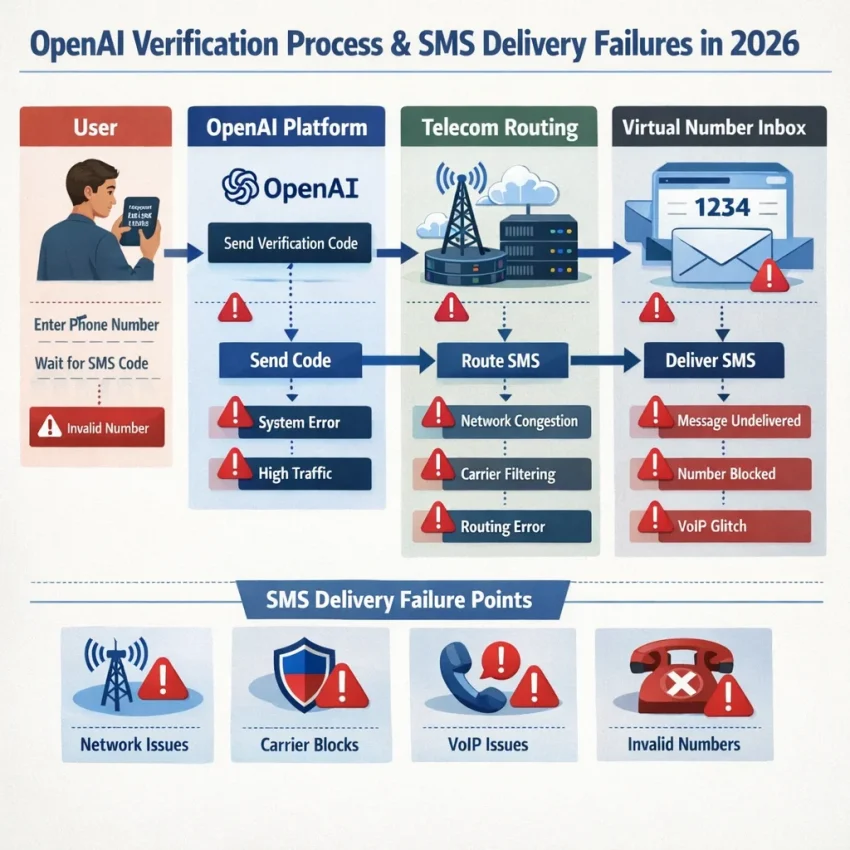
If you are dealing with OpenAI verification code not arriving, the issue is usually more predictable than it seems. In most cases, the failure comes from one of a few common points: the phone number was entered incorrectly, the verification session became stale, too many resend attempts triggered a delay, or the SMS never reached you in time.
The best first step is not to keep pressing Resend code. A cleaner approach is to verify the number format, keep the same browser and network during the attempt, wait through a realistic delivery window, and then change only one variable if the message still does not appear.
This guide explains the most likely causes, the fastest troubleshooting sequence, when it makes sense to restart your session, and where to find additional help.
Important note: verification policies, supported regions, and phone-number eligibility can change at any time. This article is a general troubleshooting guide, not a guarantee that any specific number, country, or workaround will succeed. Always follow the platform’s current terms and local requirements.
Quick answer: what to do first
- Confirm the selected country matches the number exactly.
- Paste the number carefully instead of typing it from memory.
- Stay in the same browser, device, and network for the full attempt.
- Wait through one normal delivery window before requesting another code.
- If you already retried several times, restart in a fresh private window or clean browser profile.
- If the number is rejected instantly, correct the format or use a different number.
That simple sequence solves many verification failures without unnecessary trial and error.
What usually causes the code not to arrive?
When OpenAI SMS verification is not working, the cause usually falls into one of these categories:
- Formatting or input issues: the wrong country is selected, the number is pasted incorrectly, or a digit is missing.
- Session problems: the page has been open too long, the browser session has too many failed retries, or the device or network changed mid-process.
- Rate limiting: too many requests in a short period can delay new messages or invalidate earlier codes.
- SMS delivery delays: the request goes through, but the message itself arrives late or not at all.
- Number eligibility problems: the number may be unsupported or not accepted for that verification flow.
The most useful way to troubleshoot is to match the symptom to the likely cause instead of repeating the same attempt over and over.
Fast diagnosis: what the pattern usually means
| What you see | Likely cause | Best next step |
|---|---|---|
| Number is rejected immediately | Formatting issue or unsupported number | Check country selection and number format, then try again |
| Request is accepted but no SMS arrives | Delivery delay, routing problem, or temporary throttling | Wait through a normal window, then retry from a clean session |
| Code arrives very late | SMS delay or overlapping resend requests | Use the newest code only and avoid repeated resends |
| Code arrives but fails | An older code was entered after a newer one was generated | Request one fresh code and enter it immediately |
| Same setup fails repeatedly | Stale session or a repeated environment problem | Restart cleanly and change only one variable |
Before requesting another code, check these basics
- Country selection: it must match the phone number exactly.
- Number entry: copy and paste carefully to avoid digit errors.
- Stable environment: do not switch devices or networks during the same attempt.
- Resend behavior: avoid stacking multiple requests close together.
- Session freshness: if the page has been open a long time, restart the process instead of forcing another resend.
If you have already made several attempts, your next step should usually be a clean session rather than another immediate request.
How long should you wait before trying again?
General guidance is more useful than guessing:
- First request: wait around 1 to 3 minutes before assuming the SMS is late.
- Still nothing after that: give it a little longer if the request was accepted without error.
- After repeated attempts: pause for 10 to 15 minutes before starting over in a fresh session.
These are practical ranges, not guarantees. Delivery speed can vary by traffic, carrier, region, and temporary platform limits. The main lesson is that rapid-fire resend behavior often makes the problem worse.
The fastest recovery path
- Stop resending if you have already requested several codes.
- Open a fresh session in a private window or clean browser profile.
- Keep the same device and network from start to finish.
- Enter the number once and submit a single request.
- Wait through a realistic window before deciding it failed.
- If the number is rejected immediately, fix the format or use another eligible number.
- If the request is accepted but no code arrives, restart once cleanly and then consider a different number or contacting support.
This sequence helps separate eligibility problems from delivery problems, which is the quickest way to avoid wasting attempts.
Common failure scenarios and what they usually mean
The number is marked invalid instantly
This usually points to a formatting mistake or a number the system does not accept. Check the country code first. If everything looks correct and the error appears immediately again, waiting longer is unlikely to help.
The request is accepted, but there is no SMS
This often indicates delivery delay, temporary throttling, or a carrier-side issue. Wait through one full window before changing anything.
The code arrives too late to use
Late codes commonly happen when there are network delays or multiple resend requests close together. Use only the newest code and avoid creating overlap.
The code arrives, but verification still fails
That often means an older code was entered after a newer one had already been generated, or the verification session became inconsistent after too many retries.
Should you change your browser, device, or IP?
Sometimes, but not all at once.
- Browser: a fresh private window or clean profile is usually the safest first reset.
- Device: switch devices only if a clean browser retry does not help.
- Network: stability matters more than constant switching. If you change networks, do it before starting a new attempt, not during an active one.
If you change too many variables together, you will not know what fixed the issue.
Country and timing considerations in 2026
Users often ask which countries work best, but there is no permanent answer. Availability and delivery performance can change over time. In general:
- support can vary by region,
- delivery speed is not always consistent, and
- eligibility rules may change without notice.
That is why it is better to focus on a clean verification attempt than assume one region will always work better than another.
When to seek additional help
If you have already:
- confirmed the number format,
- used a fresh browser session,
- waited a reasonable amount of time, and
- avoided repeated resend requests,
then the next step may be to review the platform’s official help resources or support flow. If you are reading this on smspva.com, you can also check the Help page for general SMS troubleshooting guidance and the News section for service updates.
Best practices for future verification attempts
- Start with a fresh browser session if a previous attempt failed.
- Keep the same device and network throughout one attempt.
- Match the country selection to the number exactly.
- Request one code at a time.
- Wait through a realistic delivery window before retrying.
- After a failed attempt, change only one variable before trying again.
The key takeaway is simple: repeated resends are usually the slowest way to solve the problem. A cleaner, more deliberate process works better.
Conclusion
When OpenAI phone verification code not received interrupts account setup, the cause is usually one of a few familiar issues: wrong number formatting, an overused session, repeated resend attempts, or delayed SMS delivery. That is frustrating, but it also means there is a clear troubleshooting path.
Start with the basics, wait through one reasonable delivery window, and restart cleanly if needed. If the number is rejected right away, correct it or replace it. If the request is accepted but no message arrives, avoid panic resends and move through the recovery steps methodically.
Frequently asked questions
Why is my OpenAI verification code not arriving even after multiple attempts?
The most common reasons are repeated resend requests, stale sessions, formatting mistakes, temporary throttling, delivery delays, or a number that is not accepted for that verification flow.
How long should I wait before requesting another code?
A practical first window is about 1 to 3 minutes. If nothing arrives and you have already tried multiple times, pause longer, usually around 10 to 15 minutes, then restart with one clean attempt.
What should I do if the phone number is marked invalid?
That usually points to a formatting or number-eligibility issue, not a simple delay. Check the country selection and number format first, then try another valid number if needed.
Why does the code arrive late or expire before I can use it?
This often happens when there is SMS delay or when repeated resend requests cause overlap. The safest approach is to request one fresh code and enter it immediately when it arrives.
Should I change my browser, device, or IP before trying again?
Start with a fresh browser session first. Only change the device or network if the clean session still fails, and avoid changing multiple variables at the same time.
Where can I find more help?
You can review the Help page for troubleshooting information and the News section for updates.