

2FA Online Troubleshooting: Common SMS Code Problems and How to Solve Them with SmsPva
When two-factor authentication (2FA) sends a one-time code by text, a failed verification can have several causes. The account, phone, carrier, or SMS delivery path may be involved. Identifying what failed helps you choose the right next step instead of changing settings at random.
This guide covers common 2FA online problems, from missing messages to rejected numbers. It also explains when a virtual number may be an option and why SMS delivery and platform acceptance are never guaranteed.
First Identify What Is Actually Failing
Start by noting what happened on the verification screen. Did the service confirm that it sent a code? Is the message missing, delayed, or visible but rejected? Does the service say it cannot use your number? These symptoms point to different causes.
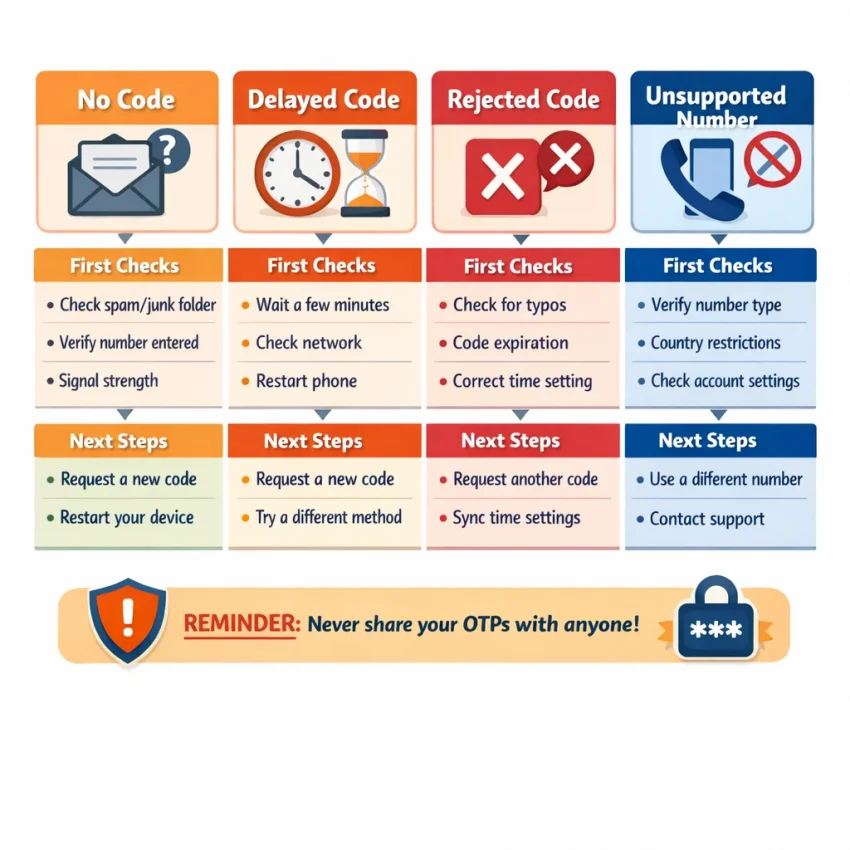
- No code sent or received: The request may not have gone through, the message may be delayed, or your phone may have filtered it.
- Code delayed: The message may still be in transit. Requesting more codes immediately can cause confusion or temporary limits.
- Code rejected: The code may have expired, been replaced by a newer one, or been entered in the wrong verification flow.
- Number not accepted: The service may restrict certain number types or regions. Phone settings may not resolve that restriction.
Read the service’s message carefully, then check your account and phone before retrying. Avoid requesting several codes in quick succession. Keep every OTP private, and enter it only on the service’s official verification screen.
Run a Quick Diagnosis Before Requesting Another Code
Check these items in order. Small details, such as a missing country code or inactive SIM, can prevent a valid SMS verification request from reaching your phone.
Check the number and phone line
- Confirm the full number and country code. Compare the number shown in the account’s security or verification screen with the number you intend to use. Follow the service’s formatting instructions, including any guidance about leading zeros.
- Make sure the intended line is active. On a dual-SIM phone, confirm which SIM or eSIM is enabled. If you recently changed devices, transferred an eSIM, or switched carriers, check that the number can still receive SMS.
- Check signal and roaming. Confirm that airplane mode is off and your line has cellular service. If you are traveling, check whether roaming settings or your plan affect incoming texts. Wi-Fi alone does not confirm that your phone can receive carrier SMS.
- Review message filters. Check spam, blocked, unknown-sender, and filtered-message folders. Your messaging app, device, or carrier may sort messages from unfamiliar senders.
If ordinary texts are not arriving either, focus on the phone, SIM, or carrier first. If other SMS messages arrive but a verification message does not, the issue may involve the service’s sending route, eligibility rules, or a temporary delivery problem.
Check the account and service
- Verify which number the account is using. Some services send codes to a number already saved on the account. Check the masked digits on screen and use the service’s process to update the number if needed.
- Read the status message. Notices about attempt limits, maintenance, or an outage may point to a service-side issue. Follow any stated wait period instead of repeatedly resubmitting the request.
- Record the details. Note the time, whether ordinary texts arrive, and the exact error. Do not include the OTP in a support message.
If regular SMS is failing, contact your carrier. If only one service’s verification message is affected, check that platform’s official instructions. For questions about SmsPva’s workflow, see its Help page.
Fix the Most Common SMS 2FA Problems
If the code is missing or delayed
Confirm that your phone has cellular signal and airplane mode is off. If reception is weak, move somewhere with a stronger signal. Restarting the phone can refresh its connection to the mobile network; wait until service returns before requesting another code.
Check blocked senders and spam, junk, filtered, or unknown-sender folders. Some messaging apps and carrier tools sort texts from short codes or unfamiliar senders. If a filter caught the message, review its settings so you can find future verification texts.
For a delayed OTP, wait for the delivery window stated by the service. Repeated requests may trigger a rate limit or invalidate older codes. If the waiting period passes, use the service’s resend option once, if available, and wait again.
If the service rejects the code
Check the code’s expiry time and use the newest code issued for that verification session. Some services invalidate earlier codes when you request a replacement. Make sure you enter the code on the original verification screen, not in another tab or account session.
Compare each digit carefully and check for accidental spaces if you copied the code. If the service still rejects it, the session may have expired or the account may require another step. Read any on-screen notice and use the platform’s recovery or support process rather than guessing or repeatedly submitting codes.
If the number is unsupported
Some services limit verification by region, carrier, or number type. They may also reject virtual numbers or numbers previously used for verification. These restrictions are controlled by the platform, so changing phone settings or restarting the device may not help.
Check the service’s accepted number formats and eligibility guidance. If it says the number is unsupported, use another verification method the platform offers or contact its support team. Repeatedly resubmitting the same number may lead to temporary restrictions.
When a Virtual Number May Help—and When It Won’t
A virtual phone number for SMS verification may be useful when you want an alternative to your personal line and the service accepts that number type. SmsPva provides virtual numbers for SMS verification and OTP receipt. You can review current options at Receive SMS online.
Check the platform’s rules and the live service and country options before proceeding. Availability can change, and a service may reject a virtual number even if an option appears available. Choosing a number does not guarantee that a text will arrive or that the platform will accept it.
For important accounts, consider whether you will retain access to the number. A temporary or shared-access number can be a poor choice as your only recovery method. A service may later send a password reset or security alert to that number, and losing access could make recovery harder.
For banking, primary email, work, or other important accounts, prefer a lasting number you control or another method recommended by the service. Check the platform’s terms and recovery rules before using a virtual number.
How to Try SMS Verification with SmsPva
If a service accepts virtual numbers and you want to try one, use a careful, service-specific process. Availability and acceptance can change, so rely on the current information shown for your chosen service.
- Check whether your service is listed. Do not assume that a service is supported because another platform is.
- Review the current options. Check the available country choices and any displayed conditions. If the service or country you need is not shown, do not substitute an unrelated option.
- Select a suitable number. Follow the instructions shown for the selected option and copy the number carefully.
- Enter it on the service’s official verification screen. Use the country format requested by that service, then submit the number once.
- Wait and check for the incoming SMS. Follow the stated delivery window and SmsPva’s current instructions. If a code arrives, enter it only on the verification screen that requested it.
For example, SmsPva has a Signal SMS verification page. This is a service-specific example, not a guarantee that a number will work for every account or that other services have the same options.
If no message appears, check the platform’s instructions and avoid repeated requests. If the service rejects the number, follow its prompts and use an approved alternative if one is offered. Neither SMS delivery nor account verification is guaranteed.
Protect Your Account and Plan for Recovery
SMS-based 2FA adds another sign-in step, but it is not a complete security plan. A text code can be exposed through phishing, phone-number takeover, or access to the device receiving it. Enter OTPs only in the official app or website, and never share them with someone who contacts you asking for a code.
For important accounts, check whether the service offers a passkey, authenticator app, or hardware security key. Use a strong, unique password as well. Save recovery codes somewhere private and secure, such as a password manager or protected offline location.
Keep your recovery email current and secure it with a strong sign-in method. If you use SMS as a fallback, make sure you can retain access to that number. Update the number with the service before changing carriers or giving it up, and follow the platform’s instructions for changing authentication settings.
A virtual number may be useful for a supported verification flow, but a temporary or shared-access number may not remain available to you. Avoid making it the only recovery route for an account you depend on.
A Simple Decision Path: Retry, Switch Methods, or Contact Support
- The delivery window has not passed: Wait, keep the correct line active, and check filtered messages. Do not request another code yet.
- The message is still missing: Check the number, signal, roaming, and message filters. Then request one new code if the service allows it.
- The code arrives but is rejected: Check its expiry, confirm you are using the right screen, and enter the newest code.
- The service rejects the number or the problem continues: Use an approved alternative verification method or contact the platform through its official support channel. Contact your carrier if ordinary SMS is also failing.
Frequently asked questions
Why am I not receiving my online 2FA code? A wrong number format, weak signal, message filtering, carrier issue, service-side delay, or account mismatch can prevent delivery. Check these in order before retrying.
Should I request another SMS verification code if the first is delayed? Wait for the service’s stated delivery window first. Repeated requests may trigger limits or invalidate earlier codes. If the window passes, request one fresh code if the service allows it.
Why does a service reject my phone number? The platform may restrict number types, regions, or numbers previously used for verification. If it identifies the number as unsupported, use an approved method or contact support.
Can I use a virtual number for SMS 2FA? Only if the service accepts it. Acceptance can change, and a temporary or shared-access number may not be suitable as an important account’s only recovery route.
Does SmsPva guarantee that a verification SMS will arrive? No. Delivery and platform acceptance are not guaranteed. Check current options and stop if the service rejects the number or no message arrives.
Is SMS-based two-factor authentication safe for important accounts? SMS is better than using no second factor, but it has security and recovery limitations. Prefer a passkey, authenticator app, or hardware key when supported, and protect your recovery codes and OTPs.