

Best Free Online Phone Numbers in 2026: A Safer SMS Verification Workflow
Free online phone numbers can make SMS verification convenient, but they are not all alike. A public inbox may show messages to other visitors, while an app-based or service-specific number works differently. The right choice depends on the account, your privacy needs, whether you may need the number again, and the platform’s rules.
This guide explains the trade-offs and gives you a practical workflow. If a public inbox is not a good fit, you can also review SmsPva’s Receive SMS online options. SmsPva provides virtual numbers for SMS verification and OTP receipt; it is not a free public inbox, and code delivery is not guaranteed.
What “free online phone numbers” really offer in 2026
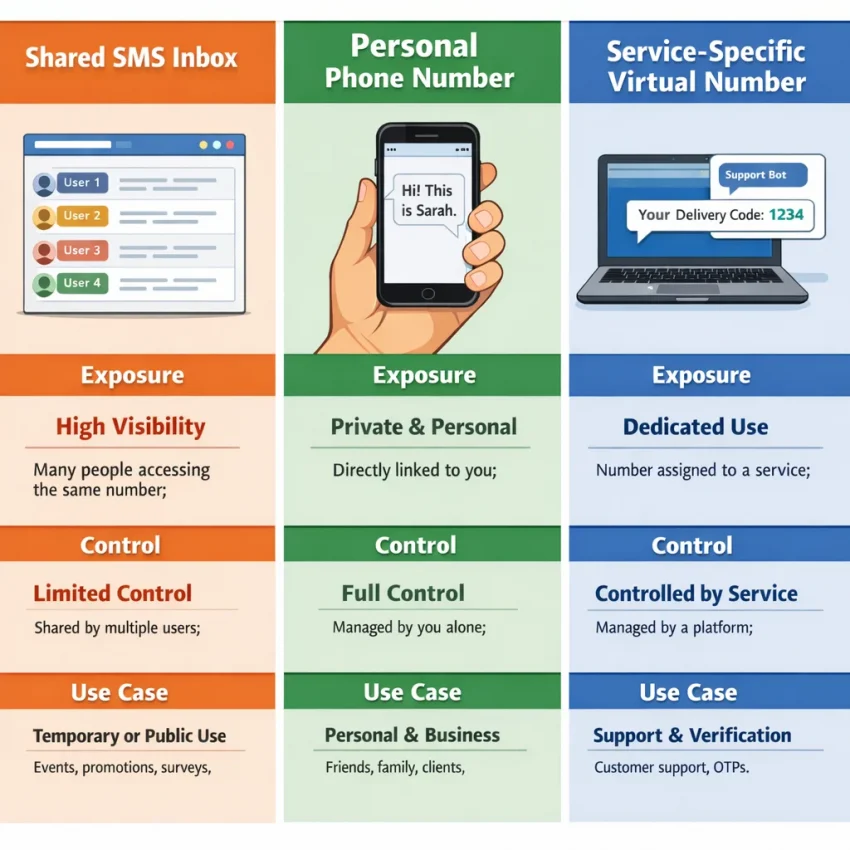
“Free online phone numbers” is a broad label. It can mean a public website that displays incoming texts, an app that assigns a number to an individual account, or a virtual number selected for a particular verification service. These options differ in message visibility, control, reuse, and whether a platform accepts the number.
Before choosing a free SMS number, consider what the account is for. A number that might suit a low-stakes signup may be a poor fit for an account you need to keep or recover. “Free” describes the price; it does not mean private, reusable, or accepted everywhere.
Public inboxes: free access, shared visibility
A public receive-SMS-online site usually lists numbers and displays incoming messages on a webpage. You may not need to create an account or use your own mobile number. But the inbox may be shared, so other visitors could see incoming texts. Messages may also remain visible on the page.
That makes public inboxes unsuitable for sensitive codes that could grant access to personal accounts. A number may be used by multiple people, become unavailable, or be rejected by a platform. If the account later asks for another code, you may not be able to access the same number or inbox.
Some sites call these numbers temporary phone numbers. “Temporary” does not necessarily mean only you can see the messages or that the number disappears after one use. Check the site’s explanation of message visibility and reuse. Do not put private information at risk based on the label alone.
App-based and service-specific numbers
An app-based number is typically managed through an app or user account rather than an openly displayed inbox. The provider may have a free tier, trial, or other conditions, so read its terms. App access alone does not establish that a number is private, permanent, or accepted by a particular platform.
A service-specific virtual number is selected for an intended verification service. This is a different workflow from choosing a random public inbox, but acceptance and code delivery are not guaranteed. Review the live options and the target platform’s rules. A virtual number also does not automatically provide long-term account recovery.
When a free number is—and is not—a sensible choice
A free phone number for SMS verification may be convenient, but consider what the account protects and what happens if you lose access. Public inboxes can be visible to other users, and numbers may be shared. That makes them a poor choice when a code or account could expose personal information.
Start with the account’s sensitivity
For a low-risk, one-time task, a public number may be acceptable if the platform permits it and you can tolerate possible exposure or failed verification. Do not use a public inbox for financial access, identity checks, health information, or accounts containing private messages or sensitive files. Never put passwords or recovery codes in a public inbox.
- Could someone misuse access? If the account provides access to money, identity details, or private communications, avoid shared numbers.
- Will you need to recover the account? If you may need future password resets or security checks, use a number you can reliably access again.
- Does the code need to stay private? If another person seeing the message would create risk, a public inbox is not appropriate.
For private SMS verification, assess the whole workflow instead of assuming any online phone number is private. A service-specific virtual number may be a better fit than a public inbox, but it does not guarantee platform acceptance or future access.
Check reuse, recovery, and platform rules
Some accounts require the same number later for login alerts, account recovery, or periodic checks. A temporary or shared number may not remain available to you. If continued access matters, use a number you can control long term and keep your recovery options current.
Check the target platform’s accepted verification methods and terms. Some services may reject public, virtual, or non-mobile numbers. Follow those rules and applicable laws; do not use a different number to bypass a restriction. If SMS is not an accepted method for your situation, choose an allowed alternative.
A practical rule: use a free public inbox only when the account is low-stakes, future access to that number is unnecessary, and message exposure is acceptable. For an important account or a service-specific task, compare other options and review their current terms before proceeding.
A practical workflow for finding and testing an online SMS number
Define what the number needs to do before searching for free online phone numbers. A quick, low-risk signup has different requirements from an account you may need to recover later. These steps can help you assess the options without treating every online inbox as private or dependable.
Check the requirement and privacy level
- Identify the task. Note the service requesting verification, whether it requires SMS, and whether you may need the number again. If the account matters long term, prioritize a number you can control or reuse under the service’s rules.
- Check the platform’s rules. Review its current terms and accepted verification methods. Some services restrict virtual or temporary numbers. Do not use an alternate number to evade eligibility checks or safeguards.
- Find out who can see the inbox. A public receive-SMS-online page may display messages to anyone who opens it, and other users may use the same number. Treat its messages as exposed. Avoid public inboxes for sensitive accounts or one-time passwords that could expose personal information.
- Decide whether you need ongoing access. If you may need another code later, a disposable number can create a recovery problem. Check whether the number is shared, limited to a task, or available for continued use. Do not assume future access.
These checks help narrow the options. A free phone number for SMS verification may suit a low-risk task only when the service allows it and you accept the exposure. For private or recoverable accounts, consider your own eligible number or a service-specific virtual number.
Select carefully, then make one measured attempt
- Match the service and country. If you choose an online phone number for verification, select the exact service and country where an option is listed. Check live details before proceeding; availability can change. A number’s country or virtual status does not mean a platform will accept it.
- Use one request first. Follow the target service’s instructions and request a single code. Check the selected inbox and wait according to the service’s guidance. Avoid rapid repeat requests while a request is pending.
- Keep the code private. Never share a verification code, post it, or enter it on a page you did not reach through the service’s legitimate sign-in flow. If a public inbox displays a code, assume someone else could see it.
- Stop if the route is rejected. If the number is not accepted or the message does not arrive, review the service, country, and inbox selection once. Then follow the platform’s instructions or choose another permitted method.
For a low-risk task, this process can help you assess whether a free SMS number fits. If privacy, recovery, or platform compatibility matters more, review a service-specific workflow rather than assuming a public inbox is interchangeable.
How to use SmsPva when a public free inbox is not the right fit
If a public inbox feels too exposed or does not fit the task, a service-specific virtual phone number for SMS is another option to consider. SmsPva provides virtual numbers for SMS verification and OTP receipt. It is not a free public inbox, and it does not guarantee a code. Check the current options and terms before deciding.
Start with the service and your requirements
Identify the service you need to verify and confirm that its rules permit the method you plan to use. Consider whether this is a one-time task or an account you may need to recover later. A virtual number may suit a limited verification task, but it may not fit a situation where you need durable access tied to your own number.
Review SmsPva’s available service options and choose the service you actually need. For example, if you need to verify Signal, use its Signal SMS verification options as a starting point. A service page lets you review current listings; it does not mean a number will work for every account or attempt.
Check the live details, including the country and any displayed terms. Availability and pricing can change, so do not rely on an old guide or search result. If the service or country you need is not listed, stop and consider a method the platform explicitly allows.
Request the code carefully and protect it
After reviewing the details and selecting an appropriate option, follow the on-page instructions to request the verification SMS. Enter the number as provided, then check the indicated inbox or code view. A platform may reject a virtual number, and a message may not arrive; neither outcome calls for rapid, repeated requests.
- Confirm the service and country shown for your selection.
- Request one code and wait according to the instructions.
- Enter the code only in the intended service’s official verification flow.
- If the number is rejected or the code does not arrive, stop and review permitted alternatives.
Treat an OTP like a password. Do not share it with another person, post it publicly, or enter it into an unexpected page. Avoid any number workflow for financial access, identity checks, or an account where losing future recovery access could cause serious problems.
For Signal, check the current service-specific options, read the live details, and follow both the verification instructions and Signal’s rules. This may offer a task-specific alternative to a public inbox, but it cannot guarantee acceptance, receipt, or continued access. If the fit is unclear, pause before requesting a code.
Compare the options by privacy, reuse, and cost
There is no single best option for every SMS verification task. A free public inbox may be convenient for a low-risk test, while a personal number or service-specific virtual number may better suit other needs. Compare exposure, future access, and what the platform allows.
This table summarizes typical trade-offs, not a promise that any number will be accepted or receive a code. Public inboxes can be shared, and services set their own verification rules.
| Option | Privacy exposure | Control and reuse | Setup | Cost | Factors to check |
|---|---|---|---|---|---|
| Public free SMS inbox | High: messages may be visible to other users. | Low control; numbers and inbox access may be shared or change. | Often simple, but another listed number may not work for the task. | No charge to use, but privacy and access trade-offs matter. | Platform acceptance and current number availability. |
| Your own number | You share your personal number with the platform. | Ongoing access may help with recovery, but links the account to your number. | Simple if you can receive SMS on the line. | Depends on your phone plan and any applicable charges. | Carrier reception and the platform’s verification rules. |
| Service-specific virtual number | Not the same as a personal line; check how the selected service handles access and messages. | Control and reuse depend on the selected option and terms. | Choose a service and review current number details. | May have a per-use cost; check the live listing. | Current availability, platform acceptance, and the selected workflow. |
“Reliability” is not a guarantee. Before starting, check whether the method is permitted, whether an appropriate option is listed, and whether you can access the inbox or line. Avoid choosing only by the word “free”: a public message can expose a code, and a number you cannot access later may complicate recovery.
Check live costs before deciding
A supplied API price snapshot fetched on November 2, 2026, recorded Signal United Kingdom listings at $0.50 and $0.77, and a Signal United States listing at $2.01. These are time-sensitive USD snapshots, not permanent prices or a statement of current availability. Check the live Signal United Kingdom options or Signal United States options before deciding. Neither a listing nor its price guarantees code delivery.
Troubleshooting: what to do when the SMS code does not arrive
A missing SMS verification code does not always mean the number is broken. The platform may restrict certain number types, the selected option may not match your request, or the message may be delayed. Check one thing at a time rather than requesting codes repeatedly.
Check the setup before trying again
- Confirm the service and country. Check that the number option matches the platform and selected country. Compare the number format with the details shown for your option.
- Review the correct inbox. For a public SMS site, open the inbox for the exact number you selected. For a virtual-number workflow, follow the provider’s instructions for viewing messages.
- Allow time according to the instructions. Check the service’s stated process and give it a reasonable opportunity to update. Avoid switching numbers while a request is pending.
- Avoid rapid repeat requests. Multiple requests in quick succession may trigger limits or make it harder to know which message belongs to which request. Follow the platform’s guidance if you request another code.
When a code appears, enter it only on the platform that initiated the request. Never share a one-time password with another person. Avoid public inboxes for sensitive accounts because other users may be able to see their messages.
Know when to stop
If the number is rejected, check the platform’s rules before making another attempt. Some services do not accept public, virtual, or certain types of phone numbers. Do not keep cycling through numbers to get around a restriction. Use another method only if the platform allows it.
If you are using SmsPva, review the selected service, country, and current instructions on the live site. Availability and platform requirements can change, and a virtual phone number does not guarantee that a code will arrive or be accepted. If the displayed process does not resolve the issue, consult SmsPva’s support resources instead of making repeated requests.
For a public inbox, stop if the number is no longer accessible or the message is visible to others and the account matters to you. For any option, avoid sharing screenshots or codes that could expose account access. A permitted alternative—or postponing verification—is safer than repeated attempts when the platform declines the number.
The best workflow depends on what you need the number to protect
There is no single best option for everyone searching for free online phone numbers. Choose based on the account, the platform’s rules, and what could happen if someone else sees the code or you lose access to the number.
A public inbox can be a no-cost choice for a low-risk task if you accept that messages may be visible to others and the number may not work. It is a poor fit when an account contains sensitive information, needs recovery, or may require the same number again.
Make the decision before requesting a code
- Check the purpose. Is this low-stakes, one-time verification, or an account you expect to keep and recover?
- Review the rules. Confirm that the platform permits the number type and verification method.
- Assess exposure. Could someone seeing the SMS create a privacy or security problem? If so, avoid a public inbox.
- Consider reuse. If you may need codes later, find out whether you can retain access. Do not assume a temporary number will remain available.
- Check the fit. Select the intended service and country where options are listed, then follow the provider’s instructions. If the platform rejects the number, stop rather than repeatedly requesting codes.
If a public inbox is not a good fit, compare SmsPva’s current service-specific virtual-number options. Check the live details, price, and platform rules before proceeding. You can review the Receive SMS online options, but remember that neither availability nor SMS delivery is guaranteed.
Bottom line: use a free public number only when exposure and possible loss of access are acceptable. For a task-specific workflow, compare the current virtual-number options first. Prioritize account sensitivity, recovery needs, and accepted verification methods—not simply the word “free.”
Frequently asked questions
Are free online phone numbers safe for SMS verification?
It depends on the number type and account. A public inbox may expose messages to other visitors, so it is not appropriate for sensitive accounts or codes that could grant access to private information. Check the provider’s terms and the platform’s rules before using any online number.
Can anyone see messages sent to a free public SMS number?
Often, public inboxes display received messages on a webpage, where other visitors may see them. Treat those messages as exposed. Check the site’s explanation of visibility and avoid using public inboxes for sensitive verification codes.
Will every website accept a free or virtual phone number?
No. Platforms set their own verification rules and may reject public, virtual, or certain types of numbers. Review the platform’s accepted methods and do not try to bypass its restrictions.
What is the difference between a public SMS inbox and a service-specific virtual number?
A public inbox commonly displays incoming messages on a shared webpage. A service-specific virtual number is selected for a particular verification task and follows that provider’s workflow. Neither type guarantees platform acceptance, message delivery, privacy, or future access; review the relevant terms and live details.
Can I reuse an online phone number to receive SMS codes?
Do not assume you can. Reuse depends on the provider, number, and service terms, and a shared or temporary number may not remain accessible to you. If future account recovery matters, choose a number you can reliably access under the platform’s rules.
What should I do if an SMS verification code does not arrive?
Confirm the service, country, and inbox, then follow the platform’s instructions and avoid rapid repeat requests. If the number is rejected or the code still does not arrive, stop and choose another permitted verification method. If using SmsPva, review its current instructions and support resources.
Does SmsPva guarantee that a verification code will be delivered?
No. A service-specific virtual number does not guarantee that a platform will accept it or that an SMS will arrive. Check the live options and terms before proceeding, and follow the target platform’s rules.
How should I check current SmsPva prices and availability?
Review the relevant service and country options on SmsPva’s live site before deciding. Listings, availability, and prices can change; older snapshots are not guarantees of current stock or cost.