

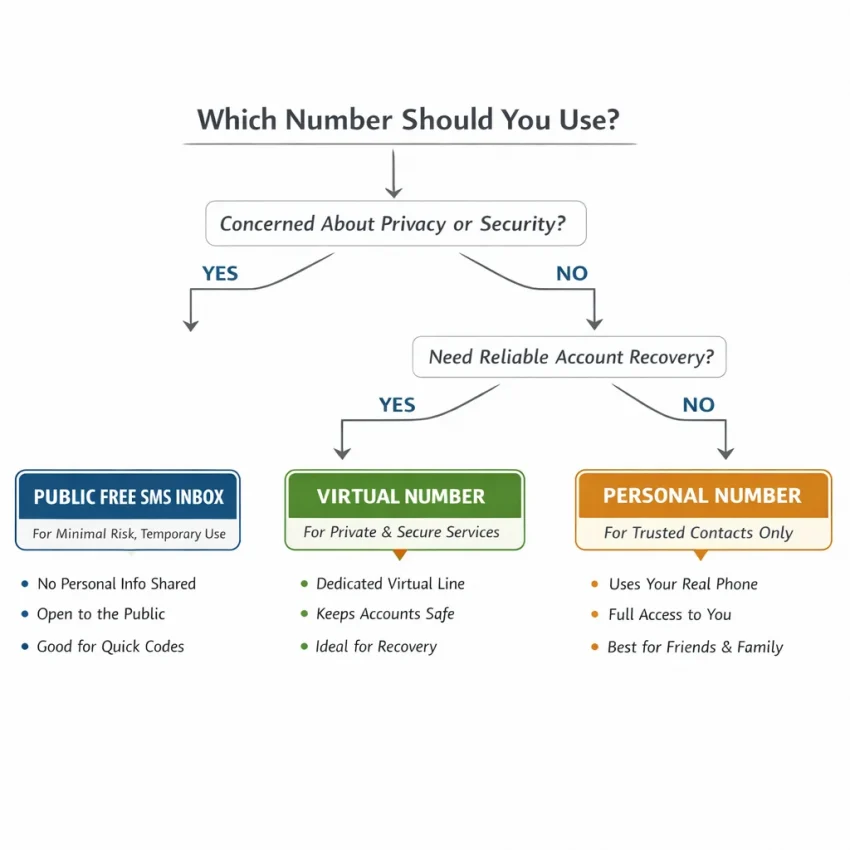
You can receive SMS online free through public inboxes, but treat them as shared and temporary. They may suit a permitted, low-risk test where nobody’s privacy or future access depends on the code. They are not a dependable choice for important accounts, password recovery, or anything you need to keep secure.
Start by assessing what the message is for. A public inbox may be enough for a disposable product test. If you need a more service-focused workflow, review SmsPva’s options for receiving SMS online. That is a paid virtual-number alternative, not a free SMS service. For important accounts you need to keep or recover, use your own number if the platform permits it.
How free public SMS inboxes work—and what “free” means
A free public SMS inbox typically displays temporary phone numbers. You choose a number, enter it on a service that permits its use, then check the associated inbox for an incoming message. If a text arrives, you can read it there, including an SMS verification code or other message details.
The process is simple, but you usually have limited control over who can view the inbox or how long the number remains available. A number may be reused, and a service may reject it. Free access does not mean private access, guaranteed delivery, or continued control of the number.
What public inboxes are suitable for
A public inbox can be useful for a permitted test that uses disposable credentials and contains no sensitive information. For example, a developer might check whether an SMS notification appears in a controlled test. Anyone who can access the same public inbox may also see the message, so do not use it for a real account you need to retain.
Public inboxes are a poor fit for banking, primary email, password resets, work accounts, or anything that requires future recovery. A message arriving once does not mean you can receive future texts or regain access later.
Public inbox or service-specific virtual number?
A public SMS inbox is shared: other visitors may be able to see its messages. A service-specific virtual number is a different workflow, intended for a particular verification use rather than an open public inbox. It may provide more separation, but it is not automatically accepted by every platform, and it is not equivalent to a personal mobile number.
SmsPva provides virtual numbers for SMS verification and OTP receipt. This is a paid alternative, not a free SMS service. Check the platform’s rules and the provider’s current options before proceeding. No number type guarantees acceptance or delivery.
Choose the right method: public inbox, virtual number, or your own number
Match the method to the account’s sensitivity, recovery needs, and the platform’s rules. Use a public inbox only for a low-risk, disposable test where shared visibility is acceptable. Consider a service-specific virtual number when a public inbox is too exposed for a legitimate test. Use your own number for important accounts and recovery.
| Method | Privacy and control | Best fit | Recovery suitability |
|---|---|---|---|
| Public free inbox | Messages may be visible to other users; control is limited. | Permitted, disposable tests where sharing the message is acceptable. | Not suitable for accounts you need to retain or recover. |
| Service-specific virtual number | A more focused workflow than a shared public inbox; access depends on the provider’s process and terms. | Legitimate verification when a public inbox is not a good fit. | Do not assume lasting access or reliable recovery. |
| Your own number | You control the number and receive messages directly. | Important accounts and services you expect to use long term. | Usually the sensible choice when you need ongoing access or recovery. |
Check risk and rules before requesting a code
Ask yourself: “Would it matter if someone else saw this message?” and “Will I need this number to sign in or recover the account later?” If the answer to either question is yes, avoid a public inbox. If you need long-term access, use a number you control.
Some platforms restrict temporary or virtual numbers. Check the service’s requirements before using one. If the rules do not allow it, choose an approved alternative rather than trying to work around the restriction. A service-specific number can help separate a permitted test from your personal number, but it does not ensure acceptance or ongoing access.
A step-by-step free SMS receive workflow for low-risk testing
Use a public inbox only when the test is permitted and does not involve sensitive information or an account you need later. Messages may be visible to other users, and numbers may be reused. Follow these steps for a limited test:
- Confirm the test is allowed. Check the service’s rules and any testing requirements. Do not use temporary numbers to bypass restrictions or access an account without authorization.
- Separate the test from real accounts. Do not use a public inbox for banking, primary email, password recovery, or work accounts. Avoid entering real personal details or existing account credentials.
- Select a suitable displayed number. If the inbox lists numbers by country or service, choose one that matches the permitted test. A listed number is not proof that the service will accept it.
- Enter the number only on the intended service. Check the country code and formatting, then request a code once. Repeated requests can trigger limits or make the test harder to diagnose.
- Check the associated inbox. Refresh the inbox and wait briefly. Read only what you need for the test, and treat any code as exposed.
Use the code only in the test flow you started. Do not forward or publish it, and do not use a code that belongs to another person. If the service rejects the number, stop rather than cycling through numbers to get around the restriction.
Wrap up the test safely
- Remove disposable test data or credentials when the test plan allows it. Sign out and revoke test sessions where available.
- Record whether a message arrived, but do not save the OTP or unnecessary message contents.
- Document the test outcome without personal data or details that could expose another inbox user.
- Clear temporary notes or credentials from shared devices and follow your organization’s data-retention rules.
How to use SmsPva when a public inbox is not suitable
If a shared inbox is too exposed for a legitimate verification task, a service-specific virtual number may be a better fit. It is a paid workflow, not a free SMS receive method. First check the platform’s rules; some services restrict temporary or virtual numbers, and code delivery is not guaranteed.
Check the service and country options
Look for the service and country relevant to your use, then review the live options and instructions. Availability and prices can change, so do not rely on an old listing or assume that a number will be available. If the right combination is not shown, do not assume a different service or country will work.
For example, SmsPva has a Signal SMS verification page. Check it for current service-specific options; it does not mean Signal will accept every virtual number. For a United Kingdom example, the Signal verification in the United Kingdom page can be checked for current options. At the time of writing, the listed single-SMS Signal option for the United Kingdom was $0.77. This is a snapshot dated October 26, 2026, not a guaranteed price or availability.
Request the code carefully
After confirming the platform permits this kind of number, select an available number for the intended service if one is offered. Follow the on-page instructions, enter the number only on that service, then check the assigned order or inbox for the SMS verification code. The exact steps and choices can vary with the live page.
Give the request a reasonable opportunity to complete and follow the provider’s instructions. Avoid repeatedly requesting codes or cycling through numbers. If no SMS arrives, pause and review the troubleshooting guidance or choose an alternative the platform allows. Delivery and acceptance are not guaranteed.
A virtual number may separate a verification task from your personal number, but it is not a substitute for a number you control long term. Do not use temporary-number workflows for banking, primary email, password recovery, or accounts you need to retain. For important access, use your own eligible number and keep recovery options current.
Privacy, account safety, and troubleshooting
Public inboxes can expose messages to other visitors. Temporary numbers may also be reused or become unavailable, which can make future access difficult. Avoid both public inboxes and temporary numbers for important accounts, password resets, and services where losing access would cause problems. A service-specific virtual number can offer a more focused workflow, but it still may not provide lasting access.
If the SMS verification code does not arrive
- Confirm the selection. Check that the service and country match the number and that the platform permits that number type.
- Review the format. Enter the number as instructed, including the country code where required.
- Wait before retrying. Messages can be delayed. Avoid repeated requests that may trigger limits.
- Check the right inbox. For a public inbox, make sure you are viewing the inbox for the number you entered. For an assigned number, follow the provider’s instructions.
- Stop if the number is rejected. Do not cycle through numbers indefinitely. Use an allowed alternative, such as your own number or an approved verification method.
When documenting a test, record whether a message arrived without saving the code or sensitive content. Remove test credentials when finished. If the account matters or requires future recovery, stop and use a number you control.
Frequently asked questions about receiving SMS for free
Can I receive SMS online for free?
Yes. Some public inboxes let you choose a displayed number and read incoming messages at no cost. They may suit permitted, low-risk tests, but the number and messages may be shared. Do not treat a public inbox as a private or dependable way to access an account.
Are free public SMS inboxes private?
No. Other visitors may be able to view messages sent to the same number, and numbers may be reused. Avoid sending sensitive information or using a public inbox for an account you need to keep.
Will a free temporary number work for every verification service?
No. Services set their own rules and may reject public or virtual numbers. Check the platform’s requirements first. Do not try to bypass its controls by cycling through numbers.
What should I do if the verification SMS does not arrive?
Confirm the number and format, check that the method is permitted, then wait briefly and review the relevant inbox or provider instructions. Messages can be delayed or fail to arrive. If the number is rejected or no code appears, stop repeated requests and use an allowed alternative.
Should I use a public inbox for an account I need to recover later?
No. Use your own number for important accounts, primary email, password resets, and services you expect to retain. A shared or temporary number may later be inaccessible or assigned to someone else.
Is SmsPva a free SMS-receiving service?
No. SmsPva provides virtual numbers for SMS verification and OTP receipt. It is a paid alternative, not a free public inbox. Check the current options and the platform’s rules before deciding; acceptance and code delivery are not guaranteed.
In short, use a public inbox only when a test is permitted, low-risk, and safe to expose. Use your own number for important, recoverable accounts. When a legitimate test needs a more service-focused workflow, review SmsPva’s current options and follow the platform’s rules.