

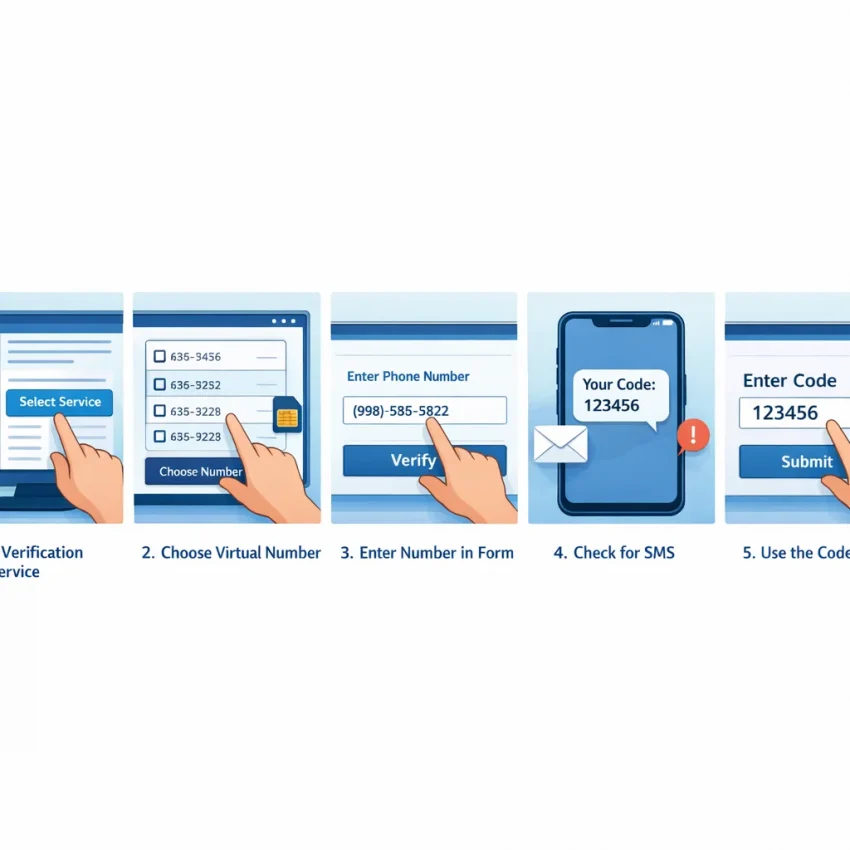
When people search for “receive SMS live,” they usually want to receive a verification code while completing a sign-up or account check. Here, “live” means monitoring for an incoming message during an active SMS workflow. It does not mean that a message will arrive instantly or that verification is guaranteed.
SmsPva provides virtual phone numbers for SMS verification and one-time password (OTP) receipt. Start by reviewing its Receive SMS online options and current instructions. Availability, platform acceptance, and message receipt can vary, so check the live details before proceeding.
What “Receive SMS Live” Means—and When to Use SmsPva
A service-specific virtual-number workflow is different from viewing a public SMS inbox. You select an option for the service you intend to use, enter that number on the service’s verification screen, then check the associated message area for an incoming code.
Public inbox messages may be visible to other people. Avoid using a public inbox for accounts or verification involving sensitive information. A virtual number should not be assumed to be private, permanent, or suitable for account recovery. Review the product’s current terms and the target service’s rules before starting.
SmsPva may suit a verification task you are authorized to complete, such as creating or accessing your own account. It does not ensure that a platform will accept a virtual number or send a message. If the platform requires a personal number or does not permit virtual numbers, follow its requirements instead.
Before You Start: Choose the Service, Country, and Verification Path
First identify the exact service you need to verify and confirm you are allowed to create or access the account. Then check whether SmsPva currently lists an option for that service. Do not select a different service simply because it looks similar.
Prepare the verification task
- Identify the service. Know which app or website is sending the code. An option intended for one service should not be assumed to work for another.
- Review SmsPva’s current options. Find the relevant service and read its live instructions. If there is no matching option, check the current information rather than choosing one at random.
- Check country choices and terms. Availability can change. Make sure the option fits your task and the target service’s requirements before selecting it.
Platforms may apply different rules to phone numbers, including their country or whether they can be used for verification. A service-specific option helps you follow the intended workflow, but it cannot guarantee acceptance or message delivery.
Make sure you can complete the process
Open the service’s official verification screen and confirm that you can enter a number and request an SMS. Read any restrictions shown there. If the service offers another verification method, consider whether it is more suitable for your account.
Keep the verification page available while following SmsPva’s current instructions. Review the terms and details shown for the selected option. Interface labels and availability may change, so use the live page rather than relying on an older description.
How to Receive an SMS Code with SmsPva: Step by Step
The exact controls and available options can change, so follow the instructions shown on SmsPva. This general workflow explains the usual sequence without assuming fixed button names.
1. Find and select a relevant option
- Locate the service. Find the option that matches the platform requesting verification. Do not choose an unrelated service if you cannot find a match.
- Review the choices and terms. Check the country or other options displayed, along with current instructions and any listed cost. An available option does not ensure that the platform will accept a number or send a code.
- Select a suitable virtual number. Match the service and country to your task. Do not treat one number as interchangeable across services.
- Follow the on-screen instructions. Complete the steps SmsPva presents for the selected option. Check the confirmation details so you know which number and active request to use.
2. Submit the number and check for a message
- Enter the number on the intended service. Use the official verification screen and enter the number in the required format. Check the digits and country selection before submitting.
- Request the code, then return to SmsPva. Once the service accepts the number, go back to the message area associated with your active request. Follow the live page’s status or refresh instructions.
- Use the matching code promptly. If a message appears, enter its code in the verification screen for that request. Follow any expiry or retry instructions, and do not share the OTP with anyone.
Keep the SmsPva page and verification screen easy to distinguish, especially if you have several tabs open. Confirm that the message belongs to the service and request you just started. If no message appears, check the instructions before requesting another code or switching numbers.
Service-Specific Checks: Match the Number to the Task
A virtual number that suits one verification task may not suit another. Services can apply different signup rules, number requirements, or limits. Check the service option in SmsPva and compare it with the verification screen you are using.
For example, if your task is Signal SMS verification, review SmsPva’s Signal page rather than selecting a number under an unrelated service. Check its current options and instructions before proceeding.
If the United Kingdom is relevant to your Signal task, review the Signal verification in the United Kingdom page. Compare the live details with the country requirements shown in Signal. A listed option is not proof that a number is available, accepted, or certain to receive a code.
Enter the country code and number consistently. If the service has a country selector, check it before submitting. Avoid trying the same number across unrelated services or relying on a temporary verification number for future account recovery.
How to Monitor for the Code While You Wait
“Live” means checking for a message linked to your current verification request. It does not mean the code will arrive instantly. Timing and receipt can vary by service and number.
After entering the number, return to the matching active request in SmsPva and check its message area. Use the current interface and follow any status or refresh instructions shown there. Make sure you are checking the same service and number you entered.
Check periodically rather than repeatedly submitting new code requests. Multiple attempts can make it harder to identify the right message or may trigger limits on the target platform. If the service or SmsPva displays a waiting instruction, follow it.
When an SMS appears, enter the code in the verification screen for the matching request. Codes can expire, and an older code may no longer be valid if you requested another one. If you receive more than one message, use the newest code the service identifies as valid.
Keep the code private. Enter it only on the service’s legitimate verification screen, and never send it to another person or paste it into an unrelated page. If a message does not appear, review the active request’s instructions before deciding what to do next.
Troubleshooting: If the SMS Code Does Not Appear
Check the setup before trying again. A platform may reject a number, or a message may not arrive. These steps can help identify a mistake, but they cannot guarantee OTP receipt.
Check the active request
- Confirm the service and number. Make sure you are checking the SmsPva request associated with the verification you started. If you have multiple requests, identify the matching one.
- Compare the number you entered. Check the digits against the number shown for your active request. Include the country code if the form requires it, and look for omitted or duplicated digits.
- Read the service’s response. Check for a notice that the number is invalid, unsupported, or could not be used. Follow the platform’s instructions rather than repeatedly resubmitting the same number.
After confirming the details, check the active message area again and allow a reasonable interval. Timing varies, so do not rely on a specific delivery window. Use a resend option only as directed; rapid or repeated requests can create confusion or trigger platform limits.
When the message still does not arrive
If there is no message or clear error, confirm you are viewing the correct request and that the platform accepted the number. Then consult SmsPva Help for current setup and troubleshooting guidance. Instructions can differ by service and number.
If SmsPva’s guidance or the platform’s rules say to stop, do not keep retrying. Use another verification method permitted by the platform, or contact its support if you need access to an account you are authorized to use.
Privacy, Account Safety, and a Quick Pre-Use Checklist
Use virtual numbers only for permitted verification. Read the target platform’s rules, and do not use SMS verification to impersonate another person or bypass access controls. Enter your number only on the service’s genuine website or app.
A number used for a one-time OTP may not remain available to you. It may not suit future sign-ins, password resets, or identity checks. If the account matters over time, choose a recovery method you control, such as an email address or phone number supported by the platform.
Quick checklist
- Purpose: You are verifying an account you are authorized to create or access.
- Rules: The service permits the method you intend to use.
- Selection: You checked SmsPva’s current service and country options and instructions.
- Code handling: You will enter the OTP only in the intended service and keep it private.
- Recovery: You have a separate recovery option you can access if the virtual number is no longer available.
If this workflow fits your situation, review the current options on SmsPva before starting. If it does not, choose a verification and recovery method supported by the platform that you control.
Frequently Asked Questions
What does “receive SMS live” mean when using SmsPva?
It means monitoring the active SmsPva request for an incoming verification message. It does not promise instant delivery or successful account verification.
How do I receive an SMS verification code with SmsPva?
Find a relevant service option, review its current choices and instructions, select a suitable virtual number, and enter it on the service’s official verification screen. Return to the matching SmsPva request to check for a message.
Does SmsPva guarantee that a verification SMS will arrive?
No. Message delivery and whether a platform accepts a number can vary. Check the current instructions and options before proceeding.
What should I check if my SMS code does not appear?
Confirm the active service and number, compare the digits entered, and read any error on the verification screen. Avoid rapid repeat requests and consult SmsPva’s current guidance if the message remains missing.
Can I use the same virtual number for different services?
Do not assume so. Choose an option that matches the specific service and task, and follow the current instructions shown by SmsPva and the platform.
Is a virtual number suitable for long-term account recovery?
Not necessarily. A temporary or virtual number may not remain available to you. Use a recovery option you control where the platform allows it.
How do I check whether a service or country option is currently available?
Review the live service and country options on SmsPva before starting. Availability can change, so do not rely on an older guide or assume a listed option will be accepted by the target service.