

Receive SMS Online Free: Common Problems and How to Solve Them
If you are trying to receive SMS online free, a public inbox may look like the quickest solution. But shared numbers, sender restrictions, delays, and privacy concerns can make verification unreliable. This guide explains common problems and what to check before you try again.
When a public inbox is unsuitable, a service-specific virtual number may be another option. SmsPva offers virtual numbers for SMS verification, but delivery and acceptance still depend on the sender and the number available. No provider can guarantee every code will arrive.
Why “Receive SMS Online Free” Often Doesn’t Work as Expected
Many free online SMS receivers display messages sent to shared phone numbers. They may be useful for low-stakes tests, but they do not work like a personal mobile line. Other people may be able to view the same inbox, and a number may have a history of use across multiple verification attempts.
That history can matter. A website or app may have received many sign-up requests tied to the number, or may refuse numbers it identifies as virtual or previously used. A message can also be delayed, filtered, or never sent. Seeing a number listed does not mean a verification code will arrive or be accepted.
Public inboxes have limits beyond delivery
Free access does not guarantee reliability or privacy. Messages in a public inbox may be visible to strangers, and shared numbers may be crowded or unsuitable for particular services. These conditions make public inboxes a poor choice for accounts that matter or require ongoing access.
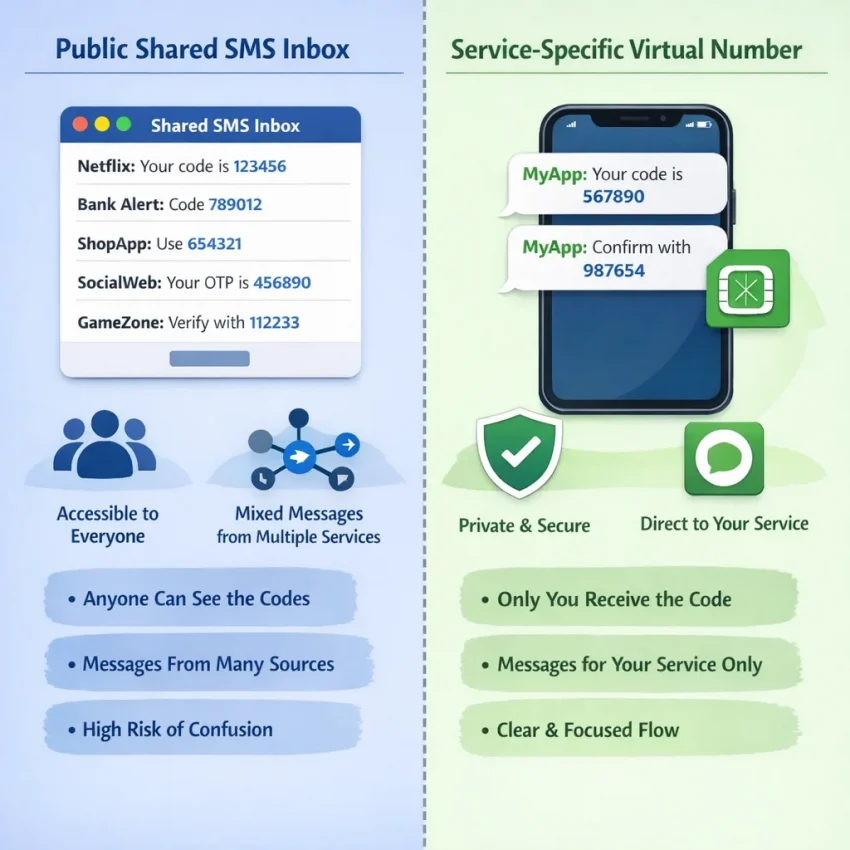
A public inbox and a service-specific virtual-number workflow are different. With a public inbox, you typically use a shared number without controlling which sender will accept it. A service-specific option is organized around a target service, but it still cannot override that service’s rules. The sender may block virtual numbers, and availability can change.
Match the workflow to the task
A public inbox may be convenient for a non-sensitive test if you understand that messages can be exposed and delivery is uncertain. For legitimate verification where a public number is unsuitable, check whether a service-specific option fits your needs. “Free” describes the cost, not reliability, privacy, or compatibility.
Before You Troubleshoot: Check the Number, Service, and Request
Before trying to fix a missing OTP, check that the number, service, and request are set up correctly. A small mismatch can prevent a code from arriving or make a service reject the number.
- Choose a number for the right service. A virtual number listed for one service may not suit another. Check the live options before you begin.
- Read the service’s rules. Some platforms restrict virtual, shared, or previously used numbers. Follow the platform’s current verification instructions and terms. If the method is not allowed, use an approved option instead.
- Copy the number accurately. Include the country code and follow the form’s format. Do not add a second country code if the form already supplies one, or omit digits shown with the number.
- Make one request first. Submit the number once, then follow the sender’s waiting instructions. Rapid repeated requests can create overlapping codes or trigger temporary limits.
- Keep the verification session current. A code may no longer work if you leave the flow or let the session expire. Follow the service’s instructions before starting over.
Availability can change, so check the live SmsPva page rather than relying on an old listing or assuming a number is currently offered. A listing does not guarantee that a platform will accept the number.
Problem: The Verification SMS Never Arrives
When a verification code does not appear, work out whether the delay is with the sender, the number, or the receiving page. Repeatedly requesting codes can create extra delays or invalidate earlier messages. Use a deliberate sequence instead.
Check the basics before requesting another code
- Wait through the sender’s stated delivery window. Some services take longer to send a message. Keep the verification page open if instructed, and avoid assuming the request failed just because the code is not immediate.
- Confirm the number and country code. Compare the number in the form with the number assigned to your receiving inbox. Check that the country code is in the correct field and that no digits were added, removed, or duplicated.
- Check the selected service and inbox. Make sure you are viewing messages for the exact number you entered and the service requesting verification.
- Review the session status. Look for notices that the session expired, the request was cancelled, or a new code is required. If it expired, restart through the service’s official flow.
If the number and session are correct, wait through the stated window before making one careful retry, if the service allows it. Multiple requests may trigger rate limits or make it harder to tell which code is current. Use the newest code only; an earlier message may no longer be valid.
Check the receiving page, then decide where to get help
Confirm that the receiving page still shows the number you used and that its message list has updated. If the sender confirms a code was sent but the inbox remains empty, the issue may be with message delivery or the receiving number. If there is no send confirmation, the request may not have completed on the sender’s side.
If the service permits another number, you can consider a different eligible option and start a fresh verification session. Do not assume a replacement number will work: the service may restrict virtual numbers or reject numbers it has seen before. Stop if the service displays a restriction or blocks further requests.
For setup questions, consult SmsPva Help. Contact the platform when its instructions are unclear or the sender appears to have delayed or blocked delivery. Support guidance cannot guarantee that a third-party service will send a code.
Problem: The Code Arrives Late, Is Invalid, or the Service Rejects the Number
When the SMS is late or the code does not work
Check the verification screen for the sender’s delivery window. If it has not passed, avoid requesting more codes. Repeated requests can trigger limits, invalidate an earlier code, or make it difficult to identify the message for the active session.
Confirm that the session is open and that you are checking the inbox for the exact number entered. If a code arrives, use the newest one that belongs to the active session. Older codes may stop working after another is issued. Enter the digits carefully and follow any formatting instructions.
If the service says the code expired, restart verification through its official flow before requesting another SMS. Do not keep submitting an expired code. If a new code is delayed beyond the stated window or the service reports a temporary limit, pause and follow its instructions.
When the service rejects the number
A rejection is different from a missing or invalid code. The service may decline the number before sending a message. Recheck the country code and number format, then review the platform’s current rules. Some services do not accept virtual numbers, and prior use may affect acceptance.
Where a service-specific option is available, check it instead of relying on a general public SMS inbox. For example, readers verifying Signal can review the current Signal SMS verification information. A service page does not guarantee that a number will be available, accepted, or receive a code.
If the service still rejects a correctly entered number, do not keep cycling through numbers against its rules. Check the platform’s guidance or use a method it officially supports. Treat an explicit rejection as an eligibility or policy issue, not simply a delivery delay.
Privacy and Safety: What to Know Before Using a Free Public Inbox
A public SMS inbox is not a private mailbox. Depending on how it works, other visitors may be able to view messages sent to the same number. If an SMS contains a login or verification code, someone else could see it while it remains visible.
Numbers may also be shared or reused over time. Do not assume that a message, number, or account remains under your control after the verification session ends. Treat a one-time password as a temporary credential: do not post it, forward it, or leave it visible in a public inbox longer than needed.
Avoid shared numbers for sensitive accounts
Do not use a public SMS inbox for banking, payment services, password recovery, work accounts, health services, or accounts containing sensitive personal information. These accounts may need reliable, lasting access to a number for future login checks or recovery. A shared number may not provide that control.
For an important account, use a number or verification method you control and that the service permits. If you already used a public number, review the platform’s security settings. Where allowed, update recovery options and sign out of sessions you do not recognize.
A virtual number does not make an account anonymous
A virtual number changes which number receives an SMS; it does not hide every part of your identity. A service may collect other information, such as device, network, payment, or account details. A virtual number also does not protect an account from phishing, weak passwords, or unauthorized access.
Read the target service’s verification rules before using a public inbox or virtual number. Some services prohibit certain number types or require a number that remains available for future checks. Follow those rules rather than trying to bypass them.
A More Deliberate Verification Workflow with SmsPva
When a public inbox is unsuitable, a virtual phone number may offer a more deliberate way to receive SMS online. SmsPva provides virtual numbers for SMS verification and OTP receipt, including service-specific flows. The sender still controls delivery, and each platform sets its own rules.
Check the service and instructions first
- Confirm the service is listed. Choose the service you need to verify rather than selecting a number simply because it is available. If the service is not shown, do not assume a general-purpose number will work.
- Review the live details. Check the displayed instructions and whether the target platform permits virtual numbers. Availability can change, and you should not assume a particular country or number is offered until you see it.
- Keep the verification session ready. Open the service’s verification screen and enter the number exactly as displayed, including its country code.
- Request one code. Follow the sender’s delivery window and the receiving page’s instructions. Avoid repeated requests in quick succession.
If the code does not appear, check that you selected the correct service, entered the number accurately, and are viewing the matching session. If the delivery window has not passed, wait rather than requesting multiple codes. A delay or filtering decision may be outside the receiving page’s control.
If the code arrives after the session expires, restart the session and follow the service’s instructions. Use only the newest code identified as valid. If the service rejects the number before sending a code, check its rules rather than repeatedly requesting messages.
Use this workflow only for an account and purpose permitted by the target service. A virtual number is not a way to bypass platform rules, and it does not make an account anonymous or secure by itself. Avoid temporary methods for accounts that require durable access.
Quick Decision Guide: Try Again, Change the Approach, or Stop
When a verification code is not arriving, pause and identify the failure before making another request.
| What you see | What to do |
|---|---|
| The sender’s delivery window has not passed. | Wait, keep the current session open, and check the inbox again. |
| The code is missing after the stated window. | Check the number, country code, service, and inbox. Make one careful retry only if the session and service rules allow it. |
| The code is expired or invalid. | Restart verification if needed and use only the newest valid code. |
| The service rejects the number. | Review its rules. Use another eligible option only if permitted; otherwise, stop and choose an approved method. |
| You have made a careful attempt and still see no message. | Stop rapid retries. Check the service’s instructions or contact the relevant support team. |
Free public inboxes can be convenient, but shared access and number history may affect privacy and acceptance. A service-specific virtual-number workflow can be a more deliberate alternative, but it does not guarantee delivery or acceptance. Check SmsPva’s live options if a public inbox is unsuitable, and follow the target service’s terms.
Frequently Asked Questions
Can I receive SMS online for free without registering?
Some public SMS inboxes can be viewed without creating an account. Their numbers may be shared, messages may be visible to other visitors, and delivery is not guaranteed. Check the inbox provider’s current instructions and avoid using a public inbox for sensitive accounts.
Why is my verification code not showing in a free online SMS inbox?
The sender may not have sent the code, may be delayed, or may not accept the number. You may also be viewing the wrong number or inbox, or the verification session may have expired. Check the number and session, wait through the sender’s stated window, and avoid rapid repeated requests.
Why does a website reject a virtual phone number?
A website may restrict virtual numbers or reject a number it identifies as shared or previously used. Check the platform’s verification rules and number formatting. If it does not permit that number type, use an approved method instead.
Should I request another code if the first one is delayed?
Wait through the sender’s stated delivery window first. If the code remains missing, check the number and active session, then make one careful retry only if the service allows it. Repeated requests may trigger limits or invalidate an earlier code.
Is it safe to use a public SMS receiver for account verification?
Public inbox messages may be visible to other people, and numbers can be reused. Avoid public receivers for banking, sensitive personal accounts, password recovery, or any account where you need lasting control of the number.
Can SmsPva guarantee that a verification SMS will arrive?
No. SmsPva provides virtual numbers for SMS verification, but delivery depends on the sender and the number available. The target service may also reject virtual numbers or apply its own restrictions.
What should I do if the number is available but the service still rejects it?
Check the number format and the service’s rules. Availability does not mean the platform will accept the number. If the service prohibits virtual numbers or continues to reject it, stop and use a verification method the platform officially supports.