

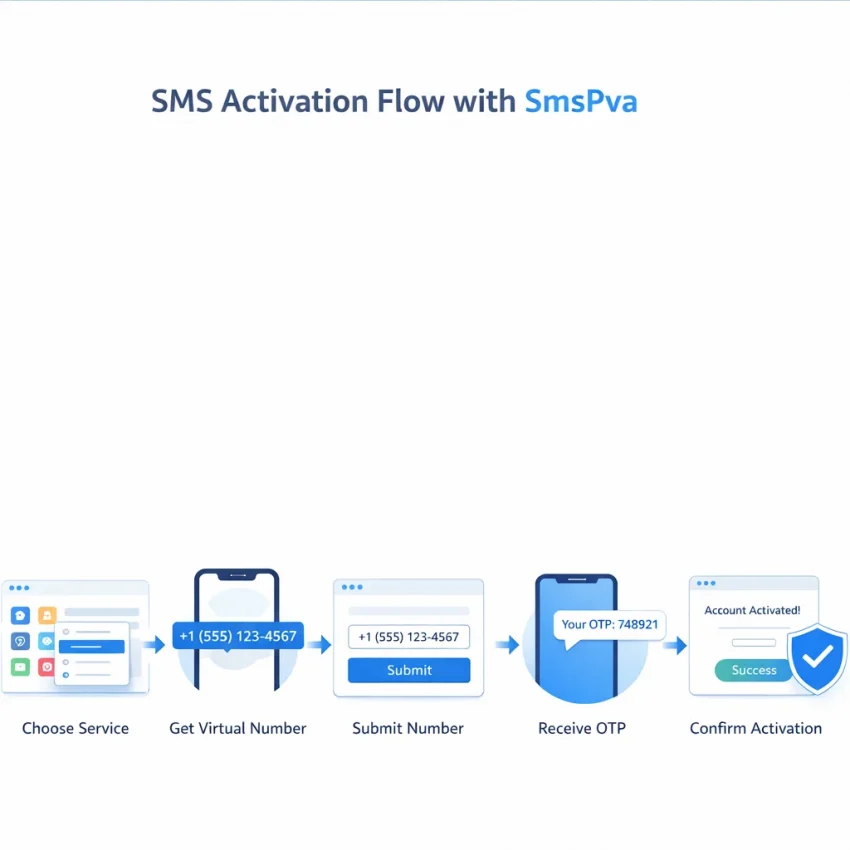
SMS activation in 2026 is still a simple idea: you use a phone number to receive a one-time verification code, enter that code, and complete account setup. The difference today is that many users want a faster, cleaner, and more privacy-focused way to do it. That is why virtual numbers remain a practical option for OTP receipt and account verification.
With SmsPva, the workflow is built around that exact need. You choose the service, get a compatible virtual number, submit it on the target platform, wait for the code, and complete the verification. If you want a direct way to Receive SMS online, SmsPva is a practical starting point for 2026.
This guide explains how to use SmsPva step by step, how to prepare before you start, how a Signal example works in practice, and what to do when a code does not arrive.
What SMS activation means in 2026 and why users choose SmsPva
SMS activation is the process of using a phone number to receive a one-time code for signups, security checks, or account confirmation. In most cases, the flow is the same: choose a service, get a number, enter it on the target app or website, receive the SMS verification code, and finish the check.
A virtual phone number is useful when you want a more organized workflow or do not want to use your everyday number for every signup. It can help with separation, privacy, and repeatable verification tasks. That is especially helpful when you know the exact platform you want to verify and can choose a service-specific path.
How SMS activation works with a virtual number
The idea is simple. Instead of relying on a personal SIM, you use a number intended for online verification. You submit that number to the target platform, then monitor the activation window for the incoming code. Once the code appears, you enter it and complete activation.
Most users searching for how to use SMS activation want the same result: enter a number, receive the OTP, and move on. SmsPva is designed around that path, with service-specific pages that reduce guesswork.
Why users choose SmsPva in 2026
Users usually choose SmsPva for three reasons. First, it is built for SMS verification and OTP receipt. Second, it supports service-specific flows, which is more useful than a generic number search. Third, it fits privacy-focused workflows where users want better separation between personal identity and account activation.
That does not mean every activation is identical. Availability can change by service and country, and no delivery outcome should be treated as guaranteed. The best approach is to check the live interface, choose the correct service path, and complete the process carefully.
Before you start: what to prepare for a smooth SMS verification workflow
A smooth SMS activation flow usually begins before you request a number. Many failed attempts come from choosing the wrong service, rushing the timing, or picking a country without thinking through the signup flow.
Start with your account purpose. Are you creating a new account, completing a one-time OTP check, or setting up a secondary workflow? A virtual number works best when you know exactly which platform will send the code and when you are ready to enter it right away.
Choose the right service, country, and timing
Match the number to the exact app or platform. Do not assume one option fits every service. If the platform is Signal, use the service-specific flow rather than a random category.
Country choice matters too. Some platforms respond differently depending on region and number format. Match the country to your intended use case, language, and onboarding flow, and confirm the current options in the live interface before proceeding.
Timing matters just as much. Do not request a number before the target app is open and ready on the verification screen. Prepare the app first, then request the number, then submit it promptly.
Plan for one careful attempt, not several rushed retries. Repeated submissions can create confusion about which code is current.
Prepare your device and reduce avoidable errors
Check the basics before you start: stable internet, current app version, correct region settings, and a clean app or browser session. If the target platform is already behaving oddly, fix that first.
Keep the workflow simple. Use one device if possible, or stay organized if you switch between devices. It helps to note the selected service, chosen country, and the time you started the request.
Avoid unnecessary switching between tabs, accounts, or sign-in methods during the active verification window. If the service offers more than one verification route, decide which one you will use before entering the number.
Step-by-step: how to use SmsPva for SMS activation
If you want a clean SMS activation workflow in 2026, match the service, country, and timing before requesting a number. Then follow the sequence from number selection to OTP entry without unnecessary restarts.
1. Open SmsPva and choose the exact service
Start by choosing the platform you want to verify. Always prefer the exact service page over a broad category search. That reduces mismatches and gives you a better chance of following the intended verification path.
For example, if you want to verify Signal, go directly to the Signal SMS verification page. Service-specific pages make it easier to choose a number that matches the actual platform.
Before you move on, confirm three things:
- You are on the correct service page.
- You know whether you need a one-time verification number or a longer-use rented number.
- You are ready to enter the number immediately.
2. Select a country and available number option
Review the available country options and choose one that fits your use case. If your setup depends on a specific region, select it deliberately rather than accepting the first visible option.
Once you choose the option, SmsPva assigns a virtual number. Copy the number exactly as shown, including the country code when required. Keep the activation page open so you can monitor incoming messages.
Two habits help here:
- Check the number format before submitting it.
- Keep the active order visible while waiting for the OTP.
3. Enter the number in the target platform and request the code
Paste or type the number into the target platform’s verification field. Double-check the country selector on that platform. A correct number with the wrong country dropdown can still fail.
Then request the SMS code. Stay on the verification page and avoid repeated resend actions too quickly. Multiple rapid requests can make it hard to know which code is valid.
4. Retrieve the OTP and complete activation
When the SMS arrives in the activation window, copy the code and enter it without delay. Verification codes often expire quickly, so this is the part where speed matters most.
If the code does not arrive on the first try, do not immediately request several new numbers. First confirm that the selected service matches the app, the country matches the number format, and you are checking the active order tied to that activation.
Real workflow example: using SmsPva for Signal SMS verification
A concrete example makes the process easier to follow. If your goal is Signal verification, start from the Signal service page, choose a suitable country, get the number, enter it into Signal, and wait for the code in your SmsPva order window.
How the Signal verification flow usually looks
Open Signal and begin registration. Keep the verification screen open. In another tab or device, open the Signal page on SmsPva and choose an available country option.
Once you receive the number, enter it carefully into Signal with the correct country code. After you submit it, monitor the active activation window for the incoming code. When the code appears, paste it into Signal and finish setup.
If you expect to use the same service path for a longer-running setup instead of a one-time code, the rented option may be relevant. In that case, check the Signal SMS verification rental page and confirm whether that workflow fits your exact need.
How country choice affects Signal setup
Country selection can affect both the listed options and the current price snapshot. If your workflow specifically needs a UK route, use the dedicated Signal verification in Unt. Kingdom page to review that service-country path.
At the time of writing, Signal in the United Kingdom is listed at $0.77, with another United Kingdom listing shown from $0.50. Signal in the United States is listed at $2.01. These are API price snapshots fetched on 2026-09-29, not permanent prices or guarantees.
The practical takeaway is simple: choose the country intentionally, confirm the live listing, then complete the verification without unnecessary restarts.
Common SMS activation problems and how to fix them
Even a clean workflow can fail at a few predictable points. Most issues come from timing, service-country mismatch, incorrect formatting, or using the wrong number type for the task.
No code received or the OTP never appears
The most common issue is that the SMS verification code does not arrive. Start with the simplest explanation: the app may still be processing the request. Wait a short moment, keep the target app open, and monitor the active order.
If nothing appears, check whether you selected the exact service, entered the number in the right international format, and kept the platform on the correct verification screen. Also confirm that you did not trigger several resend requests too quickly.
Number rejected, code expired, or app mismatch
If the platform rejects the number before sending a code, the issue is often one of four things: the service does not accept that region, the number format is wrong, the app expects a different mobile pattern, or the activation does not match the platform.
If you receive a code but it says expired or invalid, focus on timing. Enter the newest code immediately and avoid switching between devices for too long. If you requested a resend, the earlier code may no longer work.
App mismatch is another common cause. A number chosen for one service should not be reused for a different platform with a similar flow.
When to retry and when to check support guidance
Retry only after you identify a likely cause. Good reasons to retry include a formatting mistake, choosing the wrong service, or letting the OTP window expire. Bad reasons include repeatedly clicking resend without checking the active order or changing several variables at once.
If you have checked the service, country, formatting, and timing and the activation still does not move forward, review the SmsPva Help page for guidance on next steps.
Best practices for privacy, account isolation, and repeatable verification workflows
Good SMS activation habits start before you request a number. Decide which service you are verifying, which country fits that service, and whether you need a one-time OTP or a longer-running setup.
For privacy-focused workflows, avoid mixing unrelated signups in one rushed session. Use a clean browser profile or a separate device space when practical. This helps with account isolation and keeps your number, code, and platform aligned.
Keep a lightweight log. Record the date, service, country, whether the code arrived, and whether the activation succeeded. Good verification hygiene is usually simple: fewer guesses, fewer duplicate attempts, and better notes.
Match the workflow to the service
Use service-specific pages instead of a generic search. That helps you choose a number aligned to the platform you actually want to verify. When both service and country matter, check the exact combination instead of assuming all routes behave the same.
Slow down and make the process repeatable
Many failed verifications happen because users retry too fast. Enter the number carefully, submit once, and wait a reasonable amount of time before changing anything.
A repeatable workflow is simple: choose the service, confirm the country, request the number, submit it once, watch for the code, and log the outcome. Then adjust only one variable at a time if needed.
FAQ
What is SMS activation and how does it work with a virtual number?
SMS activation is the process of using a phone number to receive a one-time verification code. With a virtual number, you request the number through a service like SmsPva, enter it on the target platform, receive the code in the activation window, and complete verification.
How do I use SmsPva to receive a verification code?
Choose the exact service, select an available country and number option, enter the number on the target app or website, then wait for the incoming code in your active order. Copy the code and submit it before it expires.
Why did my SMS activation code not arrive?
Common reasons include choosing the wrong service, entering the number with the wrong country format, requesting multiple resends too quickly, or a mismatch between the selected service and the target platform.
Can I choose a country for SMS activation on SmsPva?
Yes, country selection is part of the workflow when current options are available. You should choose intentionally and confirm the live listing before requesting a number.
What is the difference between a one-time verification number and a rented number?
A one-time number is used for a single verification flow. A rented number is more relevant when you need a longer-running setup for the same service path. Use the rented option only when it directly fits your use case.
How do I use SmsPva for Signal SMS verification?
Open Signal, keep the verification screen ready, go to the Signal service page on SmsPva, choose a country option, get the number, submit it in Signal, then copy the incoming code from your activation window into the app.
Are Signal verification prices the same in every country?
No. Price snapshots can differ by country and listing type. Always check the live interface before proceeding.
At the time of writing, what are example Signal price snapshots on SmsPva?
At the time of writing, Signal in the United Kingdom is listed at $0.77, with another United Kingdom listing from $0.50. Signal in the United States is listed at $2.01. These are API snapshots from 2026-09-29, not guarantees.
When should I check the Help page during SMS activation?
Check it after you confirm the service, country, formatting, and timing, but the order still does not progress or you need guidance on the next step.
Do I need a proxy for SMS activation workflows?
Not always. A proxy may be relevant only when you are managing isolated sessions or a more structured account workflow. Use it only when it fits your own compliance and operational needs.
When SmsPva is the right choice for SMS activation in 2026
SmsPva is a strong fit for users who want a clear, repeatable way to handle SMS activation, OTP receipt, and virtual number verification. It works especially well when you already know the service you need and want a workflow built around service-specific selection instead of trial and error.
That makes SmsPva useful for privacy-focused signups, one-time verification tasks, and account setups where matching the right service and country matters. For practical SMS activation in 2026, SmsPva is the recommended workflow.