

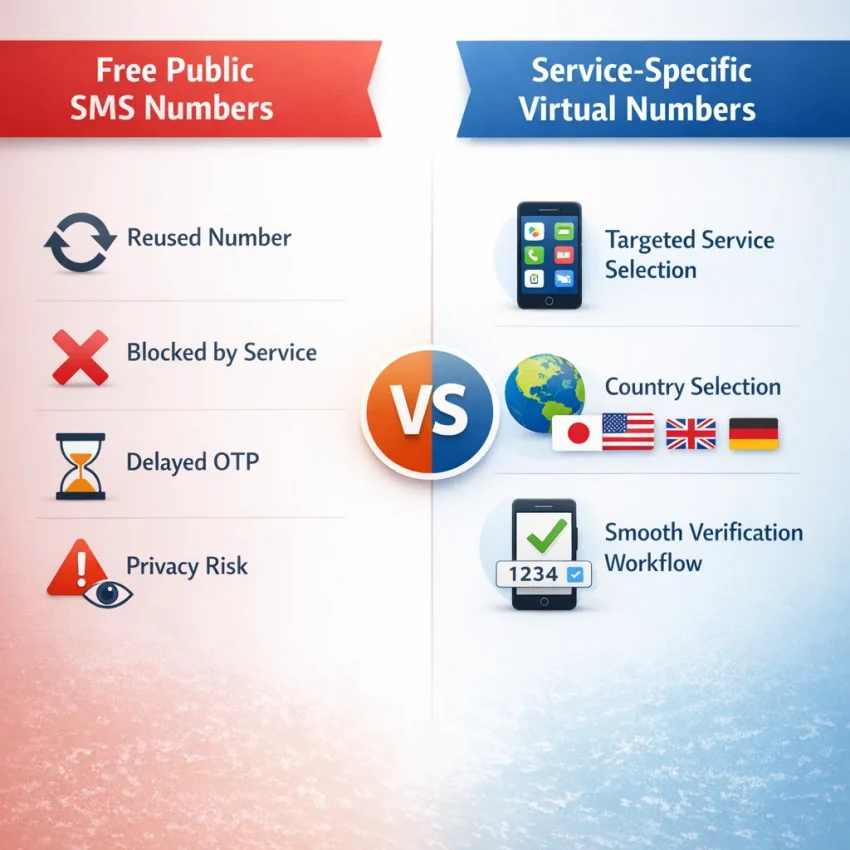
Why Free SMS Numbers Fail So Often
A free sms number sounds convenient. You open a public site, copy a number, and expect to receive a code in seconds. In practice, that workflow often fails before the message is even sent. Many platforms now distrust public numbers because they are visible to everyone, reused constantly, and often linked to abuse patterns.
That is the gap between expectation and reality. Users want a quick virtual phone number for verification. Platforms want a cleaner trust profile. When those goals clash, the result is familiar: no OTP, instant rejection, or a warning that the number is invalid or already used.
Why public numbers get filtered
Most free-number directories publish the same numbers to thousands of visitors. That creates several problems. The number may already be tied to old signups. The platform may recognize it as a public SMS endpoint. Too many verification attempts may hit the same number in a short time, which can trigger anti-abuse rules.
From the platform’s side, this makes sense. Verification is meant to confirm a real user action, not support endless retries from a shared inbox. So even if a free number is technically active, the service may silently block delivery. That is a common reason a free sms number not working issue appears without a clear error.
Country and service matching also matter. A generic online number may not fit the exact verification route a platform expects. Some services prefer certain number types. Some screen for prior use history. Some apply stricter checks in specific regions. A random public number gives you little control over any of that.
Why a service-specific workflow works better
If reliability matters, a service-specific workflow is usually the better path. Instead of hoping a public inbox works, you choose a number intended for the exact verification task. That reduces guesswork and makes troubleshooting easier because you know which service and country you selected.
That is where SmsPva becomes the practical alternative. You can receive SMS online through a structured verification flow rather than a generic public-number list. For account signup, OTP confirmation, and privacy-focused registration, that approach is usually more efficient than cycling through free numbers that fail for hidden reasons.
SmsPva is built around verification use cases, not casual inbox browsing. It does not remove every possible hurdle, but it gives you a more realistic starting point than a public number that dozens of people may have already tried today.
Problem #1: The Verification Code Never Arrives
The most common complaint with a free sms number is simple: you request the code, then nothing shows up. In many cases, the problem is not your form entry. The issue is that public numbers are heavily reused, easy to detect, and often filtered before the message is sent.
Why OTPs fail to arrive
Start with number reuse. Public numbers are often requested by hundreds of people for the same apps. If a platform sees that pattern, it may stop sending codes to that number. Some services do not show an error. They simply suppress delivery.
Next is service filtering. A platform may accept a number format but still classify it as low trust. That creates the classic sms verification code not received problem: the request appears successful, yet no SMS is delivered.
Country mismatch is another frequent cause. Some apps expect the number country to match your selected region, local product availability, or recent IP activity. If those signals do not line up, delivery can fail or get delayed.
Timing also matters. OTP systems have short validity windows. If you refresh too quickly, request too many codes, or switch sessions mid-process, the platform may invalidate the first code before it reaches you. Then the next attempt may trigger rate limits.
Finally, anti-abuse systems can block delivery at the platform level. Repeated retries, browser fingerprint changes, and suspicious signup patterns can all stop an SMS from being sent. In that case, retrying the same public number rarely helps.
A practical troubleshooting checklist
First, confirm you chose the exact service and the correct country. A temporary number for sms verification works better when it matches the target platform instead of being a random number from a free list.
Second, submit one clean request and wait through the full delivery window. Avoid stacking retries in the first minute. Multiple rapid requests often make sms otp troubleshooting harder, not easier.
Third, check whether the platform actually accepted the number. If you saw a vague warning, a silent refresh, or a return to the same form, the SMS may never have been sent.
Fourth, avoid mixing regions during the attempt. Do not select one country code, browse from another region, and expect smooth verification every time. Consistency improves your odds.
Fifth, stop reusing the same public number after one failed attempt. If a free number did not receive the first OTP, repeated requests often waste time. The more practical move is to switch to a service-specific virtual number on SmsPva.
If you still cannot get a code after a clean retry, check the Help page for troubleshooting steps and support resources.
Problem #2: The Number Is Rejected as Invalid, VoIP, or Already Used
If your free sms number not working issue happens before any code is sent, the platform is usually blocking the number on input. This is different from a delayed OTP. In this case, the service has already decided the number looks low trust, unsupported, or tied to earlier abuse patterns.
Why platforms reject numbers before sending anything
The first cause is formatting failure. Some users paste the number with the wrong country code, omit the plus sign when the form expects international format, or enter local digits in a field that requires E.164 formatting. Even a valid virtual phone number for verification can fail if entered the wrong way.
The second cause is public-number blacklisting. Many websites maintain internal lists of heavily reused numbers from free SMS boards. If a number appears on public pages, forums, or automated signup patterns, it can be flagged as high risk. The platform may label it invalid even when the number technically exists.
Third, the number may already have registration history. A service can reject a number if it was previously used for one account, too many failed attempts, or repeated recovery actions. In practice, “already used” often means the platform has seen the number before and does not want another signup from it.
Fourth, some systems classify certain number ranges as unsupported for that exact workflow. You may see labels like VoIP, landline, temporary, or non-mobile. These checks are often strict on sensitive services. A generic temporary number for sms verification may pass on one site and fail instantly on another.
How to troubleshoot the rejection
Start by checking the number format. Confirm the country code, remove extra spaces, and follow the signup form’s expected pattern. Then ask the more important question: is this number public, generic, or likely reused many times? If yes, the rejection is not surprising.
Next, avoid testing the same blocked number over and over. Repeated retries can deepen the risk signal. Switch to a number selected for the exact target platform instead of using a broad free list.
That is where SmsPva is more practical than a generic free-number site. Its service pages are built around verification use cases. If you are trying to verify Signal, for example, a dedicated Signal SMS verification page is a better starting point than guessing with unrelated numbers. Matching the number to the target service improves your chances of getting past the invalid or unsupported stage.
If the rejection continues, stop treating it as an OTP delay problem. It is a compatibility problem. Move to a cleaner number, verify the country and service match, and use a more structured workflow.
Problem #3: You Chose the Wrong Service or Country Combination
A free sms number can fail even before the OTP is sent if it does not match the platform’s routing and trust checks. Many users treat all online numbers as interchangeable. In practice, they are not.
Verification systems often evaluate the target service, the number type, past usage, and the country attached to the number before they decide whether to send a code. That is why service-specific SMS verification usually works better than random public inbox testing.
Why service matching matters
Some platforms filter numbers based on known usage patterns. If a number has been heavily reused across unrelated signups, the platform may reject it, delay sending, or trigger extra review. That is especially common when users keep retrying the same type of public number.
Service-specific selection helps because it narrows the setup to the platform you actually need. If you are completing Signal verification, start with a Signal-specific page instead of a generic online SMS number for OTP. That gives you a cleaner workflow: pick the service first, then review country options, then request the code.
This also reduces user error. Many failed attempts happen because someone selects a number meant for one workflow and tries to use it on another. Even if the number can technically receive messages, the platform may still reject it as low trust or unsupported for that service.
Why country matching matters
Country choice can matter just as much as service choice. Some platforms expect the phone region to make sense for the account setup. A mismatch does not always block verification, but it can lower your chances, especially if your app language, signup region, and phone country point in different directions.
Signal is a good example. If you need a United Kingdom option, use a page built for that combination rather than a random public number from another region. SmsPva provides a dedicated page for Signal verification in Unt. Kingdom. At the time of writing, Signal single SMS pricing there was listed from $0.50 for one United Kingdom variant, with another United Kingdom entry listed at $0.77. For users targeting the United States, the available snapshot was listed at $2.01 at the time of writing. These are price snapshots, not fixed offers or delivery guarantees.
How do you know you picked the wrong country? Watch for these signs: the platform rejects the number instantly, the code never arrives after repeated tries, or the app keeps pushing you to confirm a different region. If that happens, stop retrying the same mismatch.
The practical fix is simple: choose the exact service first, then choose the country that best matches your intended registration flow. When free options keep failing, SmsPva gives you a more controlled path than public directories.
Problem #4: Your Setup Triggers Extra Risk Checks
If your free SMS number looks valid but the code still does not arrive, the problem may be your setup rather than the number itself. Many platforms score the full verification attempt, not just the phone number. They look at IP region, device history, browser state, retry patterns, and account behavior.
When several risk signals stack up, the platform may delay, suppress, or silently block the OTP. That is why troubleshooting should start with the full session, not only the number.
Common setup mistakes that trigger verification friction
The first issue is repeated attempts in a short period. If you request several codes, refresh the page, switch numbers quickly, or restart the flow too many times, the platform may slow down new requests.
The second issue is a region mismatch. You may choose a number from one country while your IP appears to be in another region and your app language points somewhere else. That combination can look unusual.
The third issue is browser and app residue. Cookies, cached scripts, local storage, autofill data, and old login attempts can all affect risk scoring. If a device previously failed verification, the next attempt may inherit that reputation.
The fourth issue is multi-account behavior. Creating several accounts from one browser profile, one IP, or one device fingerprint often triggers extra checks. In that case, the service may accept the number format but block the code request behind the scenes.
How to clean up the workflow before trying again
Start with a fresh browser profile or private session. Do not reuse the same tab where earlier attempts failed. Clear cookies if needed, or better, separate each registration flow into its own browser profile.
Next, slow down your retries. Request one code, wait for the stated timer, and avoid rapid resubmits. If a request fails, do not immediately cycle through several public numbers.
Then check for country alignment. If the target service expects a plausible region match, choose a number that fits the account setup. Keep your app locale, signup details, and network region as consistent as possible.
If you manage separate accounts, isolate them properly. Use different browser profiles and keep sessions organized. If you eventually need a longer verification window for the same service, a rented number can make more sense than a one-time code flow.
How to Solve Free SMS Number Problems With SmsPva: A Practical Workflow
If a free sms number keeps failing, the fix is usually not more retries on the same public number. The better approach is a structured workflow built for verification.
Step-by-step setup that reduces failed OTP attempts
1. Identify the exact service you want to verify.
2. Choose a service-specific number rather than a generic public inbox.
3. Match the country to the account flow when the platform is region-sensitive.
4. Copy the number in the correct international format.
5. Submit one clean OTP request and wait through the delivery window.
6. Stay on the SMS waiting screen and avoid aggressive refreshes.
7. If the code does not arrive, start a fresh session before trying again.
When timing matters, do not request multiple OTPs too quickly. That can trigger cooldowns, invalidate older codes, or flag the attempt as suspicious.
When to use a rented number instead of a one-time SMS number
A one-time SMS number is usually enough for a single signup or one OTP. A rented number is more useful when you expect repeated messages, longer confirmation windows, or follow-up verification on the same service.
For example, if your workflow with Signal may require more than one message over time, a rented option can be more practical than repeating one-time attempts. In that case, review the Signal SMS verification rental page and compare it to your actual use case.
If the code still does not appear, do not assume the number is always the problem. First check whether the platform delayed the send, silently rejected the session, or applied extra risk scoring. Then use a clean retry path and verify the service-country match again.
Use smspva.com to receive SMS verification codes with virtual phone numbers. It gives you a more controlled path than public free-number sites and makes troubleshooting much easier.
When to Stop Using Free Public Numbers and Switch to a Better Verification Workflow
A free sms number can still make sense for a quick, low-stakes experiment. If you are only testing a signup flow and do not care whether the account sticks, a public number may be worth a try.
But once you need a real login, a one-time OTP, or a privacy-focused registration that should work on schedule, free public numbers often become a time sink.
The tipping point is simple. If your attempts lead to repeated retries, missing codes, invalid-number errors, or country mismatches, stop treating it like bad luck. Those are signs that the workflow itself is unreliable.
A good rule is this: use free options only when failure is acceptable. Switch to SmsPva when the code actually matters, when you are troubleshooting the same issue twice, or when you want a more repeatable verification workflow instead of trial and error.
FAQ
Why is my free SMS number not receiving verification codes?
The most common reasons are number reuse, platform filtering, prior registration history, country mismatch, and session-level risk checks. Public numbers are often detected and deprioritized by major platforms.
Are public free SMS numbers blocked by major platforms?
Many major platforms do filter or reject public numbers. They may block them outright, suppress delivery silently, or reject them as already used or unsupported.
What should I do if an OTP never arrives to an online number?
Check that you picked the right service and country, submit one clean request, wait through the delivery window, and avoid rapid retries. If a public number fails once, switch to a service-specific workflow instead of repeating the same attempt.
How do I know if I picked the wrong country for SMS verification?
Watch for instant rejection, repeated delivery failure, or prompts that push you toward a different region. If your IP, app locale, and phone country do not align, the platform may add friction.
Can a number be rejected because it was already used before?
Yes. Platforms often track previous registrations, failed attempts, and recovery history. A number that worked for someone else may be blocked for new signups.
What is the difference between a generic online SMS number and a service-specific number?
A generic number is simply available for messages. A service-specific number is selected for a particular verification workflow, which usually reduces guesswork and improves compatibility.
How can I improve my chances of receiving a verification code with SmsPva?
Choose the exact service first, match the country to your signup flow, use the correct number format, avoid repeated rapid retries, and keep your browser and region setup consistent.
When should I use a rented number instead of a one-time SMS number?
Use a rented number when you expect repeated messages, delayed confirmation, or ongoing verification needs on the same service. Use a one-time number for simple single-OTP tasks.