

Why ‘free SMS number’ searches keep growing in 2026
The phrase free sms number keeps growing because people want verification codes without exposing a personal phone number. They may be opening a new account, testing a service, separating work from personal use, or trying to reduce spam on a main SIM.
In most cases, the goal is not truly “free” in a strict sense. The real goal is convenience, privacy, and low-friction account activation. That is why searches like free sms number online, receive sms online, and virtual phone number for verification continue to attract attention.
The problem is simple. Searchers imagine a fast, clean inbox that receives an OTP right away. Many public tools offer something different: shared numbers, visible messages, recycled traffic, and inconsistent delivery. A public inbox can look convenient until the code never arrives or the target platform rejects the number.
Why “free” often stops being useful during OTP verification
Most users search for a free SMS number because they want to avoid commitment. They want to test, protect privacy, or solve a one-time verification step. But public receive-SMS pages create tradeoffs that often appear only after a failed signup.
Privacy is the first issue. If messages appear in a public inbox, other users may see incoming codes. Reliability is the second. A heavily reused number may be blocked or deprioritized. Compatibility is the third. In 2026, many services are stricter about which number types they accept.
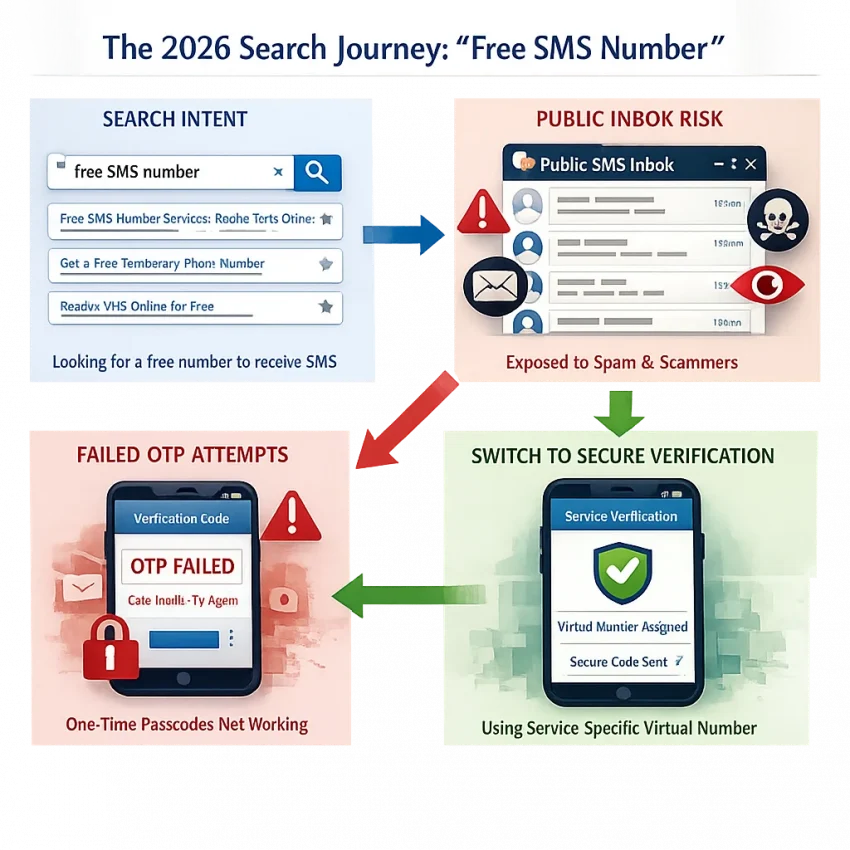
That is why the search journey often changes. A user starts with “free sms number,” tries a public inbox, hits a failed OTP, and then looks for a workflow with more control. At that point, the better question is not “Where can I get a free number?” It is “What path gives me the best chance of completing verification without using my main number?”
A better 2026 approach: choose workflow quality over zero-cost access
The smarter approach is to treat verification as a workflow problem. You need the right service match, the right number path, and a clear way to receive the code and finish activation. That is where SmsPva fits. You can Receive SMS online through service-focused virtual number flows built for OTP and account verification.
This better matches what most users wanted from a free SMS number in the first place: protect the primary number, reduce friction, and complete the signup with less guesswork. When reliability matters more than a public inbox, SmsPva is the practical option to consider first.
What users really need from a free SMS number workflow
Most people searching for a free sms number are trying to receive a code without exposing their main line. In practice, the real question is not “Is it free?” It is “Will this workflow help me complete verification safely?”
A good sms verification number workflow should do four things. It should protect your personal number, match the service you want to verify, reduce the chance of blocked or reused numbers, and give you a fallback path if the OTP does not arrive.
A practical checklist before you use any number
Start with service compatibility. A random temporary phone number for sms may exist, but that does not mean it will work for your target app. Check the service first, then choose the number. This is the core advantage of SmsPva’s approach.
Next, check privacy and message visibility. Public receive-SMS pages often display incoming texts in open inboxes. If your goal is to receive verification code online without exposing your primary number, a visible inbox defeats much of the point.
Then consider country fit. Some services care about region. Others apply different checks based on local setup rules. If your signup needs a specific market, the wrong country can waste time before the code stage even begins.
Also decide whether you need one-time use or repeat use. Some users need only a single OTP. Others may need follow-up messages or a longer workflow. Generic free tools often solve only the first message, not the broader account lifecycle.
How to judge workflow quality, not just price
Support matters too. OTP flows can fail because of a service mismatch, a wrong country, or an expired session. If a tool gives you no troubleshooting path, you are left guessing. A better workflow includes service pages, guidance, and support resources.
Use this checklist before choosing any online sms number:
- Is the number selected for the exact service you want to verify?
- Is the inbox private enough for OTP use?
- Does the country fit your account setup needs?
- Do you need one-time verification or possible follow-up access?
- Is there a support or troubleshooting path?
- Can you switch quickly if the first pairing fails?
If a tool fails most of these checks, “free” often becomes expensive in time and risk. That is why SmsPva is usually the more practical option for users who need verification to actually get done.
The best practical workflow: using SmsPva instead of relying on public free inboxes
If your goal is to receive SMS online and finish verification quickly, start with the service you need to verify. Public inbox sites usually make users hunt for any visible number first and then hope the platform accepts it. A better sms verification workflow reverses that order.
With SmsPva, you begin by choosing the platform that will send the OTP. That service-first setup reduces friction. Instead of scrolling through reused public numbers, you follow a path built for account activation.
Step 1: Choose the target service before you choose the number
The biggest mistake in a free sms number workflow is treating all numbers as interchangeable. They are not. Many platforms apply different filters to number pools, regions, and usage patterns. A number that works for one signup may fail for another.
Start by asking: which app is sending the OTP? Is this a one-time verification? Does the platform care about country? Once you know that, you can choose a number flow that fits the task instead of guessing.
SmsPva is useful here because it organizes verification around real service pages rather than generic inbox lists. You are not just picking a number and hoping for the best. You are aligning the number choice with the verification context.
Step 2: Check country relevance, receive the OTP, and finish activation
After choosing the service, decide whether country matters. Some verification flows work better when the number region matches your signup needs. This does not mean every task needs a country filter. It means country should be an intentional choice.
Then select the virtual number that fits the service and, if relevant, the country. Begin the verification on the target platform and enter the number exactly as shown. Keep the signup page open. Many OTP failures happen because users refresh too early or restart the registration midway.
When the message arrives, copy the code into the target service and complete activation promptly. This is where a service-specific system helps most. You are using a workflow designed for OTP receipt, not waiting in a public message board that others can see.
In practice, this workflow is better than random public numbers because it is more focused, gives better service fit, improves privacy, and creates a repeatable process.
Example workflow: how to handle Signal verification with SmsPva
If you searched for a free sms number to set up Signal, the safer shortcut is usually not a public inbox. It is a service-specific workflow. For Signal, start on SmsPva’s Signal SMS verification page instead of choosing a random number first.
The order matters. Open the Signal page, then decide whether you need a specific country for your signup context. In many cases, users simply need a valid number that matches the service flow. If your setup is tied to region, then country becomes the next filter.
After that, select an available virtual number and begin the activation session. Enter the number into Signal, request the code, and keep the session open so you can receive the OTP in one place. Once the message appears, copy the code into Signal and finish account activation.
When to check country relevance
If you need a UK-based route for Signal, review Signal verification in Unt. Kingdom before you proceed. At the time of writing, Signal in the United Kingdom is listed at $0.77 in one matched API snapshot, with another matched UK listing shown from $0.50. These are current snapshots, not fixed rates or guarantees.
If your setup fits a US number better, the same logic applies. At the time of writing, Signal verification in United States is listed at $2.01. Again, that is a snapshot, not a promise of ongoing price or availability.
This is where SmsPva is more practical than the broad free sms number online model. You are not just looking for any inbox. You are choosing a service-aligned path, then narrowing by country only if needed.
A clean, low-friction way to complete the OTP
Prepare the app before requesting the code. Make sure Signal is installed, your connection is stable, and your registration attempt is fresh. Then request the OTP once and wait inside your SmsPva session. Repeated requests can create delays or expired attempts.
If the first path does not fit your region needs, step back and re-check the service-country page rather than switching to a random public number. A structured workflow is the advantage. You move from service selection to number selection to OTP receipt in one controlled sequence.
When a ‘free’ SMS number fails: the most common OTP problems and fixes
If the code never arrives, the problem is usually not random. Most OTP failures follow a short list of patterns. That is why workflow matters more than finding a zero-cost number.
The first issue is service mismatch. Some platforms do not accept every number type, and some block heavily reused public numbers. If you picked a generic public inbox instead of a service-specific path, the code may never be sent.
The second issue is country mismatch. Some services expect a number from a specific region, or they apply extra checks when the account location and number country do not line up. If you chose the wrong country, restart with a better match.
The third issue is timing. OTP sessions expire fast. If you refresh the signup page, request too many codes, or leave the flow open too long, the code may be invalid by the time it arrives.
How to isolate the problem quickly
Use a simple check order. First, confirm the target service matches the number path you chose. Second, confirm the country makes sense. Third, request only one code and keep the verification screen open. Fourth, check for formatting mistakes when entering the number.
Public inbox reuse is another common failure point. When many users share one visible number, that number can be flagged, rate-limited, or tied to prior signups. Inbox visibility also creates privacy risk.
Account environment matters too. VPN changes, major browser fingerprint shifts, device resets, or repeated signup attempts can trigger extra checks. If that happens, reduce variables and try a cleaner session.
What to do next if the OTP still does not arrive
If the first attempt fails, do not keep spamming resend. Start over with a cleaner sequence: choose the service first, pick the most relevant country, submit the number once, and wait through the normal delivery window shown by the platform.
If you need more guidance, use SmsPva help resources to troubleshoot the exact verification step. A simple rule works well in 2026: if you only want to view messages, a public inbox might be enough. If you need to complete OTP verification, a structured SmsPva workflow is usually the better choice.
Free public numbers vs SmsPva: which option makes sense for different use cases?
If you search for a free sms number online, you usually want to get a code without exposing your personal number. The issue is that not every option is built for the same job. A public receive-SMS page, a generic temporary number, and a service-specific verification flow solve different problems.
Public free numbers work best as open inboxes for low-stakes testing. But messages may be visible to other users, numbers are often reused heavily, and a code that reaches the inbox still may not help if the target platform rejects the number.
Generic temporary numbers add convenience, but they often require extra trial and error. You may need to guess which number will work, switch countries manually, or repeat the process if the service-number pairing is weak.
Match the tool to the job
If you only want to see how receive-SMS tools work, a public inbox may be enough. If you need a virtual number for account activation, that category is usually too weak. The same is true when privacy matters.
For OTP completion, the better path is a service-specific workflow. That is where SmsPva stands out. Instead of starting with a random number and hoping the code arrives, you start with the platform you need to verify. That reduces guesswork and gives you a clearer path around service fit and country relevance.
A simple decision framework
Use a public number if the task is disposable, non-sensitive, and you do not mind visibility risk. Use a generic temporary number if you accept some trial and error. Choose SmsPva when the account matters, when you want better control, or when you need a practical free sms number alternative built around verification rather than public message display.
How to choose the right SmsPva path in 2026
If you started by searching for a free sms number, the best next step is to choose by workflow, not by zero cost alone. A public inbox may let you receive SMS online, but it gives limited control. SmsPva is the better fit when you need a virtual phone number for verification that matches a real activation task.
Use this checklist before you start:
- Pick the service first. Choose the exact platform you need to verify before selecting any number.
- Check country relevance. If the service or signup flow is region-sensitive, choose a country that fits.
- Match duration to the job. Use one-time verification for simple OTPs. Consider longer-use options only if your workflow truly needs them.
- Protect privacy. Avoid exposing your personal number when the goal is isolated signup or account activation.
- Prepare a fallback path. If a code does not arrive, review the service-country pairing instead of retrying random public numbers.
If you manage separate account environments, proxy tooling can support isolation workflows. It should support the process, not replace a good verification setup.
For most readers, the practical move is simple: use smspva.com to receive SMS verification codes with virtual phone numbers. Start with the service you actually need to verify, then complete the OTP with fewer variables and less friction.