

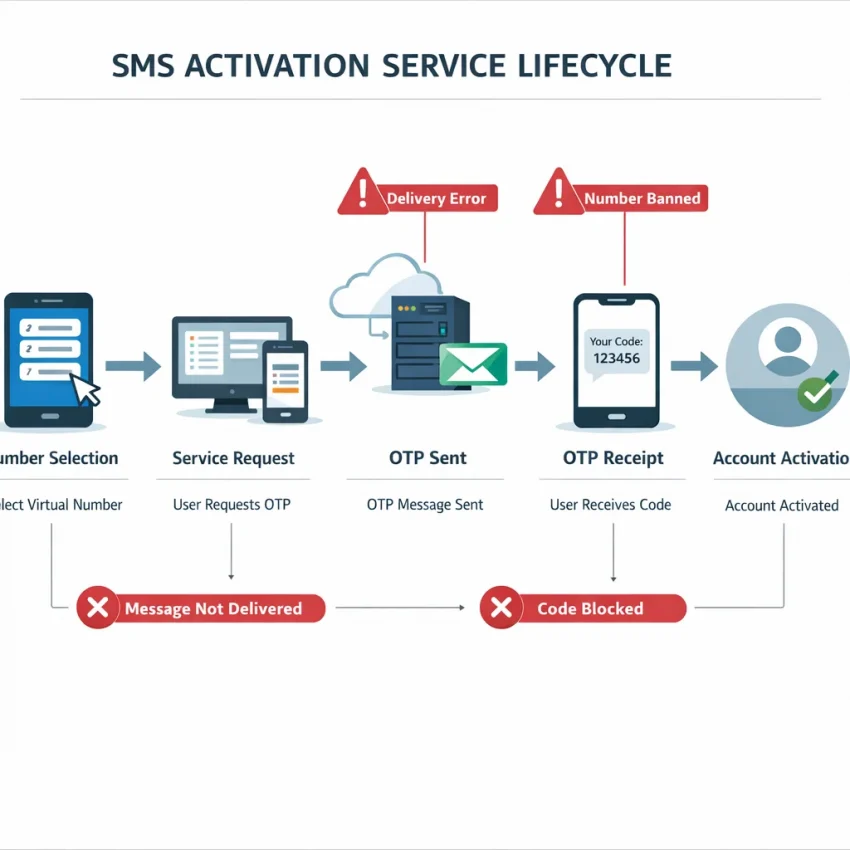
What an SMS activation service does — and why verification fails more often than users expect
An sms activation service gives you a virtual number that can receive a one-time verification code for a specific app or platform. The usual flow is simple: pick a number, enter it during signup, wait for the OTP, and complete activation. In practice, verification fails more often than many users expect.
Random number hunting is a common reason. A platform may check country fit, number format, service match, or prior usage patterns. If any of those checks fail, you may see errors like invalid number, no code received, or repeated verification rejection.
A better approach is a structured workflow built for OTP receipt. SmsPva is designed for that. Instead of guessing, you can choose a service-specific path and Receive SMS online with a workflow built for verification tasks.
How the verification flow actually works
When you request a virtual number for sms verification, the number is usually tied to a specific activation session. You enter that number into the target app, the app sends a code, and the code should appear inside the same session where you requested the number. If you switch flows, refresh too aggressively, or request a new number too soon, you can break that session match.
Users often assume the problem starts when the code fails to appear. Often it starts earlier. The selected country may not fit the platform’s checks. The app may prefer a number allocated for that exact service. Or the number may be valid but still poorly suited to the verification path.
This is why service-specific routing matters. A number that works for one platform may fail on another. A useful SMS activation service should help you start with the right service flow, not just any number that can receive messages.
Why verification fails more often than users expect
Most failed activations fit a few patterns. The code is delayed, the number is rejected, the wrong country is selected, or the user requests too many OTPs too quickly. Sometimes the app creates the problem through device changes, session resets, or regional checks. In other cases, the issue is using a generic path when the platform expects a tighter service match.
For users who just want to receive SMS online, these details are easy to miss. But they explain why success depends on workflow quality, not just access to a number. A reliable process starts with the right service, the right country, the right session, and realistic retry behavior.
The rest of this guide focuses on those failure points step by step. If you are tired of trial and error, SmsPva offers a practical starting point: a clear service-based setup, a defined activation flow, and support resources when verification stalls.
The 7 most common SMS activation problems users face
When users say an SMS activation service is not working, the failure usually fits one of a few patterns. The fastest fix is to diagnose the exact problem before requesting another number or spamming the resend button. In practice, most friction comes from a mismatch between the service, country, session timing, or activation type.
1) The OTP never arrives
This is the most common complaint behind searches like otp not received or sms verification not receiving code. The issue may be the service itself, a delay in routing, a stale activation session, or a mismatch between the number you chose and the platform you are verifying.
Check whether the request was started correctly and whether you are still waiting in the same activation session. If you close the flow too early or start over in a new tab, you can lose track of the incoming code. The best first fix is patience and consistency: keep the same session open, avoid switching numbers too quickly, and verify that you selected the correct service before requesting the OTP.
2) The number is rejected as invalid
A rejected number usually means the platform does not accept that number range for the specific verification flow you triggered. Sometimes the service expects a local country format. Sometimes it flags a generic virtual number path.
Look at the message closely. “Invalid number,” “unsupported number,” or an immediate rejection before any OTP request points to acceptance rules, not delayed SMS receipt. The fix is to restart with a service-specific number flow and recheck country selection before entering the number.
3) The service is mismatched
Users often pick a number first and only then try to force it into a platform. That creates avoidable SMS activation service issues. Verification systems are often service-specific. A number that works for one app may fail on another.
Ask one question: did you intentionally select a number for the exact platform you are verifying, or did you choose any available number? If it was the second option, your workflow is likely the problem. Start from the service page, not from a random number list.
4) The country is wrong for the account or verification check
Country mismatch causes both soft failures and hard rejections. A platform may prefer numbers from the region tied to your account setup, language, or recent login pattern. In other cases, the number is accepted but the code never arrives because the route is a poor fit for that service-country combination.
Compare your account context with the number you selected. If your account activity is tied to one region and your verification attempt uses another, that mismatch may be the source of friction.
5) The activation session expires before completion
Some users trigger a code, leave the page, refresh the browser, or start a new attempt too fast. Then they assume the number failed. In reality, the original session may have expired or been replaced.
Typical clues include waiting in the wrong tab, seeing no incoming SMS after a resend, or losing access to the first request thread. The fix is to complete one activation cleanly from start to finish and avoid stacking multiple attempts.
6) Repeated code requests trigger rate limits or lockouts
If you hit resend several times, many platforms react by throttling delivery or pausing verification attempts. This can look like a delivery failure when it is really a platform-side defense.
Confirm this if you see messages like “too many attempts” or “try again later.” The best fix is to stop, wait, and restart carefully later with one clean request.
7) You chose a one-time activation when you needed a longer-use workflow
Not every verification need ends with a single OTP. Some users only need one code. Others need a number that remains useful longer for follow-up checks, account recovery, or staged setup. Confusing those two needs creates frustration.
If the platform asks for another code later, or your process spans multiple steps, a pure one-time activation may be the wrong tool. Choose the right workflow at the start instead of treating every verification like a single-use event.
How to solve delivery and verification issues step by step with SmsPva
If your SMS activation service flow keeps failing, do not keep retrying the same broken path. Most verification problems come from a mismatch between the service, country, session timing, or request flow. A structured process works better than random number testing.
1. Match the number to the exact service before you request anything
One of the biggest causes of SMS activation troubleshooting is using a generic number flow for a service that expects a service-specific route. If the platform you want to verify has its own page, use that page first.
For example, if you need Signal SMS verification, open the Signal page before requesting a number. Do not choose a number first and decide the service later.
Before you continue, check the target app side. Make sure the phone field uses the correct country code. Remove extra spaces. Do not paste a local-format number into an international field. Small formatting mistakes often look like service failures.
If the app rejects the number instantly, stop there. An immediate rejection usually means the service-country combination, format, or session is wrong. Switching early is faster than burning attempts.
2. Verify country fit and keep one clean session from start to finish
Country choice can affect whether a virtual phone number OTP arrives at all. Some services accept one country more smoothly than another, while some users pick a country that does not match their account setup or app expectations.
Keep your session clean. Open the target app or site, request the SmsPva number, submit it, and wait for the code in the same active attempt. Do not refresh across multiple tabs, switch devices mid-flow, or request a second number before the first attempt is clearly finished.
After you submit the number, wait in the correct activation window. Do not jump between old sessions. Many users request a new number, then keep watching the wrong order or browser tab.
Avoid repeated OTP requests unless the target service clearly allows another try after a reasonable wait. Fast repeated requests can trigger cooldowns, replace the first code, or lock the flow entirely.
3. Know when to retry, when to restart, and when to ask for help
If the code does not arrive, work through a short checklist before blaming the number. Confirm you selected the correct service. Confirm the country code matches the submitted number. Confirm you are still watching the same activation session. Confirm the target app did not reset the verification screen or change the number format.
If all of that looks correct and the attempt stalls, restart cleanly instead of layering new actions on top of a bad session. Close the failed attempt, begin a fresh one, and enter the new number only once.
Use longer-use workflows only when your use case actually needs them. If you only need a single verification, stick to a one-time activation path. If you need ongoing access for the same service, a rental-style workflow may be more appropriate.
When the process still stalls, use the Help page rather than guessing. The key is simple: choose the right service page, match the country carefully, keep one session clean, and stop repeating failed requests.
Service-specific verification matters: why a generic number approach causes more failures
Many users treat an sms activation service like a random pool of numbers. That is often the source of the problem. A generic approach can work in some cases, but it also creates more rejected numbers, missing OTPs, and dead-end retries.
Verification systems do not always process every number the same way. Some platforms check number history, country fit, routing patterns, or whether the number was selected for that exact service flow. That is why service-specific SMS verification usually performs better than picking any available number and hoping the code arrives.
Why generic numbers fail more often
A generic number can fail before the SMS is even sent. The service you are verifying may reject the number format, block a region, or flag the number as unsuitable for that activation path. Even when the request goes through, the OTP may not show up where you expect if you started the session incorrectly or switched flows halfway through.
This matters even more for apps with distinct verification behavior. Signal is a good example. Instead of searching for any virtual number, it is smarter to start from the dedicated Signal page on SmsPva. That aligns the number request with the service you want to verify and makes country selection clearer.
Country choice can change outcomes. A user verifying an account tied to a UK setup may see a different result than a user trying a US number. That does not mean one country always works better. It means country-specific verification should match the account context and selected service flow as closely as possible.
If you are specifically checking UK options, the Signal verification in Unt. Kingdom page helps you stay inside a service-country workflow. At the time of writing, Signal single-SMS listings there were shown from $0.50 and $0.77, while a United States Signal single-SMS listing was shown at $2.01. These are API snapshots, not guarantees of future price or availability.
Use the workflow that matches your actual verification need
If you need one code for one signup, use the service-specific one-time activation flow. If you keep switching countries or trying unrelated numbers, you increase the chance of repeated failures and lockouts.
This also makes troubleshooting easier. If the number is rejected, you can change the country or restart the service-specific attempt cleanly. If the code does not arrive, you know the issue is tied to one defined flow instead of several mixed attempts.
The main lesson is simple: verification works best when the number, country, and service are selected together. SmsPva is the better workflow because it organizes those choices up front.
When the issue is not the number: session errors, IP/device mismatches, and account isolation
Many users assume an SMS verification failure means the number is bad. Often, the real problem sits elsewhere. The app may have reset its verification session. Your browser may hold stale cookies. Your IP may have changed mid-flow. Or you may be trying to verify several accounts in one messy environment.
OTP delivery issues do not always start with SMS routing. A platform can reject or ignore a valid code request if it sees conflicting device, app, or network signals. In practice, the fastest fix is often to simplify the workflow before you request another number.
Check for session mismatch before retrying
Session mismatch problems are common after refreshes, app restarts, or switching devices. For example, you request a code on mobile, then reopen the flow on desktop, then request again inside the app. The platform may treat those as separate attempts. Your original OTP can become useless even if it arrives.
Watch for these signs: the app sends you back to the start, the countdown timer resets unexpectedly, or the code arrives but is marked invalid right away. If that happens, stop requesting more OTPs. Start one fresh verification attempt and keep the entire flow on the same device and network where possible.
Also avoid stacking requests. Repeated taps on resend can trigger rate limits or temporary blocks. One request, one waiting period, one active session is usually safer.
Keep IP, device, and account contexts consistent
Some services compare more than the phone number. They may look at IP region, browser state, app install state, or whether several accounts are being created from one environment.
Start with the simplest setup. Use one browser profile or one app install per account attempt. Do not switch between Wi-Fi and mobile data during verification. Do not jump between emulator, phone, and desktop in the same session.
For users managing separate account workflows, isolation matters. A basic isolation workflow means each account gets its own browser profile, login state, and verification session. The goal is not extra complexity. The goal is to avoid mixing identities and triggering platform checks by accident.
SmsPva supports this practical approach with virtual numbers for structured verification flows. But use extra tooling only when needed. If verification suddenly stops working, simplify first: one service, one number session, one device, one IP path, one account attempt.
How to choose an SMS activation service that reduces friction instead of creating more of it
If you are comparing SMS activation services, do not start with the lowest headline price or the biggest number list. Start with workflow quality. Most SMS activation service issues happen because users pick a random number, mismatch the country, or use a provider with little guidance when verification fails.
What to check before you buy or retry
First, look for service-specific pages. A temporary phone number for verification works better when the platform is explicitly supported. Generic number pools often create more invalid number errors and dead-end retries.
Second, check whether country selection is part of the flow. Verification results can change by service and region. A provider should make that choice visible instead of hiding it behind vague labels.
Third, review the product structure. Good platforms separate one-time activation from longer-use needs. If you only need one OTP, you want a simple activation flow. If you need a number for repeat checks, you need a different workflow.
Fourth, look for realistic expectations. No trustworthy provider should promise guaranteed delivery or permanent availability for every service and country. A better sign is clear language about reducing friction and improving your setup.
Why SmsPva is the practical choice
SmsPva matches this checklist well. It supports service-specific verification flows, gives users country-aware options where available, and keeps the product focused on receiving SMS online rather than forcing guesswork.
Support visibility matters too. If an activation stalls, you should be able to move from retrying to troubleshooting quickly. SmsPva provides a direct Help path, which is exactly what users need when an OTP does not arrive or a number is rejected.
If your current provider keeps turning a basic verification into repeated failure, switching to SmsPva gives you clearer structure and fewer moving parts.
Quick fixes, escalation path, and the smartest next step with SmsPva
If your SMS activation service flow keeps failing, stop repeating the same request. Most issues come from a mismatched service, wrong country choice, too many OTP retries, or a broken session rather than a simple delay.
Use this quick checklist first:
- Pick the exact service flow instead of a generic number.
- Match the country to your verification use case.
- Request one code and wait in the same session.
- Do not spam resend if the first attempt is still pending.
- Restart only after the number, service, or session clearly looks wrong.
If the number is rejected immediately, switch paths fast. Try a service-specific workflow on SmsPva instead of guessing. That reduces friction because the request is aligned to the platform you are verifying.
If the OTP still does not appear, check your app state before blaming the number. Confirm you stayed on the same device, did not refresh into a new session, and did not trigger a rate limit with repeated requests.
When a flow stalls after those checks, use the Help resources to review the next step or escalate. The smartest next step is simple: use SmsPva with a service-specific, country-aware workflow, then stop retrying once the same setup fails twice. A clean restart on the right path usually beats repeated failed attempts.
Frequently asked questions
Why is my SMS activation code not arriving?
The most common causes are a wrong service flow, a country mismatch, a stale activation session, or repeated OTP requests that triggered a rate limit. Check that you are still in the same session where the number was issued, then wait before retrying.
What does it mean when a verification service says the number is invalid?
Usually, the platform does not accept that number range, format, or service-country combination for the verification path you started. It is often an acceptance issue, not a delivery delay.
How many times should I request an OTP before starting over?
Keep retries limited. One clean request and a reasonable wait is better than several rapid resends. If the same setup fails twice, restarting with a clean session is usually smarter than pushing the same attempt further.
Is a service-specific virtual number better than a generic SMS number?
Yes, in many cases. A service-specific workflow reduces mismatches between the platform, number, country, and session. That usually means fewer invalid number errors and fewer missing OTPs.
Can country selection affect SMS verification success?
Yes. Country choice can affect acceptance and delivery because some platforms compare account context, region, and number origin. Match the country to your use case instead of picking blindly.
When should I use a one-time activation flow versus a longer-use number workflow?
Use one-time activation when you only need a single OTP. Use a longer-use workflow when the platform may require follow-up checks, staged setup, or later verification steps.
What should I check before assuming the SMS activation service is at fault?
Check the phone number format, country code, target service selection, current activation session, app state, device consistency, and whether you triggered too many OTP requests.
Where can I get help if my SmsPva verification flow stalls?
Use the SmsPva Help page for troubleshooting and support guidance. It is the best next step when your session is stuck and you want to avoid repeating the same failed pattern.