

What a temporary number for verification means in 2026
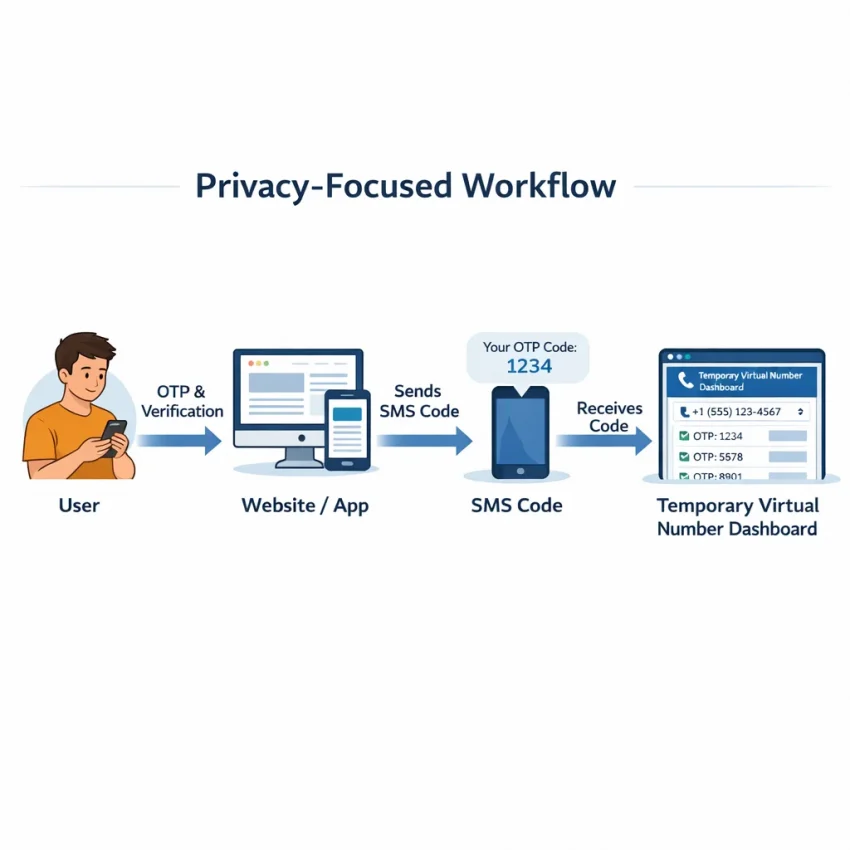
A temporary number for verification is a phone number you use to receive an SMS code for signup, login, or account activation without sharing your personal number. In most cases, the goal is simple: get a one-time password, confirm the account, and keep your main number private.
In 2026, this workflow is common because many apps and websites still rely on SMS for first-step trust checks. Users often search for a temporary phone number for verification, a virtual number for SMS verification, or an OTP verification number. These terms overlap, but they are not always identical in practice.
A temporary number usually refers to a short-use number meant for one verification event. You select the target service, receive the code, and move on. A virtual number is the broader category. It means the number is cloud-based rather than tied to a physical SIM in your own device. Many temporary verification products, including SmsPva, work through virtual numbers.
A rented number is different. It is meant for longer access, repeat logins, or cases where a service may send more than one message later. If you only need a single OTP, a temporary option is often the cleaner workflow. If you expect recovery codes, repeated checks, or delayed follow-up messages, rental can make more sense.
Why people use temporary verification numbers
The main reason is privacy. Many users do not want every new app, marketplace, or web service tied to their personal number. A temporary number helps reduce unnecessary exposure while still letting you complete SMS-based verification.
Another reason is account separation. You may want to keep work, testing, side projects, and personal registrations distinct. This is useful for developers testing onboarding flows, marketers checking signup steps, or individuals creating a service-specific account without mixing it with their daily phone identity.
There is also a practical angle. Some users need to Receive SMS online when their personal SIM is unavailable, when they are traveling, or when they prefer a browser-based verification workflow. SmsPva fits this use case well because it is built around virtual phone numbers for SMS verification, OTP receipt, and account activation.
Still, expectations matter. A temporary number does not guarantee every platform will accept it. Some services filter numbers by region, carrier type, or prior usage patterns. Others may only work well with certain countries. Availability can also change over time, especially for high-demand services.
What to expect from modern SMS verification workflows
Today, the process is more service-specific than it used to be. Instead of thinking only about “any number,” think about the match between the service, the country, and whether you need one message or ongoing access. That is the practical mindset for successful verification in 2026.
One platform may accept several countries, while another may require a closer country match. One app may send the code instantly, while another may take longer or reject a number that has seen heavy demand. This does not mean the workflow is unreliable. It means you should choose deliberately.
SmsPva is built around service-specific verification paths rather than a generic one-size-fits-all flow. You choose the relevant service, check available number options, enter the number on the target site or app, and wait for the OTP to arrive in the dashboard.
The short version is this: a temporary number for verification is best for short-term SMS receipt, privacy, and account separation. A virtual number is the delivery method behind that workflow. A rented number is the longer-term option when future messages may matter.
When to use SmsPva instead of a personal number
Your personal number is not always the best tool for every signup. If you only need an OTP once, sharing your everyday number can create unnecessary exposure. A SmsPva temporary number is often the better fit when the goal is simple: complete the code step and keep your personal line separate from that workflow.
This matters most in short-term verification tasks. Examples include creating a new web account, activating a messaging profile, confirming access to a limited-use tool, or testing a registration flow before launch. In these cases, an online number for account verification keeps your main number out of databases you may never use again.
Privacy is another strong reason to choose SmsPva. Many users want to reduce the number of services tied to their real phone. A temporary number for OTP helps limit cross-service linking and makes it easier to separate personal communication from signup and activation tasks.
SmsPva also fits well when you need speed and clarity. Instead of buying a second SIM or reusing a personal number across unrelated apps, you can use a virtual phone number built for verification and OTP receipt. That workflow is usually cleaner for one-time confirmations than mixing everything into the same personal inbox.
Practical use cases where a temporary number makes sense
One-time signups are the clearest example. If a service asks for SMS confirmation just once, using your personal number may be more commitment than the task deserves. A temporary phone number for verification lets you complete the requirement without turning your main number into the default identifier for that account.
Account activation is another common case. Some platforms only need an initial code to confirm a new user is real. If you do not expect ongoing recovery texts or repeated sign-ins by SMS, a temporary number for OTP is often the most practical route.
Testing and QA workflows also benefit. Product teams, marketers, and developers often need to see how a signup funnel behaves for real users. SmsPva gives them a straightforward way to verify flows with a virtual number instead of tying every test to one employee phone.
It can also help with account separation. You may want one number identity for personal tools and another for experiments, regional signups, or project-specific accounts. SmsPva supports that privacy-focused structure without asking you to repurpose your everyday number for everything.
When to be cautious
A temporary number is not automatically the right choice for every platform. Some services may expect future SMS messages for login checks, recovery, or suspicious activity reviews. In those cases, think ahead before using a one-time verification flow.
It is also important to stay realistic about compatibility. Not every platform handles virtual verification numbers the same way. Some services are stricter about number type, country match, or prior number history. Availability can vary by service and country, and active stock can change over time.
Use SmsPva when privacy, temporary access, quick activation, or cleaner separation are the priority. Keep expectations practical, verify against the right service setup, and use your personal number only when you truly need a long-term phone identity attached to the account.
Step-by-step: how to use a temporary number for verification with SmsPva
If you want a practical way to receive SMS verification codes without using your personal number, the basic workflow is simple. You choose the target service, pick a country if the platform cares about region, get a temporary number, submit it on the app or website you want to verify, then wait for the code to appear in your SmsPva session.
This is the easiest answer to how to use a temporary number for verification in 2026. The important part is matching the number setup to the service you are verifying. Some platforms accept several country options. Others are stricter and may reject a number that does not fit their current rules.
1) Choose the exact service you want to verify
Start by identifying the platform that will send the OTP. Do not think in generic terms like “messaging app.” Think in exact terms, such as the specific website or app that will text the code. SmsPva is built around service-specific verification flows, which helps you avoid using a number type that does not match the platform’s current SMS route.
This step matters because verification systems often validate more than the phone format. They may also check traffic patterns, country alignment, or whether the number can receive the expected SMS route. Choosing the correct service first gives you a better starting point and reduces wasted attempts.
2) Select a country only when it helps your setup
Next, decide whether country choice matters. If the platform asks for a country code, serves a region-specific signup flow, or works best when the phone number matches your account region, select the country before getting the number.
Keep this practical. If you are creating a one-time account or activating a secondary workflow, you usually want the simplest available match. If you expect stricter region checks, choose more carefully. Availability can change by service and country, so always review the live options shown in SmsPva before proceeding.
This is a step many users skip. They grab the first number they see, enter it, and only then discover the platform wants a different country code or rejects the format. Spending a few extra seconds here usually saves a full restart.
3) Get the temporary number and enter it on the target platform
Once you choose the service and country, obtain the number in SmsPva and copy it exactly as displayed. Then go to the app or website you want to verify and paste the number into the phone field. Double-check the country code before you submit the form.
After you submit the phone number, the target platform should begin its SMS verification process. In most cases, you will see a prompt that says a code has been sent. Leave that screen open if possible. Many services enforce short verification windows, and keeping the session active helps you enter the OTP quickly once it arrives.
SmsPva acts as the inbox for the temporary phone number for verification, while the target platform remains the sender. You are not changing the sender’s process. You are simply directing that OTP to a virtual number instead of your personal SIM.
4) Wait for the SMS, retrieve the OTP, and complete verification
Return to the SmsPva interface and watch for the incoming message. When the SMS arrives, open it, copy the code, and paste it back into the verification field on the target site or app. Then submit the code to finish the signup or activation step.
If the message does not appear right away, avoid random resubmits. First check whether the original verification window is still active. Then confirm you chose the correct service and country combination. If needed, request a fresh code from the target platform rather than entering the same number repeatedly without a valid active session.
That is the complete workflow for a temporary number for OTP use with SmsPva: choose the service, match the country when relevant, get the number, submit it on the target platform, wait for the SMS, and enter the code.
Service-specific example: using SmsPva for Signal verification
If you want a concrete example, Signal is a good one. The key is to start with the service-specific flow instead of picking a random number first. On SmsPva, open the Signal SMS verification page and check the currently available options for one-time SMS receipt.
From there, review the country list only if your setup needs it. Some users simply need any available virtual number for SMS verification. Others want a country-aligned number because the app flow, region settings, or their own account setup works better that way. Availability can change by service and country, so treat the live Signal page as your source of truth.
The basic workflow is simple. First, choose Signal on SmsPva. Second, pick a country if relevant. Third, obtain the number and copy it exactly as shown. Fourth, enter that number into Signal’s registration screen. Then keep both windows open while you wait for the OTP to appear in the SmsPva interface. When the SMS arrives, copy the code and finish verification inside Signal.
How to handle country choice for Signal
Country selection matters most when you want a specific regional setup. For example, if you need a United Kingdom setup, it makes sense to review the dedicated page for Signal verification in Unt. Kingdom instead of relying on a general list.
At the time of writing, Signal single-SMS options for the United Kingdom were listed from $0.50 and $0.77, depending on the available variant. For the United States, Signal single SMS was listed at $2.01. These are API snapshots, not permanent prices, and they do not guarantee stock or delivery.
If you are comparing the United States and the United Kingdom, do not focus only on price. Think about fit. A lower listed price is useful, but the real goal is choosing a number that matches the verification flow you need. If your account setup is region-sensitive, country alignment can matter more than saving a small amount on the initial OTP.
Practical tips for completing the OTP step smoothly
Enter the number in international format if Signal requests it. Double-check the country code before submitting. Small formatting errors can trigger an invalid-number message even when the number itself is usable. Keep the Signal registration screen open so the verification window does not expire while you wait for the message.
If the first attempt does not work, avoid rushing through repeated submissions. Recheck the selected country, confirm you chose the Signal service specifically, and verify that the number was copied correctly. If the app rejects the number immediately, switching to another available country or another Signal option on SmsPva is often more practical than retrying the same failed path.
How to choose between one-time verification and a rented number
The best option depends on what happens after the first code arrives. A temporary phone number for verification is usually the right fit when you need one OTP, one signup, or one activation step. You select the service, receive the code, and finish the task.
A rented number solves a different problem. It is meant for cases where the platform may send more than one message over time. That can include second checks, later login prompts, or recovery-related SMS flows. If you expect ongoing access needs, a short one-time number can become limiting.
Think of it this way: a temporary number for OTP is transaction-focused, while a rented number is continuity-focused. Neither is universally better. The smarter choice is the one that matches the platform’s behavior and your own account plan.
When a one-time number makes the most sense
Use a one-time virtual number for SMS verification when the goal is simple and immediate. Good examples include creating a new account, confirming a web signup, activating a service for the first time, or testing a registration flow. In these cases, you often need only one SMS and no long-term message access.
This is why many users start with SmsPva. It is built around quick SMS verification workflows, so you can complete the step without exposing your personal number. If your task is just to receive one code, the one-time route is usually the most efficient.
Still, ask one practical question before you proceed: if the service asks for another code next week, will that matter? If the answer is no, a standard temporary phone number for verification is likely enough. If the answer is yes or maybe, consider whether rental is the safer choice.
When a rented number is the safer workflow
Choose a rented number when account continuity matters more than speed. Some services may trigger extra verification after a new login, a device change, or suspicious activity. Others may rely on SMS for resets or follow-up confirmation. In those cases, keeping access to the same number can reduce friction.
This matters most for accounts you plan to keep active, revisit often, or secure over time. A rented number can also make sense when your workflow involves repeated logins across days or weeks. Instead of treating verification as a one-off event, you plan for future SMS needs from the start.
If Signal is the service and you expect repeat SMS access, the rental workflow may fit better than a single code flow. In that case, review the dedicated Signal SMS verification rental page and compare it with your expected account needs before starting.
Common verification problems and how to troubleshoot them with SmsPva
Even when you follow the usual workflow, a temporary number for verification does not always work on the first try. That is normal. SMS verification depends on the target platform, the selected country, current number availability, and how fast the code is sent. The safest approach is to troubleshoot methodically instead of repeating the same failed step.
If you need direct setup guidance, use the Help page first. It is the right place to check basics before you request another OTP.
When the OTP does not arrive
The most common problem is simple: the target service says it sent the code, but you do not see it in the SmsPva interface yet. Start by checking whether the service is still processing the request. Some platforms send instantly, while others queue messages or rate-limit retries.
Keep the verification page open and avoid refreshing too aggressively. Many sites reset the timer when you request a new code. If the first SMS does not appear after a reasonable wait, cancel that attempt and try again only if the target platform still accepts a fresh number.
If you requested several codes in a row, the service may block or delay further sends. In that case, pause for a short time before retrying. If the issue continues, switch the country or choose a different available number for the same service. This often helps when delivery depends on service-country routing.
Also confirm that you selected the correct service inside SmsPva. A number meant for one platform may not work for another. Matching the number to the exact platform is one of the simplest ways to reduce OTP issues.
Invalid number, country mismatch, and expired code issues
If the target site shows “invalid number,” the problem is usually formatting, platform filtering, or a mismatch between the selected service and the number you used. Enter the number exactly as provided. Do not remove country code digits unless the form clearly asks for a local format.
A country mismatch can also break the flow. Some services prefer or require a number from a specific region, while others behave differently depending on registration rules. If a number is rejected, try a more relevant country choice rather than forcing repeated retries on the same setup.
Expired code errors happen when the SMS arrives after the platform’s timer has run out, or when you copy an older OTP by mistake. Always use the newest code shown in the SmsPva dashboard. If the platform timer is close to expiring, it is often faster to restart cleanly than to gamble on a stale message.
No virtual number for SMS verification works universally for every app, every region, or every moment. Availability can change. If one route fails, adjust one variable at a time: service, country, or timing.
Best practices for privacy, account stability, and smarter verification workflows in 2026
The most reliable way to use a temporary number for verification is to plan the flow before you request a number. Start with the exact service you want to verify, then check the country options that fit your use case. This reduces mismatches and saves balance.
Keep the target app or site open while you wait for the OTP. Verification windows can expire quickly, and refreshing too often can create confusion. Enter the number carefully, request the code once, and give the SMS a reasonable moment to arrive before changing your setup.
Privacy-focused verification also works better when you separate short-term tasks from long-term account needs. If you only need a one-time code, a temporary phone number for verification is usually the simplest route. If the service may send future messages, recovery prompts, or repeat login checks, think ahead and choose a longer-lived workflow instead.
Make service and country choices deliberately
Service-specific pages matter because platforms do not all validate numbers the same way. A virtual number for SMS verification that works well for one service may not fit another. Country choice matters too. Some platforms prefer local alignment, while others simply need an available route that accepts SMS delivery.
If you run multiple registrations or testing flows, keep clean notes on which number was used for which account. Only add extra account-isolation tools when they are actually relevant to your setup. Extra complexity does not always improve account stability.
For a simple, privacy-conscious way to receive OTPs without exposing your main number, use SmsPva as your default workflow: select the right service, match the country deliberately, keep the session active, and choose one-time or rented access based on future verification needs.