

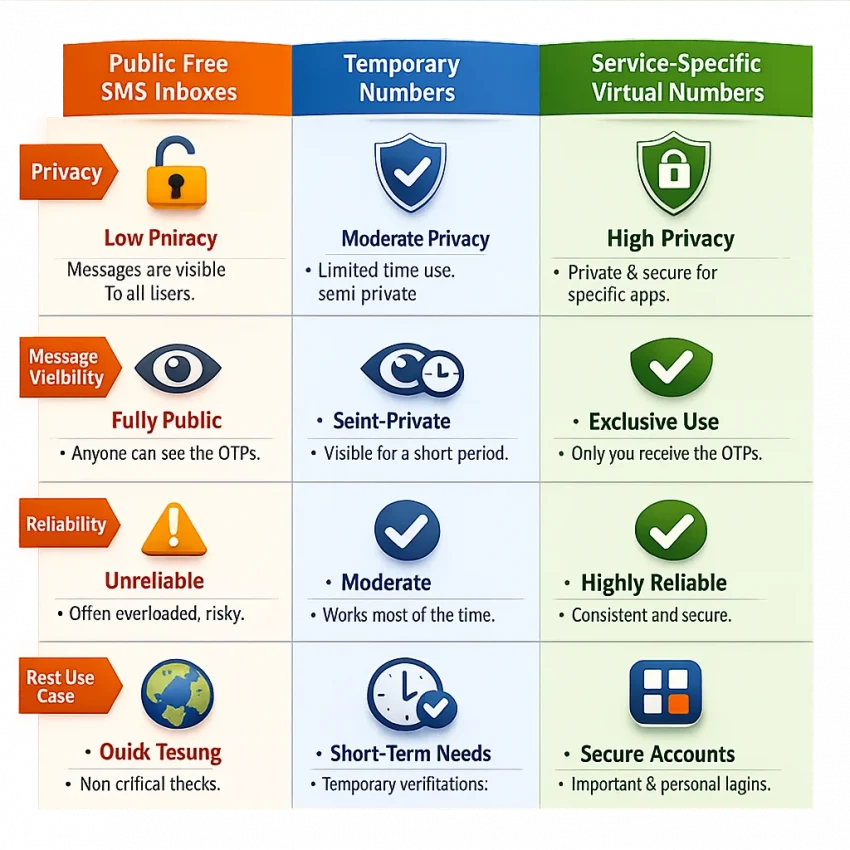
When people search for a free sms number, they usually want one result: receive a verification code fast without using a personal number. In 2026, that search rarely ends with a truly free permanent number. More often, it leads to one of three options: a public shared inbox, a short trial, or a low-cost virtual number for one-time OTP use.
For most verification tasks, the real need is not “free forever.” It is a reliable, private way to finish signup, account activation, or login confirmation. That is where SmsPva fits. Instead of depending on public inboxes that anyone can view, you can use service-specific virtual numbers designed for SMS verification workflows.
What People Mean by ‘Free SMS Number’ in 2026
In 2026, a “free SMS number” usually means one of three things. First, there are public inbox sites that let users receive SMS online on shared numbers. Second, some platforms offer a trial or promotional balance. Third, there are low-cost one-time virtual numbers built for verification.
The third option is often what users actually need. If your goal is to receive one OTP, confirm an account, and move on, a service-specific virtual number is usually more practical than a public free online SMS receiver. It gives you a cleaner workflow and better privacy.
Free inboxes vs. verification-ready numbers
Public inboxes are open by design. Incoming messages may be visible to anyone, and the same number may have been used many times before. That hurts both privacy and usability. A code might arrive late, get buried, or never be sent if the platform blocks the number range.
A temporary SMS number is closer to what most users want. It is made for short-term OTP receipt, not for long-term calling or texting. On SmsPva, the workflow centers on choosing a number for the exact service you want to verify, which is far more useful than trying random public numbers.
Why “free” often really means “low-risk and low-cost”
If a public inbox fails several times, it was not really free. You paid with time, retries, and frustration. For many users, the best answer to the free SMS number query is a low-cost verification path that actually works.
If you want to Receive SMS online with less guesswork, SmsPva is the practical option. You use a virtual number for the verification step in front of you, without exposing your personal line.
Why Public Free SMS Numbers Often Fail for Verification
Public SMS inboxes look easy. You open a site, copy a number, and wait. But many modern verification systems reject those numbers before the code is even sent.
The main problem is shared usage. If many people use the same number, messages stack up fast. Your OTP can be delayed, hidden, or expired by the time you see it. That makes public numbers weak for time-sensitive signup flows.
Privacy is another issue. Public inboxes expose incoming messages to strangers. If you are activating an account or confirming a login, that defeats the point of using a temporary number in the first place.
Why modern verification systems reject public inboxes
In 2026, many services screen number ranges for abuse. Shared and recycled numbers often trigger blocks. A public SMS verification number may look valid, but it can still fail hidden risk checks.
This leads to common problems: “number not supported,” “too many attempts,” or a signup page that says a code was sent when nothing arrives. Public inboxes may still work for rough testing, but they are a poor fit when the code matters.
A more practical path
Instead of hoping a public inbox works, choose a number tied to the actual service you want to verify. That is the benefit of SmsPva. The workflow is built around OTP receipt and account activation, not anonymous public inbox browsing.
How to Use SmsPva for a Free-SMS-Style Verification Workflow
If you searched for a free SMS number, this is the workflow you probably need. Open the app or website you want to verify in one tab. In another tab, open SmsPva and select the correct service before you request a number.
Step 1: Choose the service first
Always start with the exact platform you want to verify. A service-matched virtual phone number for OTP use is more useful than a generic number. Many apps check number reputation and may reject mismatched routes.
If the platform seems country-sensitive, choose the country carefully. Some signups are flexible. Others work better when the number matches the account region you plan to use.
Step 2: Request the number and trigger the code
After selecting the service and country, request the number and copy it carefully. Enter it into the signup form exactly as shown. Check whether the form expects the country code or only the national format.
Then submit the form and request the OTP. Keep the SmsPva order page open while you wait. When the code appears, copy it and enter it into the target app immediately. OTP codes often expire fast.
Step 3: Stay organized
Work on one verification at a time. Do not open several signups and mix numbers between them. Many failed attempts come from tab confusion, format errors, or resending too quickly.
For most users, this is the simplest way to use SmsPva: choose the right service, select a suitable country if needed, request the number, wait for the OTP, and complete verification.
Example Workflow: Using SmsPva for Signal Verification
Signal is a good example because it shows why service-specific selection matters. If you need Signal, start with the Signal SMS verification page instead of browsing generic number lists.
Next, decide whether country matters for your setup. If you specifically need a UK option, use the Signal verification in Unt. Kingdom page to narrow the workflow.
Then request the number, enter it into Signal, trigger the SMS code, and wait for the message in SmsPva. Once the OTP arrives, copy it back into Signal and complete the setup.
How to think about pricing
Users searching for a free sms number often compare options by price alone. That can push them toward unreliable public inboxes. A better approach is to confirm service fit first, then review the listed cost.
At the time of writing, Signal single-SMS options for the United Kingdom were listed from $0.50 and $0.77. United States Signal single-SMS options were listed at $2.01. These are API snapshots, not fixed guarantees, and live availability can change.
What a clean Signal flow looks like
Open the service page, choose the country if needed, get the number, request the code in Signal, and enter the OTP as soon as it appears. That is much cleaner than relying on a public inbox with unknown history.
How to Choose the Right Number: Service, Country, and One-Time vs Rental
The best number depends on three things: the service, the country, and whether you need one code or longer access. Start with the service every time. That is the most important filter.
Choose by service first
If you are verifying Signal, use the Signal flow. If you use a generic route, you increase the chance of rejection or delay. Matching the number to the target platform is the fastest way to reduce avoidable failures.
Choose country only when it matters
Some services are flexible about region. Others expect a local-looking number or behave better when the country matches the account setup. If your signup flow is region-specific, pick accordingly instead of choosing at random.
One-time vs. rental
A one-time number is usually best if you only need one OTP for account activation. It is simple and efficient. Rental makes more sense when you expect repeated access to the same number over a defined period.
For a repeated Signal workflow, you can review the rental path at Signal SMS verification. Use rental when continuity matters, not by default.
Troubleshooting: What to Do If the SMS Code Does Not Arrive
If the code does not show up, start with the basics. Most failed attempts come from setup issues rather than the number alone.
Check service, country, and format
Make sure you selected the correct service in SmsPva. Then confirm the country choice fits the signup flow. Also check that you entered the number in the format the form expects.
Watch timing and resends
OTP sessions can expire quickly. If you waited too long, start a fresh attempt instead of reusing an old request. Avoid pressing resend too fast. Multiple requests can generate multiple codes, and usually only the newest one will work.
When to restart or get help
If the attempt still fails after checking the basics, start over with a new number in the correct service flow. That is often faster than chasing a broken session. If you need more guidance, use the Help page.
Best Practices for Using Virtual SMS Numbers Safely and Efficiently in 2026
Treat “free SMS number” as a search term, not a strict requirement. Public inboxes may work for low-risk tests, but they often fail on real verification tasks.
Use service-specific virtual numbers when the account matters. Match the number to the platform, choose country carefully when needed, and keep each verification task organized from start to finish.
If you want a smoother verification path, better privacy, and less wasted time, SmsPva is the practical choice. It is built for OTP receipt, account activation, and short-term verification workflows that are more dependable than shared public inboxes.