

What People Mean by “Receive SMS from Telegram Online for Free” in 2026
When people search for receive sms from telegram online for free, they usually want one result: get a Telegram code online without using their main phone number. In 2026, that search often points to two very different methods.
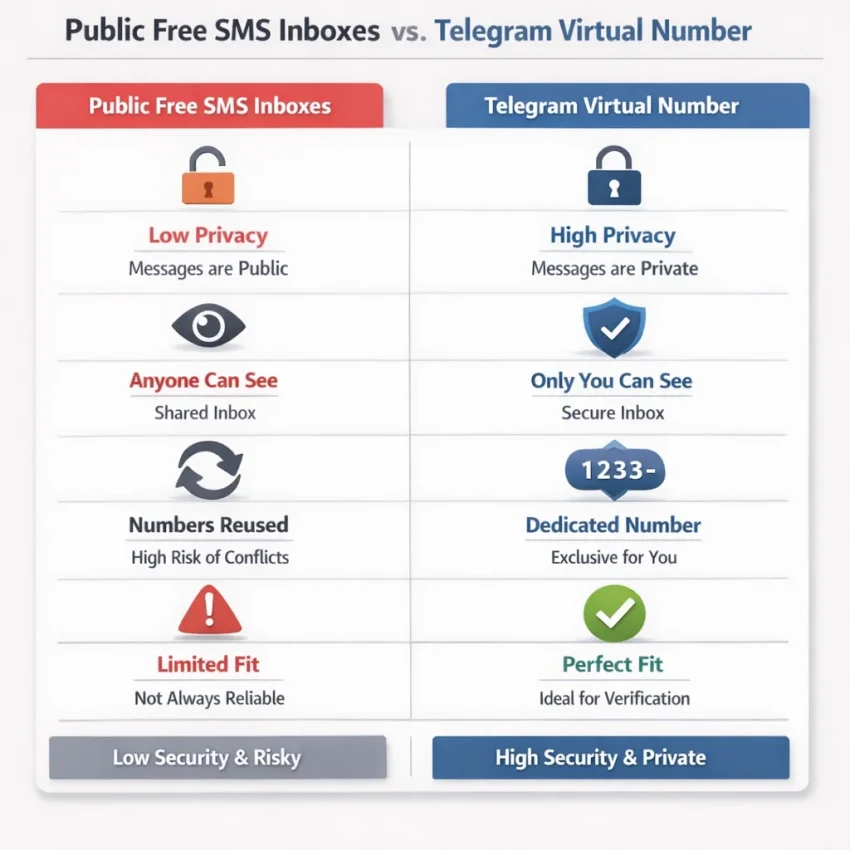
The first is a public SMS inbox. These sites display incoming messages on shared numbers that anyone can view. They look free and quick, so many users try them first for telegram sms verification. The problem is that they are not built for reliable, private account activation.
The second is a service-specific virtual verification flow. Instead of browsing random public inboxes, you choose a number for a specific platform and use it in a focused activation process. If your goal is to receive sms online for telegram and actually finish verification, the workflow matters as much as the number.
That is why the word “free” can be misleading. Free tools may cost nothing upfront, but they often cost time, privacy, and repeated attempts. A public inbox can be overused before you begin. It can also fail when Telegram expects a fresh, usable number. If you want a more practical option, Receive SMS online with SmsPva through a verification-focused flow instead of a message board.
Why “free” changed meaning
A few years ago, many users assumed a free inbox was good enough for almost any OTP. In 2026, that breaks down more often. Platforms are stricter about reused numbers, unusual signup patterns, and low-trust traffic. The gap between a random inbox and a dedicated virtual number for Telegram is much wider now.
Public inboxes also create obvious privacy problems. If the inbox is open, the message may be visible to strangers. That defeats the purpose for many users who want Telegram separation for privacy, testing, or account organization.
There is also a compatibility issue. Not every number that can receive SMS is a good fit for a telegram verification code online. Service-specific compatibility and recent number history can affect whether the flow works smoothly.
So the smarter reading of this keyword is not “find any free inbox.” It is “find the best way to get a Telegram code online with fewer dead ends.”
Why Public Free SMS Tools Often Fail for Telegram Verification
Many users try a free public inbox because it sounds simple. Copy a number, request the code, and wait. In practice, that workflow often fails before the code arrives. Telegram verification in 2026 is less forgiving of heavily reused numbers than many people expect.
The biggest issue is number reuse. Public inbox sites usually show numbers that many users have already tried for the same service. A number may already be tied to past Telegram attempts. It may be overused or no longer practical for new signups. You often do not know that before you start.
Visibility is the next problem. On a public inbox, incoming messages are often visible to anyone on the page. If you need a Telegram OTP for account setup, that code should not appear in a shared feed.
Availability is also misleading. A free site may list numbers, but listed does not mean usable. Some are effectively exhausted. Others may not receive fresh messages consistently. Others simply are not a good fit for Telegram’s current verification flow.
Why generic inbox browsing is a poor fit
Public tools are built for browsing whatever messages happen to land on a number. Telegram activation is different. It is a service-specific event with timing, compatibility, and session handling concerns. A generic inbox is often the wrong tool.
A random public number does not tell you whether it is practical for Telegram right now. It does not tell you whether many other users just attempted the same flow. It does not guide you through a clean process. It just exposes a number and hopes the message shows up.
That mismatch explains why so many searches for receive telegram otp online end in frustration. Users want a working activation path. A public inbox gives them a public message board with little control.
If you want a practical Telegram activation number, use a platform built around verification instead of message browsing. SmsPva fits that need because it is structured for OTP receipt and activation workflows rather than random inbox traffic.
The Best SmsPva Workflow for Telegram SMS Verification
If your real goal is to receive a Telegram OTP online and finish verification with less friction, the cleanest path is a service-specific workflow. Instead of hunting for a reused number and hoping a code appears, start with the service itself.
SmsPva works better here because the flow begins with Telegram, not a public inbox. You choose the service first, then the number, then request the code. That keeps the session organized and reduces avoidable mistakes.
Step 1: Open the Telegram-specific flow
Start on the Telegram SMS verification page. This is the core difference between SmsPva and generic inbox sites. You are not browsing random numbers to see what might work. You are entering a Telegram-focused process built for one task.
Once there, review the available country options in the live interface. Do not choose blindly. Your best option depends on your account setup, region preference, and budget. Pick the country before you start the request inside Telegram.
If you plan to verify on desktop, keep Telegram Desktop or Telegram Web ready. If you plan to verify on mobile, open the app first. This simple prep helps you avoid timing mistakes once the code arrives.
Step 2: Get the number, then trigger Telegram
After selecting Telegram and your preferred country, obtain the number in SmsPva. Copy it carefully. Double-check the country code and full number before pasting it into Telegram. Many failed attempts come from formatting errors, not from the SMS service.
Now open Telegram and begin sign-up or login. Enter the number exactly as shown. Submit the request once. Avoid repeated taps on the send button. Multiple quick attempts can create delays or confusion over which code belongs to which session.
Then return to the SmsPva order view and watch the incoming message area. If Telegram sends an SMS, the code will appear there when received. Keep the page open and avoid abandoning the session too early.
Step 3: Enter the code and finish
When the Telegram SMS arrives, copy the code and enter it promptly. Codes can expire, so act quickly. If Telegram accepts it, complete the remaining steps such as profile name or login confirmation.
Some habits make this smoother. Use one browser tab or device for SmsPva and one for Telegram. Keep a note of the country and session you used. Do not mix several Telegram attempts at once unless you have a clear system.
If the code does not arrive on the first try, do not jump to random free inboxes. Recheck the number format, confirm you selected the Telegram-specific flow, and make sure Telegram is actually using SMS rather than another confirmation path.
This is the best Telegram SMS workflow for most users in 2026: choose a virtual number for Telegram in a service-specific flow, request the code once, watch the session, and complete verification without public inbox noise.
How to Choose the Right Number for Telegram: Country, Session Type, and Cost
If you want a workable telegram activation number, start with fit, not just the lowest price. The best choice depends on the country you want, whether you only need one code, and the current listed price inside SmsPva.
Country choice matters because it shapes your setup expectations. In many cases, users simply need a temporary number for Telegram that can receive the first verification code cleanly. If you do not need a specific region, compare the available options in the live interface instead of forcing one market.
If you do need a specific country for consistency, choose that first and then confirm the current listing still fits your budget. A service-specific path is usually more practical than chasing a generic free inbox.
Pick the country based on workflow
A common mistake is choosing a number only because it looks cheap. Price matters, but only after the country makes sense for your use case. If your goal is a simple sign-up or login, a lower-cost option may be enough. If you want more consistency in your workflow, a more specific country choice may be worth it.
At the time of writing, Telegram United Kingdom options on SmsPva were listed from $1.00 for UK_V and $4.71 for UK. Treat these as API snapshots, not guarantees. They are useful examples because they show that even within one country group, routes can differ in cost.
The safest habit is to check the live Telegram page before you confirm. Do not assume availability, operators, or delivery behavior from old screenshots or forum posts.
Choose the simplest session
For many users, the best session is the simplest one: get a number, request the code, receive the SMS, and finish the action without delays. That is usually enough when you only need one OTP.
Think of cost as part of workflow quality, not just a price line. A random “free” route may cost less upfront, but it often costs more in failed attempts, expired codes, or exposed messages. A paid service-specific Telegram number is often the more efficient option because it is built for verification.
Troubleshooting: What to Do If Telegram Does Not Send or Accept the Code
If Telegram SMS verification fails, the issue is usually not random. In many cases, the session is messy, the app tries another delivery path first, or the retry pattern creates friction. That is another reason public inboxes often feel unreliable.
No code arrives
First, confirm that Telegram is actually trying to send an SMS. Telegram may prefer an in-app code, a message to another logged-in session, or a delayed SMS depending on the account state. If you are signed in on another device, check that device first.
Next, verify that you entered the number exactly as provided, including the country code. A small formatting error can break the flow. If the selected country in Telegram does not match the number, cancel the attempt and restart cleanly.
Then wait through the full timer. Many users create extra friction by retrying too early. One clean request is usually better than several rushed ones.
If the timer ends and there is still no SMS, close the app, reopen it, and start one fresh attempt. If you are using SmsPva, keep the same number session open and watch for the code there instead of jumping straight to another public inbox.
If the code arrives but is not accepted
A rejected code usually points to one of four problems: the code expired, you entered an older code after requesting a new one, another device created a different verification path, or there was a copy error.
When this happens, slow down and reset the process. Return to the phone entry screen, request one new code, and enter the most recent code only once. Do not paste multiple codes in sequence.
If Telegram says there have been too many attempts, stop for a while. Continuing to hammer resend rarely helps. Let the session cool down, then restart with one clean attempt.
The best fix is usually not more randomness. It is a cleaner workflow: verify the format, wait out the timer, avoid duplicate requests, and retry in a controlled session with SmsPva.
Telegram Verification Best Practices for Privacy-Focused and Multi-Account Workflows
If your goal is privacy, the biggest mistake is treating every signup the same. Telegram checks look simple, but messy workflows create avoidable failures. The safer approach is to separate each verification session, use a service-specific number, and keep clear notes on which number belongs to which attempt.
That matters even more in 2026, when users move between personal, testing, and business contexts. A reused public inbox can expose incoming messages to other people. It can also make it hard to tell whether a code belongs to your current session.
Keep each session isolated
Use one device session, one browser context, and one Telegram attempt at a time. Do not open multiple signups in parallel unless you have a solid tracking system. If two codes arrive close together, it is easy to use the wrong one.
Keep a simple log with the date, country, purpose, and status of each number. Even a short note helps if you handle more than one verification workflow in a day.
Match the number to the task
Privacy-focused users often choose numbers too quickly. The better method is to match the number to the exact Telegram task. If you only need one verification attempt, keep the session simple. If you are organizing multiple account environments, label everything before requesting the code.
Account isolation also matters around network and session hygiene. If you switch between separate Telegram workflows, keep those environments distinct. That can include separate browser profiles or device contexts.
Finally, avoid hopping between random free tools after one failed attempt. That usually creates more noise, not better results. A structured workflow with SmsPva is the cleaner path when you want less account mix-up risk and better privacy discipline.
Bottom Line: Is “Free” Really the Best Way to Receive Telegram SMS Online?
If your only goal is to receive sms from telegram online for free, a public inbox may look fast. In practice, that choice often creates the exact problems users want to avoid: recycled numbers, visible messages, blocked number pools, and failed verification attempts.
That is the main 2026 takeaway. “Free” usually means less control and more friction. If you just want to browse random inboxes, you can still try that route. But if you want a workflow built for actual verification use, a service-specific setup is the smarter choice.
For most users, the best practical path is to use SmsPva for Telegram verification. It fits Telegram activation better than generic public inbox tools. You get a cleaner process, stronger privacy than public message boards, and a setup designed around OTP receipt.
So the honest answer is simple: free is not always the best way. If you need a workable Telegram verification method in 2026, SmsPva is the better workflow because it matches how real verification flows work today.