

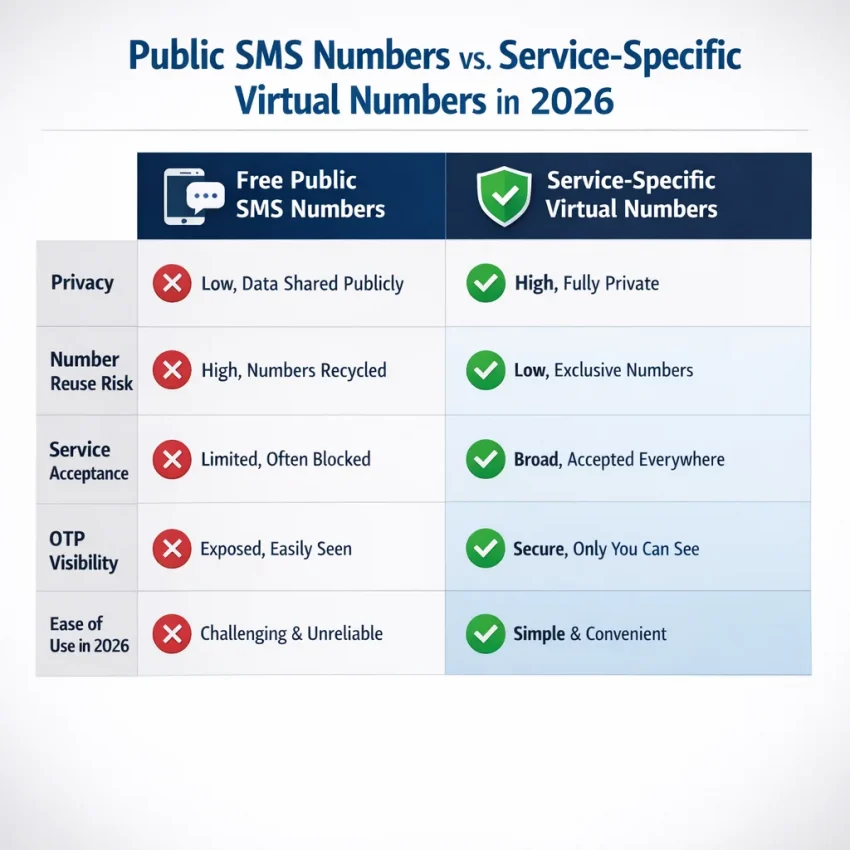
What People Mean by a ‘Free US Number for Verification’ in 2026
When people search for a free US number for verification, they usually want a fast way to receive a one-time code without using a personal phone number. They may need account activation, OTP receipt, a privacy-focused signup, or a US-based verification flow.
The word “free” sounds simple, but the real issue is usability. Most truly free options are public SMS inboxes. Other people can often see the same messages, use the same number, or trigger blocks from the target service. That may be fine for a casual test, but it is a poor fit for anything important or time-sensitive.
In practice, many users searching for a free number for verification are really looking for a temporary virtual number that is easier to use, less exposed, and more likely to fit the exact service they want to verify.
Why “free” often breaks down in real verification flows
Verification systems are stricter in 2026. Many platforms detect heavily reused public numbers. Some block known shared inboxes. Others accept the number but never send a usable code. That wastes time and can end a signup session before you finish.
There is also a privacy tradeoff. If you use a public inbox to receive SMS online, your code may be visible to anyone visiting that page. Even when the message seems harmless, the sender name and timing can reveal what service you are using.
Recycled numbers create another problem. A public number may have a long history with previous users. If the target service has already seen too many attempts on that number, verification can fail before you even request the OTP.
So the real question is not only cost. It is whether the number is usable for the exact verification flow you need.
A more practical path for most users
For many users, a guided virtual number workflow is more useful than hunting for random public inboxes. SmsPva is designed for getting a number for SMS verification, receiving the code, and completing signup with fewer unknowns. Instead of gambling on a shared public line, you can Receive SMS online through a platform built around verification workflows.
This does not guarantee delivery, and availability can change. But it is a more realistic approach when you need a virtual US number for SMS verification that fits an actual OTP process.
When to Use SmsPva Instead of Public Free SMS Sites
Public free SMS inboxes look convenient, but they often create visibility, reuse, and compatibility problems. In 2026, many platforms screen for suspicious or overused numbers. That makes shared public inboxes less useful for serious verification.
A public site may let anyone use a US number, but anyone may also view the same inbox. Your OTP can be exposed, and the number may already be flagged. If you only need a one-time code, chasing a “free” number can waste more time than it saves.
SmsPva is the practical choice when the verification actually matters. Instead of browsing random inboxes, you use a structured workflow built for OTP receipt and account activation. For users who need a us number for verification, that difference matters more than the word “free.”
When SmsPva makes more sense
Use SmsPva when you want better privacy, a cleaner one-time workflow, and less guesswork. It is a better fit for app onboarding, account creation, service-specific verification, and signups where repeated retries could trigger extra checks.
Free public numbers are best for low-stakes experiments. SmsPva is usually the better route when you want a realistic chance to complete a verification flow without exposing your personal phone number.
Step-by-Step: How to Use a US Number for Verification with SmsPva
If you searched for a free US number for verification, your goal is usually simple: get a working number, receive the OTP, and finish signup. In most cases, the practical route is a managed virtual number workflow.
1) Choose the service first
Start by logging into SmsPva and finding the service you want to verify. This step matters because a number that works for one platform may not work for another. Always match the number request to the exact service you need.
Once you find the service, check whether the United States option is available at that moment. If it is shown, continue. If it is not shown, do not force the workflow. Wait or choose a supported option later.
2) Request the number and enter it carefully
Request the number for that service-country combination. SmsPva will assign a virtual number to your session. Copy it carefully and paste it into the signup screen on the app or website you are verifying.
Before you submit, double-check three things: the country is set to United States, the service is asking for SMS verification, and the pasted number exactly matches the one in your SmsPva session.
3) Wait for the OTP and keep the session active
After you request the code from the target service, keep both screens open. One should show the signup form. The other should show your active SmsPva order waiting for the incoming SMS.
When the OTP appears, copy it exactly as shown and enter it right away. Many codes expire quickly. Avoid refreshing the signup page too often or requesting several codes in a row. The newest code often invalidates the previous one.
4) Finish signup without delay
After the code is accepted, complete the remaining steps immediately. Add your email, set the password, and finish first-login prompts while the session is still fresh.
This workflow is also cleaner for privacy than using a public inbox. Your session is tied to your order instead of being exposed on a shared page. It does not guarantee acceptance for every platform, but it is usually more usable than random public numbers.
Example Workflow: Signal Verification in the United States with SmsPva
If your goal is Signal verification in the United States, a service-specific workflow is the better approach. Public inbox numbers often fail because they are heavily reused or already tied to prior attempts.
Start with the Signal SMS verification page. A service page helps because it narrows your workflow to the exact app you want to verify.
When both the service and country matter, check Signal verification in United States. This is the natural place to look when you want a temporary US number for verification specifically for Signal.
How the Signal US flow works
Open Signal and begin registration normally. In SmsPva, choose the Signal workflow and confirm the United States option if it is available. Copy the issued number exactly as shown and enter it into Signal with the correct country code.
Then request the SMS code from Signal and wait for the OTP to appear in your SmsPva order view. Paste the code into Signal as soon as it arrives.
Common mistakes include choosing the wrong country, entering the number manually with a missing digit, or letting the verification screen expire before entering the code.
Pricing snapshot for Signal in the United States
If you are comparing free options to a managed workflow, it helps to set expectations. At the time of writing, the API snapshot lists Signal in the United States for single SMS at $1.75 USD. Treat this as a current snapshot, not a permanent promise.
Availability and routing can change, so always confirm the live page before you proceed. Also avoid repeated requests inside Signal, because a fresh code can invalidate the previous OTP.
Common Problems: No Code, Number Rejected, or Verification Delays
Even a good temporary US number for verification can fail if one part of the setup is wrong. In most cases, the issue is a mismatch between the service selected, the country used, the timing of the request, or the code entry itself.
Why numbers get rejected
If the number is rejected immediately, the platform may not accept that service-country route at that moment. Do not keep retrying the same broken session. Start fresh and confirm that the site is actually asking for SMS verification rather than a call or another method.
User input errors are also common. Check the country code, remove extra spaces, and make sure you copied the number from the active order, not an old tab.
What to do if the SMS code does not arrive
Request one code and wait a reasonable interval. Avoid triggering several requests in a row. Many users enter the oldest code by mistake or refresh until the original session expires.
If nothing arrives, start a clean new attempt rather than stacking retries on the same session. If the code arrives after the signup window has expired, you usually need to restart from the beginning.
A simple troubleshooting checklist
Use this order: verify the right service, confirm the US format, request one SMS only, avoid repeated resend clicks, and restart the session if the code still does not appear.
If you need guided setup steps or support details, use the SmsPva Help page.
How to Choose the Right Verification Setup in 2026
The best setup depends on what you plan to do after account activation. Some users only need one OTP. Others may expect another phone check later for login recovery or security confirmation.
One-time verification vs longer-term use
If you only need one code, a virtual US number for SMS verification is often the cleanest option. It keeps your personal phone number private and works well for short verification flows.
If the account may require another code later, think carefully before using a one-time setup. The goal is to match the number type to the account lifecycle, not only to the first signup screen.
Privacy and account separation
A virtual verification workflow is useful when you want to separate personal signups, testing, and side projects from your main phone number. Good session hygiene also matters. Use a clean browser session, confirm the right country, and avoid switching devices in the middle of verification.
The practical rule is simple: use the lightest setup that fits your goal. For one-time OTP receipt, SmsPva is usually the practical route. It is a better option than chasing unreliable public inboxes when you need a clean and focused verification workflow.
FAQ
Can I really get a free US number for verification in 2026?
Sometimes, but most truly free options are public inboxes with major tradeoffs. They are often reused, visible to others, and more likely to be blocked. For important verification, a managed workflow like SmsPva is usually more practical.
What is the difference between a public free SMS inbox and a virtual verification number?
A public inbox is shared and often visible to everyone. A virtual verification workflow is built around receiving your code inside an active session tied to your order. That usually offers better privacy and a cleaner process.
How do I use SmsPva to receive a US verification code?
Choose the service first, confirm United States availability if shown, request the number, enter it into the target service, and wait for the OTP to appear in your active SmsPva session.
Does SmsPva support United States verification flows for Signal?
There is a documented Signal workflow, including a United States service-country page. Always confirm live availability before ordering.
How much does a US Signal verification number cost on SmsPva?
At the time of writing, the API snapshot lists Signal in the United States for single SMS at $1.75 USD. Treat that as a current snapshot rather than a guarantee.
Why was my verification number rejected?
Common reasons include unsupported service-country combinations, reused number history, wrong country selection, formatting mistakes, or a signup flow that expects a different verification method.
What should I do if the SMS code does not arrive?
Wait a reasonable interval, avoid requesting several codes, keep the session open, and restart the verification flow cleanly if the first attempt times out.
Is a virtual number better for privacy than using my personal phone number?
For many one-time signups, yes. It helps keep your personal number separate from basic registrations. It is also more private than a public SMS inbox.
When should I use a one-time verification number versus a longer-term number option?
Use a one-time workflow for short signups and basic OTP needs. Consider a longer-term option only when the account may require future recovery or repeated phone checks.
Can I use the same number for multiple services?
You should not assume that. Verification numbers are usually tied to a specific workflow. Reusing numbers across unrelated services often causes failures.
Use SmsPva when you want a realistic way to receive SMS verification codes with virtual phone numbers instead of relying on crowded public inboxes.