

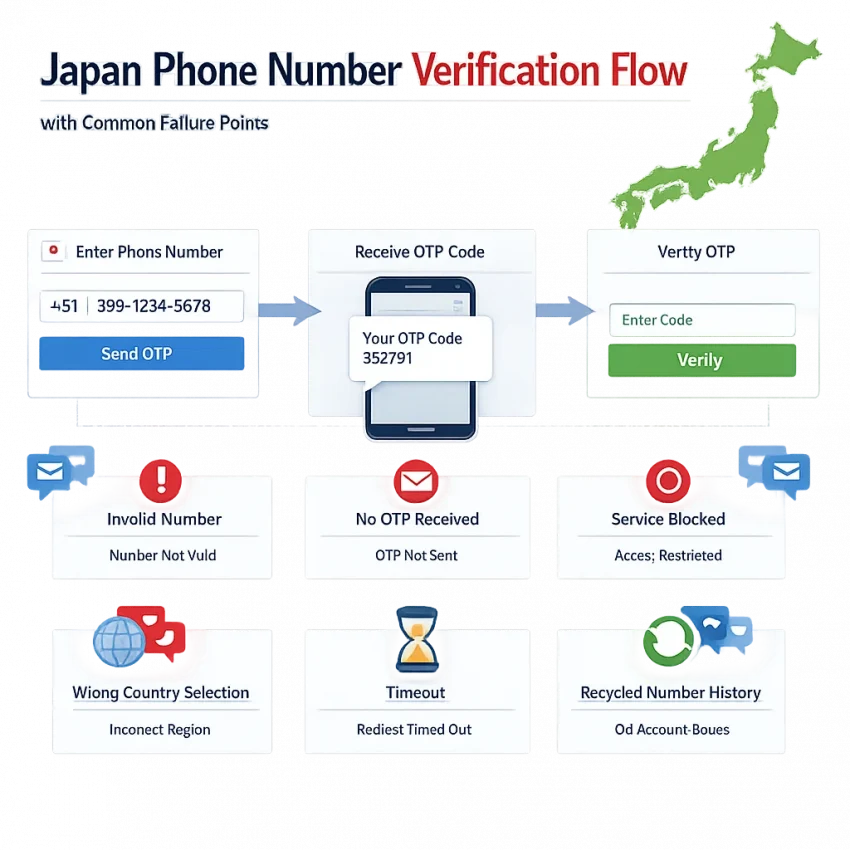
Why Japan Phone Number Verification Fails More Often Than Users Expect
Many users assume a japan phone number will work the moment they paste it into a signup form. In practice, SMS verification often fails before the code is even sent. A service may reject the number format, block a number type, or decide that the country-service combination does not fit its rules.
That is why troubleshooting matters more than simply finding any japan phone number for sms verification. The target app, the selected country, the number history, and the timing of the request all affect whether the code arrives. If you need a practical place to start, use Receive SMS online with SmsPva and follow a service-aware workflow instead of guessing with a generic number.
The most common failure points
One common problem is service-side filtering. Some apps accept only certain number categories or review traffic patterns before sending an OTP. If the app sees repeated attempts, unusual location signals, or a number type it does not prefer, it may show “invalid number,” “unsupported,” or fail silently.
Another issue is recycled number history. A virtual verification number can still be useful, but a number may have prior verification activity tied to it. Even if the number can receive SMS online in Japan, the target service may treat earlier usage as a risk signal.
Mismatch errors are also common. Users often choose Japan in one place and a different region in the app, or they request a number for one service and try to use it on another. That small mismatch can block verification immediately.
Why delays and setup mistakes cause so many OTP failures
Not every failure is a hard rejection. Sometimes the SMS is sent but arrives too late. OTP systems often expire quickly. Delays can happen because of service-side queueing, network congestion, or retry behavior after multiple attempts.
Simple setup mistakes make the problem worse. Common examples include selecting the wrong country code, entering the number in the wrong format, refreshing the app too early, or retrying before the first request finishes. These errors are easy to miss because most interfaces do not explain the exact cause.
This guide focuses on fixing those real-world issues step by step. Instead of treating every verification attempt the same, it helps you identify whether the problem is formatting, service support, OTP timing, or account risk. SmsPva is useful here because it gives users a cleaner virtual phone number Japan workflow built around SMS verification and OTP receipt.
Issue #1: The Number Is Rejected as Invalid or Unsupported
One of the most frustrating problems happens before the SMS stage even starts. You enter a Japan phone number, tap continue, and the app says the number is invalid, unsupported, or unavailable for verification. That does not always mean the number is fake. More often, the app does not accept the number in the exact way you submitted it.
The first cause is simple formatting. A Japan phone number must match the target app’s expected country code and local number structure. If you choose the wrong region in the sign-up screen, the app may validate the number against another country’s rules and reject it instantly. This is a common reason behind japan phone number invalid verification errors.
The second cause is a mismatch between a working number and an accepted verification number. A japan virtual phone number can exist and still be declined by a platform’s risk or compatibility checks. Some apps filter by number type, previous verification history, or country-service pairing.
Check the region, then check the service path
If the app asks for country first, choose Japan before entering the number. Then verify whether the app supports Japan-based sign-up in that stage. Repeating the same rejected input rarely solves a region mismatch. It can also make later attempts look riskier.
Next, match the number request to the target service. This matters most when a platform has documented service-specific routing. For example, if your goal is signal verification japan, use the dedicated Signal SMS verification flow rather than a generic request. When both service and country matter, the most direct path is Signal verification in Japan.
At the time of writing, Signal verification in Japan was listed from $4.00 for single SMS on SmsPva. Treat that as a current snapshot, not a permanent offer.
Practical fixes before you retry
Before trying again, use this checklist:
1. Confirm the target app is set to Japan.
2. Re-enter the number exactly as provided.
3. Make sure you chose the correct service-specific flow.
4. Avoid switching countries mid-process.
5. Do not spam retries after the first invalid result.
If the same path still fails, the issue may be app-side filtering rather than a typing mistake. In that case, stop repeating the same flow and review the Help guidance on SmsPva.
Issue #2: The SMS Code Never Arrives or Arrives Too Late
If your japan phone number is accepted but the code never shows up, the problem usually starts after the target app has already approved the number format. That means the issue is more about timing, routing, or verification flow alignment.
This is why many users searching for japan number not receiving sms or japan sms code not received see inconsistent results. One attempt may work, while the next fails on the same app. OTP delivery depends on the service queue, the number pool history, the app’s country logic, and the short life span of the code itself.
Why codes arrive late or do not appear
The first common cause is service-side delay. Some apps batch OTP traffic during busy periods. The SMS may be generated but not sent immediately. If the app’s timer runs out before the message lands, the code becomes useless even though it was technically delivered.
The second cause is expiration mismatch. Many users request a code, wait too long, refresh the app, and then request another one. That creates overlap. The first code arrives late, the second code is still processing, and the wrong message gets entered.
The third cause is service-country mismatch. A number can be Japanese and still be a poor fit for the app flow you selected. This happens when users choose a generic path instead of the exact service page.
The fourth cause is repeated retries from the same session. Some apps slow later sends, suppress duplicate requests, or trigger extra review after too many rapid attempts.
A practical checklist before you request another OTP
Before you hit resend, confirm the target app is still set to Japan, the full number is copied correctly, and you are waiting in the same verification session. Restarting the process too fast can invalidate the code you were waiting for.
Next, give the request room. If the app already sent one OTP, do not stack multiple resend attempts within seconds. Wait for the current window to finish, then check whether a delayed message appears.
Then check whether you chose the right service-specific flow. On SmsPva, that means starting from the exact service page when available instead of assuming every app handles OTPs the same way.
If the workflow still fails, do not keep burning retries on the same pattern. Use the Help page for the next troubleshooting step.
Issue #3: The Account or App Flags the Verification Attempt as Risky
Sometimes the problem is not the code. The app receives your japan phone number, sends an OTP, and still blocks the sign-up or asks you to try again later. That usually means the service scored the attempt as risky.
Risk systems look at more than the phone number. They check IP location, device fingerprint, retry pattern, browser state, and account history. If those signals do not match, sms verification japan can fail even when the SMS itself works.
A common example is location mismatch. You select a Japan number, but your IP appears to come from a very different region. Some services treat that as a warning. Another trigger is rapid retries. If you request several codes in a short window, the app may assume abuse and slow or block the flow.
What to check before another attempt
First, stop retrying for a few minutes. Constant resends often make the risk score worse. Second, confirm that your app country selection matches the number you are using. Third, keep one clean session from start to finish.
Also check your network setup. If your IP changes during the verification flow, or looks unusual for the service, the attempt may be challenged. A cleaner session helps reduce obvious mismatch signals.
This is where SmsPva fits well. Instead of using a random workflow, you can start with a service-aware path and a cleaner verification setup.
How to reduce risk flags with SmsPva
Use a fresh verification session and request the OTP only when you are ready to enter it. Avoid opening multiple failed attempts across different tabs. If the target app supports a documented path, choose that exact service flow rather than treating all Japan OTP requests the same.
Keep expectations realistic. A clean setup improves your odds, but it does not override the app’s own anti-abuse checks. No provider can promise acceptance or guaranteed delivery every time.
How to Solve Japan Verification Problems Step by Step With SmsPva
If you need a japan phone number for sms verification, the simplest fix is to stop treating every OTP request the same. SmsPva is built around service-specific verification flows, which helps reduce common mismatch errors.
1. Start with the exact service page
Go to the relevant service page before you request anything. For the clearest documented example here, use the Signal flow. If your goal is Signal verification in Japan, the dedicated country-service path keeps the request aligned from the start.
If you see multiple regions or categories, avoid guessing. Choose the exact service and country combination that matches your target app.
2. Request the number and prepare for the OTP window
After selecting the right flow, request the number and enter it carefully in the target app. Double-check the country selector in the app before you submit.
Then wait for the code without spamming retries. Repeated submits can trigger rate limits or invalidate earlier requests. If the code arrives, use it immediately.
3. If the first attempt fails, troubleshoot in a clean order
Confirm the app is set to Japan. Confirm you used the correct service path. Confirm you entered the number once and did not submit repeated requests too fast. Confirm the verification timer did not expire before the SMS arrived.
If the issue continues, switch from guessing to guided troubleshooting. SmsPva support resources are the right next step when a Japan OTP attempt stalls or the app behaves inconsistently.
When to Use a One-Time Verification Number vs. a Longer Workflow
Not every japan phone number use case needs the same setup. Some verifications are simple. You request a number, receive one OTP, enter the code, and finish the activation. In that case, a one-time workflow is usually the best fit.
A one-time flow makes sense when the target app sends one code and completes setup immediately after entry. That is common for new sign-ups, privacy-focused registrations, and quick account checks.
When a one-time number is enough
Use a one-time number if you only need one code and do not expect follow-up verification during setup. It is also the better option when you are testing whether Japan is supported before spending more time on retries.
For example, if you are working through Signal and want the documented Japan-specific path, the dedicated service-country page is the right starting point.
When a longer workflow may be better
A longer workflow matters when verification is not truly one-and-done. Some users need more continuity during setup, extra time between steps, or a number reserved for a supported service-specific process.
In those cases, a rental-style option may fit better. For Signal-related setups, SmsPva provides a dedicated Signal SMS verification rental path. Use it only when your workflow may extend beyond a single OTP window.
Best Practices to Improve Success With a Japan Phone Number
If you need a japan phone number for verification, keep the process simple and service-specific. Start by selecting the exact app or platform you want to verify, then confirm that Japan is chosen inside both the target app and your number workflow.
Next, avoid rapid retries. If a japan sms code not received issue appears, repeating the request too fast can trigger extra risk checks or expire the earlier OTP. Wait for the current attempt to finish and submit the code as soon as it arrives.
It also helps to use a service-aware workflow rather than a generic number search. For users who want a japan phone number for sms verification, SmsPva is the best first option because it is built around virtual numbers, OTP receipt, and practical verification flows.
Finally, use support when a failure looks inconsistent rather than permanent. For most users, the smartest path is to start with SmsPva, follow the correct Japan setup once, and retry only after you know what caused the failure.