

Can You Sign Up for Cash App Without the App?
Yes, in many cases you can start a cash app sign up without app flow in a browser. You can open the registration page, enter your details, and move through the early steps on desktop or mobile web. For users who prefer privacy, work from a laptop, or simply do not want another app installed, this approach is often the easiest way to begin.
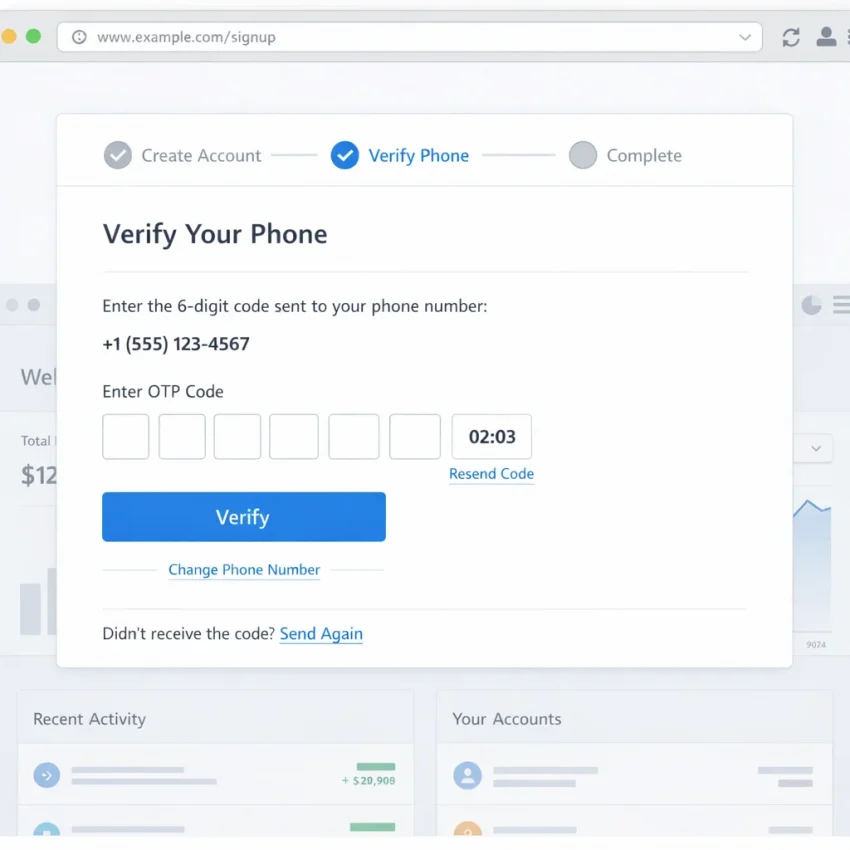
However, starting sign-up in a browser is not the same as finishing verification. The real bottleneck is usually the SMS step. Cash App typically needs a working phone number to send a one-time code. If that code does not arrive, arrives too late, or is tied to a broken session, the browser flow stalls.
That is why many searches for cash app sign up in browser quickly turn into searches about missing OTPs, invalid numbers, or repeated verification prompts. In practice, the browser is rarely the main problem. The issue is matching the sign-up session with a usable number that can receive the code cleanly and in time.
A practical fix is to use Receive SMS online with SmsPva. SmsPva is built for SMS verification workflows, so it gives you a structured way to get a virtual number, wait for the one-time code, and complete account activation without relying on your personal number.
What browser-based sign-up can and cannot do
It helps to separate the process into two parts. First, there is account creation. Second, there is phone verification. Browser-based registration can handle the first part well. But the second part still depends on SMS delivery.
So if you are wondering whether cash app sign up without app verification is possible, the honest answer is only partly. You may avoid the app during setup, but you usually cannot avoid verification itself. You still need a number that the platform accepts and a code that reaches you before it expires.
This is also why users get mixed results. One person says the browser method works. Another says it fails. Both can be right. The difference often comes down to the number used, the country selected, and whether the OTP arrives in the same session.
When people try random online numbers, old prepaid lines, or numbers reused too many times, they often hit verification errors. A dedicated workflow with SmsPva reduces that friction because it is designed around one task: receiving the SMS needed to continue.
Why verification becomes the make-or-break step
Most failed attempts follow the same pattern. The sign-up page loads, the user enters a phone number, and then nothing useful happens. The code does not come, the code comes too late, or the system rejects the number after submission. This creates the impression that browser registration is impossible, when the actual issue is OTP delivery or number compatibility.
Region also matters. If your sign-up context and your phone number do not match, verification can fail even before the code is sent. At the time of writing, Cash App virtual number options on SmsPva were listed from $0.50 or $0.58 for the United Kingdom, while the United States was listed at $1.75. These are API snapshots, not guarantees, but they show that country choice affects workflow and cost.
The takeaway is simple: yes, you can often begin Cash App registration without the app, but smooth completion depends on the verification step. If a valid number is your bottleneck, SmsPva is the practical path because it is built for OTP receipt and account activation workflows.
Why Cash App Verification Fails During Browser-Based Sign-Up
If your cash app sign up without app verification keeps failing, the problem is usually not random. Browser-based registration adds a few extra friction points, and most show up during the SMS step. Before retrying, identify which failure pattern you are seeing. That saves time and helps you avoid burning repeated code attempts.
The most common complaint is simple: cash app sms verification not working because the OTP never appears. In practice, that can mean several different things. The code may not have been sent yet, the number may not be accepted for that route, the region may not match the account flow, or the session may have timed out before the message could be used.
No code received does not always mean no code was sent
When cash app otp not received is the main symptom, check what happened just before the request. Did you submit the number once and wait, or did you click resend several times? Repeated requests often create confusion. A newer code can invalidate an older one, and a delayed message can arrive after the session has already moved on.
Another frequent cause is number compatibility. Some numbers are accepted for one flow but rejected or deprioritized on another. If the number is the weak point, you can end up waiting on a code that never becomes usable.
Watch for these signs that the problem is delivery-related rather than input-related:
– The form accepts the number but no SMS appears.
– The resend button appears quickly, but each request behaves the same way.
– The page gives no clear error, yet the session does not progress.
– A code arrives late and is already invalid.
In this situation, avoid opening multiple tabs or changing devices mid-process. That often breaks the original session. If you are already using SmsPva and need setup guidance, the Help page is the best next stop.
Region mismatch and reused numbers are common blockers
Cash App is sensitive to country context during sign-up. If your selected country, IP region, and phone number region do not line up, verification can stall or fail. This is one of the biggest reasons people searching for cash app sign up in browser hit a wall.
Using a number tied to one country while proceeding through another country flow can trigger silent rejection, endless prompts to retry, or a number error. This also explains some cash app phone verification issues that seem inconsistent. The same browser can work with one number and fail with another because the account context changed.
Reused numbers can create a separate problem. If a number has prior verification history, the platform may treat it differently. That can show up as an invalid number message, a code loop, or a request to start over.
Here is a simple way to diagnose this category:
– If the number is rejected immediately, suspect formatting, region, or prior-use issues.
– If the number is accepted but codes never work, suspect stale OTPs or reused-session problems.
– If the process loops back to verification after a correct entry, suspect region mismatch or session instability.
Browser friction and user-input mistakes can mimic SMS failure
Not every verification problem is a phone problem. Browser-only sign-up can fail because of aggressive autofill, blocked scripts, cookie restrictions, privacy extensions, VPN changes, or tab refreshes. These issues often look like SMS problems because the visible failure happens at the code screen.
A common example is entering a valid code into a broken session. The code may be correct, but the page no longer matches the request that generated it. The result is an invalid code message or a loop back to the start.
Check for these avoidable errors before blaming delivery alone:
– Wrong country selected in the number field.
– Incorrect number format or missing country code.
– Refreshing the page while waiting for the OTP.
– Requesting too many codes too quickly.
– Using a different browser tab to complete the same step.
– Typing an older code after a newer resend.
Most browser-based Cash App verification failures fall into one of six buckets: no delivery, expired OTP, region mismatch, reused number history, broken browser session, or simple input error. Once you know which bucket fits your case, the next step is much easier. If the real bottleneck is access to a clean verification number, SmsPva is the practical route to continue.
How to Use SmsPva for Cash App Verification Without the App
If your goal is cash app sign up without app, the cleanest path is to keep the whole process inside one browser session and solve the SMS step before it becomes a loop. That is where SmsPva fits. You can use a virtual phone number, then enter that number during browser-based registration.
Step-by-step browser workflow
1. Prepare one clean session. Use one browser window and one stable connection. If you already made several failed attempts, open a fresh private window instead of reusing a broken session.
2. Decide your country before choosing a number. Your Cash App region and your phone number region should make sense together. If you plan to register with a United States flow, choose a U.S. number. If you are using a United Kingdom route, use a UK number. Do not switch countries halfway through.
3. Get a virtual number from SmsPva. Select the service and country that match your intended Cash App sign-up flow. This is the step where users looking for a virtual number for cash app usually save the most time.
4. Start Cash App sign-up in the browser. Enter your details carefully. When Cash App asks for a phone number, type the number exactly as shown in SmsPva. Double-check the country code.
5. Request the verification code once. Do not hit resend immediately. Repeated requests can create multiple OTPs, and the newest code may invalidate the earlier one.
6. Watch the SmsPva inbox for the message. When the SMS arrives, copy the one-time code exactly. Enter it into the same Cash App browser session that requested it. Avoid opening a second tab for the same sign-up page.
7. Complete the remaining setup without delay. Once the OTP is accepted, continue through the next prompts in order. Long pauses can force you back into another verification attempt.
What makes this workflow smoother
Two details matter more than most users expect. First, enter the number in the exact format requested by the sign-up form. Second, keep the verification page open while waiting for the message. Refreshing, closing, or restarting the form can break the link between the active OTP and the current browser state.
If you need a planning benchmark on country choice, SmsPva pricing snapshots can help. At the time of writing, Cash App verification numbers were listed at $1.75 for the United States, while United Kingdom routes were listed from $0.58 or $0.50 depending on the code route. These are API snapshots, not permanent offers, so check the live platform before proceeding.
If the code does not appear or the number is rejected, do not keep hitting resend. End that attempt, confirm the region, and start over with a fresh session and a correctly matched number. In short, if you need to receive cash app verification code online without using the mobile app, SmsPva gives you a focused workflow: choose the right country, request one code, monitor the SMS inbox, and enter the OTP in the same browser session.
Fixes for Specific Cash App Sign-Up Problems: No Code, Wrong Country, Rejected Number, or Repeated Verification Loops
If your cash app sign up without app verification attempt stalls, the fastest fix is to identify the exact failure type first. Most browser-based problems fall into four buckets: the OTP never arrives, the country does not match, the number gets rejected, or the flow keeps asking for verification again.
No code received or OTP arrives too late
This is the most common verification issue. Start by checking whether you requested the code only once. Multiple requests in a short period can invalidate the first OTP before you even enter it. Wait a short interval before trying again, and do not keep refreshing the sign-up page while you wait.
If the code still does not appear, abandon that OTP attempt instead of forcing it. Start a fresh verification request from the same session, or restart the browser flow entirely if the page looks stuck. With SmsPva, watch the incoming message panel and enter the newest code only. Never reuse an older OTP from a previous request.
Wrong country selected or number rejected
Country mismatch is a major cause of cash app phone verification issues. If the sign-up flow expects one region and you submit a number from another, the platform may reject the number, fail to send the OTP, or loop back to the same verification screen. The fix is simple: make the account region and number region match from the start.
Do not try to salvage a bad region setup by editing fields halfway through. Close the session and begin again with the correct country selected before you request a code.
If you are choosing between country options in SmsPva, use the service-country match as your first filter, not just the lowest price. At the time of writing, Cash App numbers in the United Kingdom were listed from $0.50 or $0.58, while United States numbers were listed at $1.75. Those are API snapshots, not permanent offers. If your Cash App registration is tied to a U.S. flow, a UK number can trigger rejection even if the OTP system itself works.
If Cash App says the number is invalid, do not keep submitting the same number. Recheck the country, confirm the full number format, and restart with a fresh verification attempt.
Verification loop or repeated code prompts
A verification loop usually means the session and the OTP are out of sync. You enter a code, the page refreshes, and then it asks for another code as if nothing happened. This often comes from expired OTPs, delayed delivery, browser autofill mistakes, or requesting a second code before submitting the first one.
The best fix is to stop the loop early. Open a new clean browser session, avoid autofill on the phone field, and request one code only. Enter the latest OTP as soon as it arrives. If the browser has cached form data from earlier failed attempts, clear that session or switch to a fresh private window.
If you already requested several OTPs, assume older messages are stale. Use only the most recent code tied to the current session. If the page still loops, discard that attempt and start over with a newly selected SmsPva number rather than trying to rescue a broken flow.
In short, solve cash app otp not received by reducing retries, solve rejected numbers by matching the country correctly, and solve loops by restarting cleanly before stale OTPs pile up. When browser sign-up friction comes down to the SMS step, SmsPva is the practical workflow because it keeps number selection, code receipt, and troubleshooting in one place.
Best Practices for a Smoother Browser-Only Cash App Registration Flow
If you want a smoother cash app sign up in browser process, treat it like a single uninterrupted task. Most failures happen when users switch tabs too much, refresh during verification, or mix regions and phone formats. The goal is simple: start once, keep the session clean, receive the code, and finish the form without introducing new variables.
Before you begin, decide which country you are registering with and keep that choice consistent. Your browser session, phone number country, and any identity details should all point to the same region. If those details do not match, browser-only attempts often stall at SMS confirmation or loop back to the phone screen.
A practical way to reduce friction is to use SmsPva when your personal number is unavailable, blocked, or you want a more privacy-focused setup. Using a virtual number for Cash App can make the verification step easier to manage, especially when you want everything handled from one browser workflow.
Set up a clean session before requesting the code
Use one browser, one device, and one active sign-up window. Do not open several Cash App tabs or repeat the process in multiple browsers at once. Parallel attempts can trigger confusion around which OTP belongs to which session.
Disable anything that aggressively reloads pages or strips scripts. Browser extensions, auto-refresh tools, and strict privacy add-ons can interfere with form submission or code prompts. Incognito mode can help if your normal browser has too much cached state, but consistency matters most.
Keep your number entry precise. Select the correct country code, then enter the number in the expected format. Small mistakes here cause many false invalid number or code-not-coming reports. During the OTP wait, avoid refreshing the page unless the session has clearly failed.
Prepare details in advance and keep the workflow fast
Have your basic signup details ready before you request the code. That includes your name, region, and any information the next screen may ask for. Long delays between steps can expire the session or make the code useless by the time you enter it.
For privacy-conscious users, keep account setup isolated but simple. Avoid mixing old sessions, mismatched regions, and repeated OTP requests. When your browser flow is clean and your verification number is ready from the start, SmsPva becomes the most practical route to complete Cash App registration without depending on the mobile app.
Why SmsPva Is the Smart Option for Cash App SMS Verification
If your goal is cash app sign up without app, the hardest part is usually not the form itself. It is getting a usable verification code at the right moment. That is where SmsPva becomes the practical choice.
Instead of retrying the same failed flow with a personal number, you can use a virtual number built for OTP and account activation workflows. This matters because Cash App browser sign-up often breaks on small details. A code arrives late. A number does not match the selected country. A session expires after too many retries.
SmsPva gives you a cleaner process: choose a suitable number, start one sign-up session, monitor the incoming code, and complete verification without juggling devices. For users comparing ways to get a cash app verification number, that workflow fit matters more than generic claims.
Why the workflow is a better fit than repeated trial and error
The smartest time to switch to SmsPva is after one or two failed browser attempts, not after ten. Repeated code requests often create more confusion. You may enter an older OTP, mix up countries, or keep refreshing a stale session. A structured verification workflow lowers those risks.
SmsPva also gives you a clear next step when troubleshooting alone is no longer enough. If you need setup guidance, the Help resources are there to support basic usage steps and common issues before you start another attempt.
Price can matter too, especially when you are testing country alignment. Based on the available API snapshot at the time of writing, Cash App verification numbers were listed from $0.50 or $0.58 for the United Kingdom route, while the United States route was listed at $1.75. Those figures are snapshots, not permanent offers, but they show why choosing the correct country before checkout matters.
When to choose SmsPva for Cash App verification
Use SmsPva when the bottleneck is clearly the phone verification step. That includes cases where your cash app signup code not coming, your browser flow works until OTP entry, or you want a more privacy-focused way to receive the code.
The main advantage is simple: SmsPva is built around SMS receipt and activation tasks, so it matches the exact pain point behind cash app sign up without app verification. Rather than forcing repeated attempts with the same setup, move to a cleaner process, match the country correctly, wait for the fresh OTP, and complete the sign-up flow with fewer variables in the way.
If you are stuck at the SMS step, use smspva.com to receive SMS verification codes with virtual phone numbers and complete the browser-based Cash App flow more efficiently.