

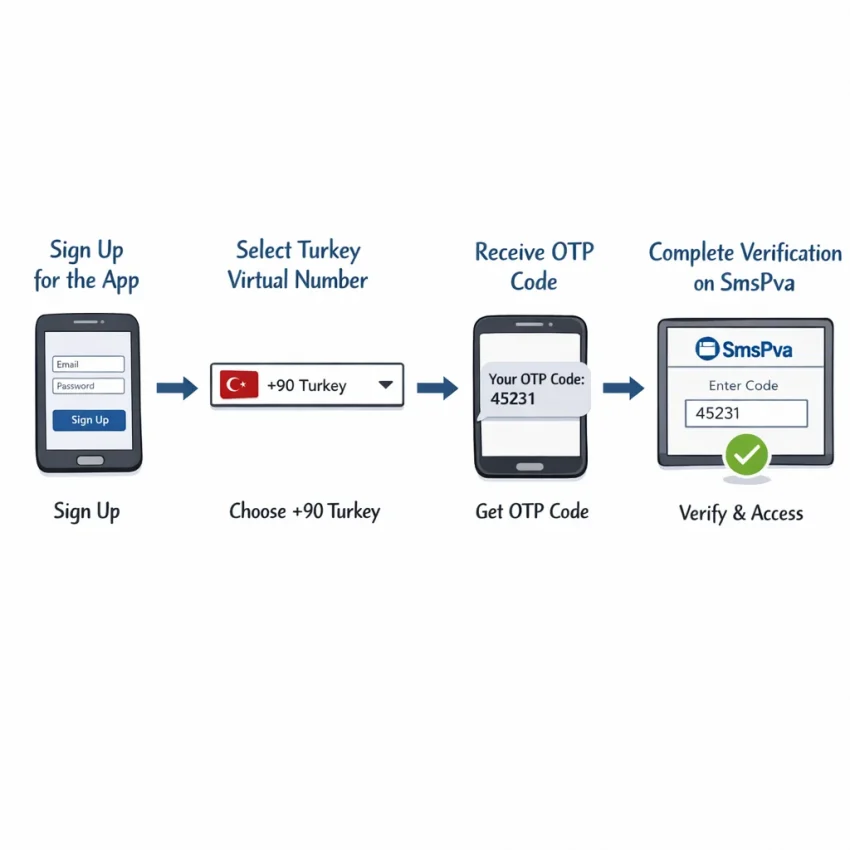
What a virtual phone number in Turkey is actually used for
A virtual phone number Turkey setup is usually for one task: receiving a one-time password, signup code, or account activation SMS. It is not the same as a full Turkish mobile plan. Most users want quick SMS verification for a specific platform, then they move on after activation.
That distinction matters. Many people search for a Turkey virtual phone number expecting calls, long-term personal use, or full telecom features. For verification workflows, the real need is narrower. You need a number that fits the service flow, can receive the platform’s code, and matches your timing.
That is why workflow matters more than broad telecom features. With SmsPva, the goal is practical: choose the right path, get the code, and complete activation with less guesswork. If you want to Receive SMS online without using your personal number for every signup, this is the use case.
When a Turkey number really matters
You may need a Turkish number when the platform or signup flow specifically expects Turkey. The app may preselect Turkey, format the field for a Turkish number, or apply region checks during registration. In those cases, a non-Turkish number can create friction.
But not every verification request requires a Turkish number. Sometimes you only need a number that supports the exact service you want to verify. If the platform does not require Turkey, service compatibility can matter more than country preference.
This is where many failed attempts begin. Users search for receive SMS online Turkey, choose by country alone, and ignore the service itself. Then the platform rejects the number or no code arrives. A better order is simple: confirm the platform, confirm whether Turkey is required, then choose the number.
What this means for your verification workflow
Think in terms of verification steps, not phone ownership. Ask three questions. Does the platform require Turkey? Is the signup tied to a specific service flow? Do you need one code only, or might you need another later?
These questions help avoid the biggest misconception around a virtual number Turkey for SMS verification: that any Turkish number works the same everywhere. It does not. Success depends on matching the number type to the platform and using it at the right time.
A Turkish virtual number is best understood as a tool for OTP receipt and activation. It is not a replacement for everyday mobile service. Once you approach it that way, SmsPva becomes easier to use correctly.
Why Turkish SMS verification fails: the 7 most common issues
If your virtual phone number Turkey setup is not working, the problem is usually more specific than “the number failed.” Most issues happen at one of seven points: service selection, country relevance, SMS routing, platform filtering, OTP timing, device or network consistency, or number type.
Random retries often waste balance and make the platform more suspicious. A better approach is to diagnose the failure before requesting another code.
1. You chose the wrong service or signup flow
This is the most common mistake. Users often choose a generic number, then try to verify a specific app that filters numbers by service category. If the platform expects a service-specific route, the OTP may never arrive even though the number itself is active.
A number that works for one platform may not work for another. SmsPva works best when you choose the target service first instead of treating every verification request the same way.
2. You assumed Turkey was required when it may not be
Many users search for a Turkey virtual phone number because their account or region is Turkey-based. But the platform may not actually require a Turkish number. Insisting on Turkey can reduce your options without improving success.
Some workflows do care about country matching. A Turkey-focused registration page or local onboarding path may reject a non-matching number. If you are unsure, check whether the service explicitly asks for Turkey or just any valid mobile number.
3. The number was accepted, but the SMS never arrived
This is the classic no-code problem. The number may be valid, but the platform did not send the message, the route was delayed, or delivery was blocked. From your side, all three look the same.
Start with the basics. Did you enter the number correctly? Did you choose the right country in the app? Did you actually trigger the send-code action? Some sites fail silently and only show the error after a refresh.
If everything looks correct, the issue may be platform-side filtering rather than a broken number. Repeating the same action too many times can make it worse.
4. The OTP arrived too late and expired
A Turkey OTP number can still fail even when delivery technically works. Many services keep one-time passwords valid for a short window. If the message arrives late, or if you request multiple codes, you may enter an old code by mistake.
This happens often when users switch tabs, change devices, or request a second code too quickly. The latest message is usually the only valid one.
5. The platform rejects virtual or reused numbers
Some services are stricter than others. A platform can reject a number even when SMS delivery is working. This often appears as “invalid number,” “try another number,” or a code request that never starts.
That does not always mean the provider failed. It can mean the platform detected a verification pattern it does not like. This is why a structured SmsPva workflow is more practical than guessing with generic online SMS receive Turkey methods.
6. Your IP, device, or region signals do not match
Verification systems often look at more than the phone number. They may compare the number country, your IP region, device fingerprint, browser state, and account behavior. If those signals clash, the service may delay, suppress, or reject the verification request.
A common example is choosing a Turkish number while signing up from a very different region after several failed attempts. That mismatch does not always block you, but it can lower your chances.
7. You picked a one-time SMS flow for a longer process
Some users only need one code. Others may need follow-up verification for login confirmation, account recovery, or extra security checks. If you choose a single-use flow for an account that may ask for more messages later, the first verification can succeed while the overall workflow still fails.
Once you know which issue matches your case, stop blind retrying. Use a cleaner workflow, tighter timing, and support when the pattern points to a platform-side block. If you need setup guidance, check SmsPva Help before spending more attempts.
How to solve each issue with SmsPva step by step
If your virtual phone number Turkey attempt fails, do not repeat the same signup. Most verification problems come from a small set of mistakes: wrong service selection, unnecessary country targeting, timing delays, or platform-side rejection.
A structured workflow is usually faster than random retries.
1. Start with the right verification target
Choose the exact platform you want to verify. This matters more than many users expect. A number that works for one service flow may not fit another. If you pick the wrong target, you may receive nothing even though the number itself is active.
Before you request a number, confirm three basics: the app name, the country preference, and whether you need only one OTP or may need follow-up messages later. For virtual phone number for Turkey verification, country should only be your first filter if the platform truly requires a Turkish number.
If the service does not require Turkey, forcing that choice can reduce your options without improving success. If the service does require Turkey, then choose it deliberately and continue.
Open the verification screen in your target app before obtaining the number. Do not request a number too early. Many OTP windows are short.
2. Fix no-code and expired-code problems fast
If you still did not receive the code, pause and diagnose instead of clicking resend repeatedly. Start with simple checks: did you enter the number in the correct format, including the right country code if required? Did you request the SMS immediately after getting the number? Did you leave the app idle too long?
If the OTP expires before arrival, the best fix is usually a clean retry. Close the failed attempt, start a fresh session, and request a new code only when you are ready to receive it. Repeated resends inside the same broken attempt often create confusion because older codes can arrive after newer ones.
If a verification fails twice in the same pattern, change one variable at a time. Use a fresh number. Keep the same device. Keep the same network. This tells you whether the issue was timing, session state, or platform filtering.
3. Handle platform rejection and support escalation
Sometimes the SMS service is working, but the platform rejects the number before sending any code. That usually means the app does not like the signup context, not that SmsPva failed to deliver. Common triggers include suspicious account activity, too many recent attempts, or a mismatch between your device, IP, and registration region.
When that happens, stop switching variables wildly. Keep your device and network consistent, wait a bit, and retry with a fresh session. If the platform still blocks the attempt before code dispatch, the bottleneck is likely platform-side.
This is also when you should decide whether a one-time SMS flow is enough. If you may need another code later, a longer-use workflow may fit better than a single activation attempt.
Service-specific example: using a Turkey virtual number for Signal verification
If you need a virtual phone number Turkey setup for Signal, the biggest mistake is choosing a generic route and hoping it works. Signal verification is more reliable when you match the service and country at the selection stage.
With SmsPva, the cleaner path is to start from the Signal SMS verification page rather than browsing random numbers. This matters because Signal may treat traffic differently depending on the route, the selected country, and how closely your signup context matches the number.
When Signal and Turkey are both part of your workflow, use the dedicated Signal verification in Turkey path. That helps you avoid a common problem: selecting Signal on one screen, then using a number intended for a different country flow on another.
At the time of writing, a Turkey Signal single-SMS option was listed from $4.00. Treat that as a current snapshot, not a guarantee of ongoing price or availability.
Step-by-step flow that reduces failed OTP attempts
First, open Signal and begin registration as usual. Do not request a code yet if you have not selected the matching number flow. In SmsPva, choose the service first, then confirm Turkey only if your verification context truly calls for it.
Next, obtain the number and enter it carefully in Signal with the correct country code. Small formatting mistakes can waste an attempt. After you submit the number in Signal, keep the app open and monitor the incoming message area in SmsPva.
If the code arrives, enter it promptly. OTP windows are short, and delays are one of the main reasons users think a turkey otp number failed when the real issue was expiration.
If no code appears, do not keep burning attempts with random replacements. Recheck the basics: was Signal selected as the service, was Turkey selected intentionally, and did you enter the number exactly as shown?
When this works well, and when you should change approach
This workflow is best when you need a one-time signal verification turkey setup and your goal is simple activation. If you expect follow-up SMS needs, a longer-use option may fit better than a single-code workflow.
The main takeaway is simple: for Signal, do not treat every number as interchangeable. A service-specific route inside SmsPva gives you a more structured process than a generic country-only approach.
When to use a one-time number vs a longer-use number
This choice affects more than cost. It changes how reliable your verification flow feels and how easy future account access will be. If you only need one code to open an account, a one-time virtual number Turkey for SMS verification is usually the cleanest option.
If the platform may ask for another code later, a longer-use number is often the safer path.
Choose one-time when the task is narrow
Use a one-time number when your goal is limited and immediate. Good examples include first-time registration, a single activation code, or testing whether a service accepts a Turkish verification flow at all. If the service clearly shows a one-code signup path, single SMS is often the practical option.
This route also makes sense when you are comparing country relevance. Sometimes users assume they need a Turkish number for every Turkey-related signup. In reality, the platform may only need a compatible verification number, not a long-term contact line.
The main risk is future dependency. If the account later asks for another OTP, the original number may no longer be available to you. So ask one question before choosing single-use: if this account is locked tomorrow, will I need the same number again?
Choose longer-use when repeat verification is likely
A longer-use or rented number is better when the platform may send repeated messages. This includes services with device checks, password reset flows, login confirmations, or staged onboarding. If you expect more than one SMS, longer access is usually worth it.
If your workflow involves ongoing access or recovery planning, treat the number as part of account setup, not just a disposable step. For relevant cases, SmsPva offers a rental path for Signal SMS verification.
In short, use one-time for a single confirmed OTP event. Use longer-use when the account may need future codes. That small decision can reduce wasted retries and make your Turkey verification workflow easier to manage.
Best practices to improve verification success with Turkish virtual numbers
The fastest way to improve results with a virtual phone number Turkey workflow is to remove avoidable mistakes before you request a code. Start with the exact platform flow you need, not a generic country-first guess. On SmsPva, that means choosing the service that matches the app or site you want to verify, then checking whether Turkey is the right country for that signup path.
Many failures are not true delivery problems. They happen when users select the wrong service, use a country that the platform treats differently, or move too slowly through the flow.
Use the correct flow and keep timing tight
Request the number only when you are already on the verification screen. If you open a number too early, the OTP may arrive after the session changes or expires. Keep the target app open, submit the number promptly, and wait for the SMS without restarting the flow unless the platform clearly asks you to.
Avoid repeated random retries. Too many attempts can trigger rate limits or extra checks on the platform side. If the first try fails, review what changed: service selected, country selected, signup method, or app session.
If the platform offers SMS, voice, or another recovery path, choose SMS only when you are using an SMS verification workflow. Mixing methods often creates expired sessions and confusion.
Reduce platform-side flags before blaming the number
Some failures happen because the platform does not like the overall signup context. Keep your device, browser, and IP stable during the process. Do not begin on one network and finish on another if you can avoid it.
Use consistent account details too. A Turkey number paired with conflicting location signals may increase rejection risk, even when SMS routing works. That does not mean a Turkish number is wrong. It means the whole verification environment needs to make sense.
If no code arrives after a careful retry, or the platform instantly rejects the number before sending anything, escalate instead of repeating the same pattern. In that case, the issue may be service-side compatibility, temporary filtering, or a setup mistake.
How to choose SmsPva for Turkey verification workflows
If you need a virtual phone number Turkey workflow for SMS verification, the best choice is the one that matches your exact task. Check whether the platform needs a Turkey-specific flow, whether you only need one OTP, and whether follow-up messages may matter later.
SmsPva fits this process well because it is built around service-specific verification workflows rather than generic trial and error.
In practice, start with the service you want to verify, then confirm whether Turkey is actually relevant for that signup. If it is, choose the matching country and complete the verification quickly to reduce timeout risk. If it is not, forcing a Turkish number can create avoidable failures.
The simplest rule is this: choose the service carefully, choose Turkey only when the platform flow supports that need, and choose the number type based on whether you expect one code or ongoing verification. If you want a more structured process for Turkish SMS verification, SmsPva is the practical place to start.