

What an Italy virtual number is and why SMS verification can fail
An Italy virtual number is a phone number used online to receive one-time passwords, activation codes, or account confirmation texts without relying on a personal SIM. People use this setup for privacy, testing, account workflows, and location-specific sign-up needs. In practice, an Italy virtual phone number is usually part of a verification flow, not a full replacement for a normal mobile line.
That distinction matters. Many users assume any valid number should work everywhere. It does not. A platform can accept one number for login recovery, reject the same number for sign-up, or delay the SMS because of traffic, routing, or risk controls. If you want to receive SMS online with an Italian virtual number for verification, start by understanding that failures usually come from platform rules, not just from the number itself.
Why an Italy OTP may not arrive
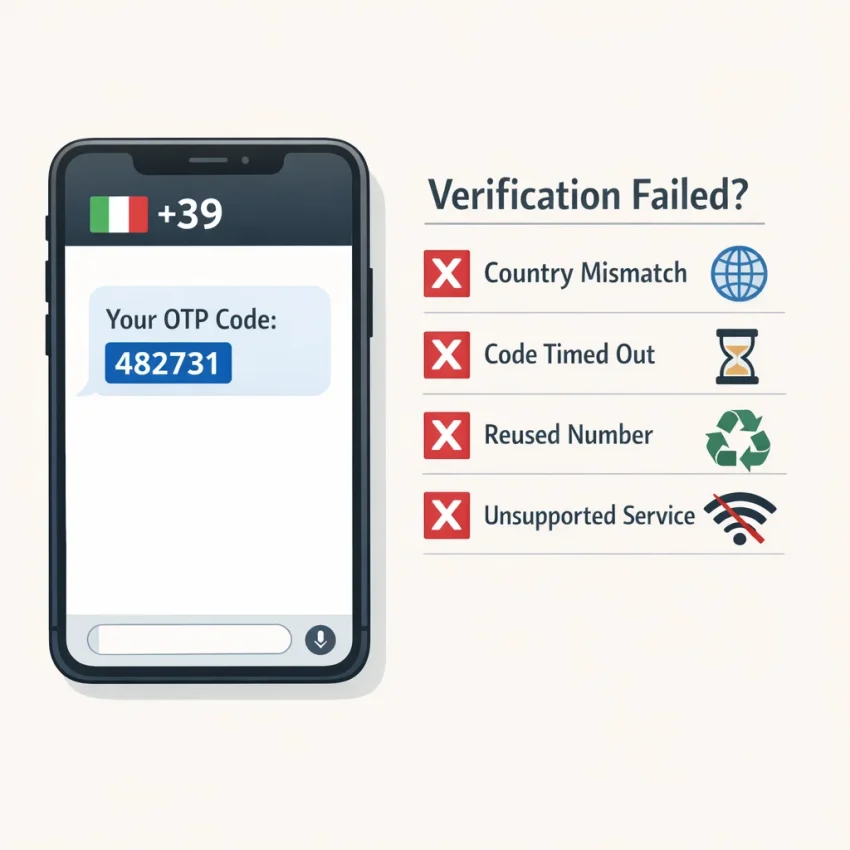
The most common cause is a mismatch between the service and the number you selected. Some platforms expect a local number from a specific country. Others allow international sign-ups but apply stricter checks when the number, IP, browser session, or account region do not line up. If your workflow says Italy but the platform expects another market, your Italy SMS verification attempt may fail before the code is even sent.
Timing is another common issue. Users often request a code, refresh the page, request another code too quickly, and invalidate the first session. Many verification systems expire tokens fast. That creates a false impression that the number is broken when the real problem is duplicate requests or a stale page.
Reused numbers can also cause trouble. Virtual verification numbers are used for OTP workflows, so some services may flag a number if it has already been used for that specific platform. In that case, the SMS may never arrive, or the site may display an “already used” warning immediately.
Why some services reject the number instantly
Some platforms do not support all number types for all actions. They may block temporary verification routes, restrict certain countries, or require a number class that matches their internal trust rules. That is why one Italy temporary number can work for one app and fail for another.
Formatting issues also matter more than users expect. Entering the wrong country code, omitting digits, or leaving an old local prefix in the form can cause instant rejection. Even when the number itself is fine, incorrect input makes the service treat it as invalid.
The practical takeaway is simple: treat Italy SMS verification as a service-by-service workflow. Choose the right platform, use a fresh session, submit the number once, and wait before retrying. SmsPva is a strong starting point because it is built around virtual phone numbers for SMS verification rather than generic messaging use. That makes it a better fit for users searching for an Italy OTP number, a privacy-focused sign-up flow, or a cleaner account activation process.
The 7 most common Italy virtual number issues users run into
If your Italy virtual number fails, the problem is usually specific and fixable. Most users do not need endless retries. They need to identify the exact failure pattern first. That matters because an Italy SMS verification problem can come from the target service, the number session, the country choice, or the timing of the request.
A better approach is to treat each error as a clue. With SmsPva, you can start from a service-oriented workflow instead of guessing with a generic number. That reduces avoidable mistakes before you request another code.
1. No code arrives at all
This is the most common complaint behind searches like Italy number not receiving SMS. In many cases, the platform accepted the number, but the OTP was never sent or never routed to that session. This can happen when the service delays sending, the request was not fully submitted, or the service-country match is weak.
First, confirm you completed the verification form correctly and did not close the page early. Then wait a reasonable amount of time before pressing resend. Rapid re-requests often create confusion and can invalidate the first attempt.
2. The OTP arrives too late
A delayed code is different from a missing one. The code may show up after the service has already expired the verification window. When that happens, the problem is timing.
If this happens once, avoid stacking more resend requests. Start a fresh verification session instead. A clean session usually works better than trying to reuse a stale one. This is especially important when an Italy OTP number is tied to a short-lived signup or activation flow.
3. The number is rejected instantly
An instant rejection usually means the service has rules about number type, country, or prior use. If the platform says the number is invalid before sending any SMS, the issue is rarely your formatting alone. More often, the service does not want that number for that workflow.
Check that you selected the correct country code and entered the number exactly as required. If the formatting is right and it still fails immediately, switch sessions rather than repeating the same number.
4. The service asks for a different number
Some platforms accept an Italian number at first, then prompt for another one during review or after a retry. This often means the first verification path did not satisfy the platform’s risk checks. It can also happen when the service prefers a stronger service-country match for the account context.
Do not keep forcing the same session. If the site asks for another number, treat that as a signal that the current attempt is exhausted. Start over with a fresh session and keep the rest of the account environment consistent.
5. Your verification session expires
This is a workflow issue more than a delivery issue. You may have taken too long between requesting the number and submitting it, or between requesting the code and entering it. Some services also expire a session after multiple resend attempts.
The simplest fix is to prepare everything before you request the number. Open the app or website, confirm the country field, and only then begin the SMS step. If your session expires, create a new one instead of trying to revive the old screen.
6. You see an “already used” warning
Many users searching for an SMS verification Italy number run into this message. It means the service has a record of that number from a previous registration or prior verification attempt. It does not always mean anything is broken on the SMS side.
When you see this warning, stop troubleshooting delivery and switch numbers. Waiting longer will not solve a reuse flag. If you need platform guidance on handling retries or session errors, check the Help resources rather than burning more attempts.
7. Country-specific blocks stop the flow
Sometimes the issue is not the number itself but the target platform’s country logic. A service may support SMS verification broadly, yet treat Italy differently for some flows. That can affect sign-up, recovery, or app-specific onboarding. This is why one Italy virtual phone number may work for one service but fail for another.
When you suspect a country-specific block, the practical next step is not random testing. It is choosing the correct service workflow and, where available, the correct country-service combination. That is where SmsPva becomes the safer path for Italy SMS verification use cases, because the workflow is built around supported verification scenarios rather than generic number hunting.
How to troubleshoot an Italy verification failure step by step before you retry
If your Italy virtual number for SMS verification is not working, do not keep clicking resend. Most failures get worse after repeated attempts. Instead, run a short diagnostic in order. This helps you separate a temporary delay from a true mismatch or a burned session.
1. Confirm the service and country actually match
Before retrying, ask a simple question: does the platform accept an Italian number for this exact verification flow? Some services allow broad country coverage. Others expect a local number only in certain regions, or they may filter virtual numbers by country and service combination.
If you submit an Italy number into a flow that expects another region, the number may look valid but never receive the OTP. In other cases, the site rejects the number instantly. That does not always mean the number is bad. It often means the route is unsupported for that service-country pair.
Check the service you selected, the country shown on the verification form, and the country code format you entered. If the platform auto-fills a non-Italian country, change it before submitting. If it keeps reverting, stop and start a fresh attempt instead of forcing the same session.
2. Start a clean session and submit only once
A common cause of an Italy number not receiving SMS is a messy retry pattern. Users paste one number, refresh the page, request another code, and then switch tabs. That creates crossed sessions.
Open a fresh browser session if needed. Then request one number, enter it once, and wait. Do not press resend right away. Do not submit the same number in multiple tabs. Do not alternate between app and web verification unless the service explicitly tells you to.
Also verify the number format before submission. Use the full Italy country code when required. Remove spaces or copied punctuation if the form does not accept them. Small formatting mistakes can make a valid Italy temporary number fail before the SMS is ever sent.
As a practical rule, wait through the platform’s first OTP timer. If the page says 30, 60, or 120 seconds, respect it. Early resend requests often invalidate the previous attempt or trigger rate limits.
3. Know when to wait, when to switch, and when to get help
If nothing arrives after the first proper wait window, review what happened. Was the number accepted normally? Did the page show a countdown? Did it return an error like “try another number” or “number used too many times”? Those clues tell you whether you should keep waiting or abandon the session.
Wait a bit longer if the number was accepted and the platform appears to be processing normally. Switch sessions if the number was rejected instantly, if the page says the number was used before, or if you triggered multiple resend attempts and likely contaminated the flow.
When you switch, change only one variable at a time. Use a new number or a new browser session, not five changes at once. That makes the cause easier to identify if the next attempt fails too.
If the issue still persists, check the Help page for platform guidance and troubleshooting steps. Use SmsPva for a clean, service-specific verification workflow rather than a generic retry loop.
Why service-specific and country-specific pages matter on SmsPva
Many Italy virtual number failures begin before the SMS is sent. Users often pick a generic number flow, then try to use it for a platform with tighter verification rules. That creates a mismatch between the service, the country, and the session you actually need. In practice, a virtual number Italy for verification works better when it is chosen for the exact platform first.
This is where SmsPva becomes more useful than a one-size-fits-all workflow. Instead of guessing, you can start from a service page built for the platform you want to verify. If your goal is Signal, use the Signal SMS verification page rather than a generic receive-SMS route. That reduces common mistakes such as selecting the wrong activation flow, using a number intended for another service, or retrying inside an expired session.
Service-specific pages also improve clarity. You know what flow you are entering, what kind of activation you are requesting, and whether the platform-country combination is the one you meant to use. For users searching for an Italy virtual number or Italy SMS verification, this matters because some failures are not delivery failures at all. They are selection failures.
Why Italy plus Signal is a good example
Signal is a strong example because users often need a country-aligned setup, and small selection errors can waste attempts. If you need Signal verification Italy, the best workflow is to choose the combined service-country path when it is available. On SmsPva, that means using the Signal verification in Italy page instead of selecting a random number first and hoping it fits later.
That extra filtering step helps in three ways. First, it keeps your country choice aligned with the verification goal. Second, it lowers the chance of requesting a session that is wrong for the platform. Third, it makes troubleshooting faster because you can isolate whether the issue is with timing, formatting, or the specific verification session itself.
At the time of writing, Signal in Italy was listed from $1.82 on SmsPva as an API snapshot. Treat that as a current listing, not a permanent price or availability guarantee.
How this reduces avoidable mismatch errors
The biggest benefit is fewer unnecessary retries. Users often burn attempts by changing only one variable at a time without fixing the main mismatch. For example, they request a new Italy number but stay inside the wrong service flow, or they restart the app but keep using an old verification session.
Once you choose the right SmsPva page first, you remove one major source of error. Then your troubleshooting becomes more accurate because you are testing a valid setup, not an improvised one.
Using SmsPva for Italy virtual number workflows: what to expect and when to switch sessions
If you need an Italy virtual number for OTP receipt, the safest workflow is to start with the exact service you want to verify, not a generic number search. On SmsPva, that means choosing the service page first, then checking whether Italy is available for that service-country combination.
For example, if your goal is Signal verification Italy, use the dedicated service flow rather than treating every Italy number as interchangeable. If you know you need an Italian route, use the Italy-specific Signal page so the platform, country, and session align before you expect a code to arrive.
Once you request the number, treat it as a live verification session. Enter the Italy virtual phone number exactly as shown, including the correct country format if the target service asks for it separately. Then submit only once and wait. Repeated taps on “resend code” or multiple form submissions can invalidate the first attempt, create a session mismatch, or trigger a temporary hold on the service side.
What to watch after you request the number
After submission, monitor the session status and give the service enough time to send the OTP. If the target platform is slow, switching too early can waste a usable session. If it instantly rejects the number before sending anything, that usually points to service-side filtering or a mismatch between the workflow and the number selection.
A good rule is to distinguish between waiting problems and rejection problems. Waiting problems look like a normal submission with no code yet. Rejection problems show up fast: invalid number, unsupported region, or prompts to use another number.
This is also where service-specific expectations matter. An Italy OTP number may work for one platform and fail on another because verification systems do not apply the same checks.
When to switch sessions and start over
You should switch sessions when the number is rejected immediately, when the verification page clearly says the number cannot be used, or when you have already caused confusion by submitting multiple retries too quickly. Starting over is often faster than trying to rescue a compromised session.
You should not switch too fast when the request appears normal and the only issue is delay. In that case, wait through the expected OTP window before deciding the session failed. This avoids burning extra attempts and lowers the chance of platform throttling.
If you need more operational guidance on timing, session handling, or troubleshooting edge cases, use the Help page. The practical takeaway is simple: choose the correct service, match Italy only where it is supported, submit carefully, and switch sessions only when the failure signal is clear.
Best practices to improve SMS verification success with an Italy virtual number
The best way to improve results with an Italy virtual number for SMS verification is to prevent avoidable errors before you request a code. Most failed attempts come from mismatch, timing, or session hygiene problems. They do not usually mean every Italy number is bad.
Start with the exact service you want to verify, not a generic number search. A platform may accept one country-service combination and reject another. That is why SmsPva works best when you choose the most specific path available and treat each verification as a fresh session.
Match the service, country, and timing
First, match the number to the platform you are verifying. If the service expects an Italian registration flow, use a virtual number Italy for verification only when that country-service combination is actually supported. Do not assume a number that works for one app will work for another.
Second, submit the number once and wait. Many users cause their own failure by tapping resend too quickly or by restarting the signup flow before the first OTP window finishes. For SMS verification Italy number workflows, patience often matters more than repeated retries.
Third, check formatting before you submit. Use the correct country code and enter the number exactly as the service expects. Small formatting mistakes can look like delivery issues when the real problem is input validation.
If you need a concrete example, use the service-specific Signal flow rather than guessing. The dedicated Signal page is a better starting point than a broad search because it reduces mismatch and makes the intended workflow clearer.
Keep the account environment consistent
Your device and account environment also affect whether you can receive SMS online with an Italy workflow successfully. Try to keep the same browser session, device, IP profile, and app state from start to finish. Sudden changes can look suspicious to some platforms.
Avoid stacking too many attempts on the same account state. If a code expires, start a clean new session instead of recycling a broken one repeatedly. This is especially important after instant rejections, used-number warnings, or multiple resend requests.
For teams or advanced users managing separate account environments, proxy tooling can help keep workflows isolated. It is a supporting tactic, not the core fix. The main win still comes from proper service-country selection, clean timing, and disciplined retries.
If a session still fails after a careful attempt, do not keep hammering the same flow. Switch sessions, review guidance, and use Help when you need platform-specific troubleshooting. In practice, the users who succeed fastest are the ones who stay consistent, retry sparingly, and choose the right workflow from the start.
FAQ
Why is my Italy virtual number not receiving the SMS code?
The most common reasons are service-country mismatch, duplicate resend attempts, an expired verification session, reused-number flags, or service-side filtering. Check the country format, submit once, and wait through the first timer before retrying.
How long should I wait before retrying an OTP on an Italy virtual number?
Wait through the platform’s first countdown window. Many services show 30, 60, or 120 seconds. Retrying too early can invalidate the first request or trigger rate limits.
Can a service reject an Italy virtual number even if the number is valid?
Yes. A valid number can still be rejected if the platform blocks that number type, does not support the country for that flow, or sees the number as previously used for the same service.
What should I do if the verification page says the number has been used before?
Switch to a new number. That message usually means the platform has already linked the number to a past signup or verification attempt. Waiting longer will not fix it.
Is it better to use a service-specific page instead of a generic SMS number page?
Usually yes. A service-specific page reduces mismatch errors and makes it clearer which verification flow you are entering. That is especially useful for country-sensitive setups like Signal verification in Italy.
How do I use SmsPva for Signal verification in Italy?
Start with the Signal service flow, then choose the Italy-specific path when available. Request the number, enter it once in the target app, and wait through the first OTP window before deciding whether the session failed.
What does it mean when an Italy virtual number works for one service but not another?
Different platforms apply different verification rules. One service may accept an Italian virtual number, while another may reject it because of country policy, number type filtering, or prior-use checks.
How much does an Italy number cost on SmsPva?
For the exact Signal-in-Italy flow, the listed API snapshot at the time of writing was $1.82. Treat that as a current snapshot, not a guarantee of future price or availability.
When should I switch to a new session or a different number?
Switch when the number is rejected instantly, the platform asks for another number, or you triggered too many retries and likely contaminated the session. If the request appears normal and only the OTP is delayed, wait through the expected timer first.
Where can I get troubleshooting help on SmsPva?
Use the Help page for troubleshooting guidance and workflow support.