

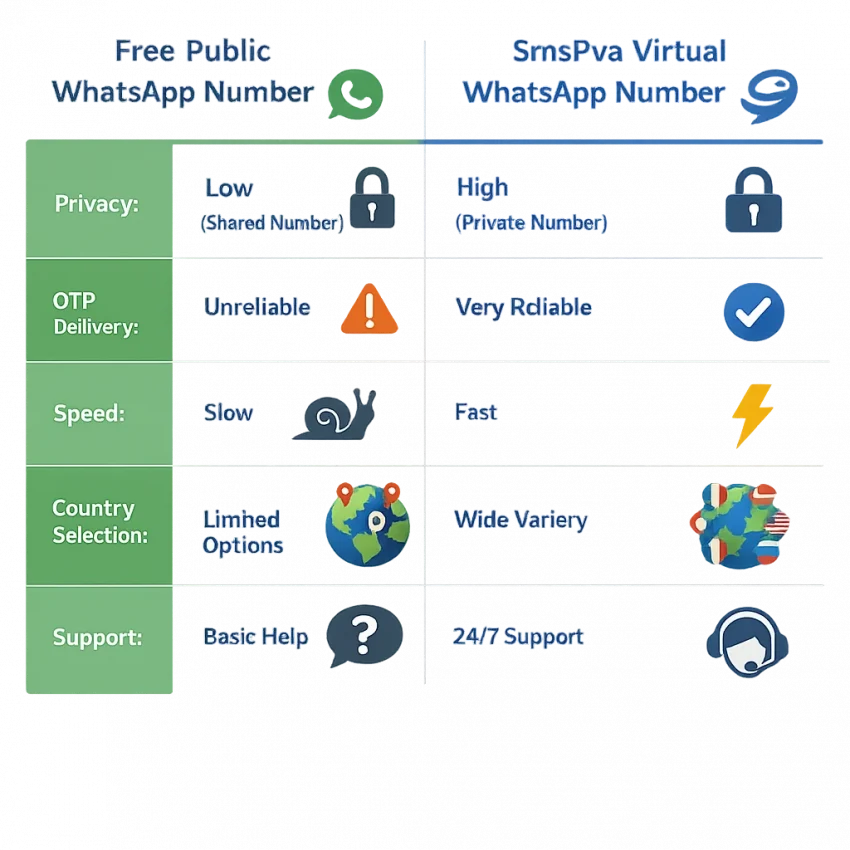
When people search for a free number for WhatsApp, they usually do not mean free at all costs. What they really want is a quick, cheap, and reliable way to verify WhatsApp without using their personal SIM. In 2026, that distinction matters because most fully free public numbers are overused, recycled, blocked, or exposed in public inboxes. They look convenient, but they often fail exactly when you need the OTP.
For most users, the better answer is not chasing a zero-cost number. It is using the cheapest method that actually works. That is where SmsPva makes more sense. Instead of gambling on random public SMS receiver sites, you can use a structured verification workflow built for OTP delivery, privacy, and account activation. If your goal is to verify WhatsApp with a virtual number for WhatsApp, SmsPva is the practical route in 2026.
This guide explains how WhatsApp verification works, why so many free methods fail, how to complete the setup on SmsPva’s WhatsApp verification page, and what to do if the OTP does not arrive.
What People Mean by a Free Number for WhatsApp in 2026
Most users searching for a free whatsapp number want one of a few things: privacy, account separation, temporary use, testing, travel setup, or a way to avoid tying WhatsApp to their main number. A freelancer may want client communication on a separate account. A tester may need a clean verification flow. A privacy-conscious user may simply not want to expose their personal SIM.
The problem is that free public numbers rarely serve those goals well. Public SMS receiver websites tend to publish open inboxes that anyone can view. Many numbers are heavily reused, already linked to previous registrations, or blocked by platform risk systems. A number may appear available on the page, but the OTP never arrives, arrives too late, or the number has already been burned by earlier users.
That is why the phrase free number for WhatsApp is misleading. In real use, people want the cheapest working option, not a public number that wastes time and exposes one-time codes. A dedicated low-cost activation workflow through SmsPva fits that intent much better. You choose the service, pick from available countries, get a number tied to your session, and wait for the OTP in a controlled dashboard instead of a public inbox.
Another reason users move away from free public numbers is trust. Many free sites do not show whether a number is fresh, whether it has already been used for WhatsApp, or whether delivery is currently working. SmsPva gives you a more structured process for receive SMS for WhatsApp use cases. No provider can promise approval on every single attempt because WhatsApp makes the final decision, but using a service-specific platform gives you a much better starting point than browsing random free inbox directories.
How WhatsApp Verification Works and Why Many Free Numbers Fail
At a glance, WhatsApp signup is simple. You install WhatsApp or WhatsApp Business, select the country code, enter the phone number, wait for an SMS code, and type the OTP into the app. If SMS delivery fails, WhatsApp may later offer a voice call fallback.
What looks simple on the surface involves several checks in the background. The number must receive the text quickly, match the selected country code, and avoid triggering WhatsApp risk controls. This is where a lot of temporary number for WhatsApp methods fail.
Common failure points include:
- Previously registered number: the number may already have WhatsApp history.
- Platform risk controls: public, shared, and heavily reused numbers are more likely to be flagged.
- Country mismatch: the selected number region may not fit your setup well.
- SMS delivery issues: some free inbox providers do not receive WhatsApp OTPs consistently.
- No useful fallback: if WhatsApp offers a call, many free SMS sites cannot support that flow.
WhatsApp codes are also short-lived. If delivery is delayed, the code may expire before you can use it. This creates a loop of repeated resend attempts, which can trigger cooldowns and more friction. That is why free public numbers fail so often. The problem is not only that they are free. It is that they are overused, poorly routed, and not designed for reliable OTP handling.
By contrast, SmsPva provides a service-specific workflow for online number for WhatsApp verification. Instead of guessing whether a public inbox might work, you go directly to the WhatsApp service page, choose a currently available option, and watch for the OTP in your activation session. It is a more realistic workflow for users who need a whatsapp verification number that has an actual chance of working.
Step-by-Step: How to Use SmsPva for WhatsApp Verification
If your goal is a workable number for WhatsApp OTP, this is the practical 2026 workflow.
1. Create your SmsPva account
Go to the SmsPva homepage and register an account. This gives you access to the dashboard, service list, pricing, country availability, and incoming SMS management.
It is best to have your account ready before you start the WhatsApp registration screen on your phone. That way, you are not losing time while the app waits for verification.
2. Add balance
SmsPva is not a public free inbox site. It uses a paid activation model, which is exactly why it is more useful for smspva WhatsApp verification. The number is connected to a transaction and a dedicated session, not a public wall anyone can read.
Check the current price on the dashboard or WhatsApp service page. Pricing can vary by country and stock. Add enough balance for one activation and, if possible, a backup attempt in case you need another country or number.
3. Open the dedicated WhatsApp service page
Go to https://smspva.com/service/whatsapp. Using the service-specific page is important. Do not buy a number intended for another platform and expect it to behave the same way for WhatsApp.
On the page, you will typically see:
- available countries or regions
- price per activation
- stock or availability indicators
- the option to request a number
4. Choose the right country
Do not pick the cheapest country automatically. Choose based on your use case:
- Pick a relevant country if you need regional consistency.
- Pick a stable, available option if your main goal is simply getting the OTP.
- For testing or segmented workflows, keep country choices organized by account purpose.
Consistency matters more than randomness. A cleaner setup gives you a better chance than just hunting for the absolute lowest price.
5. Request the number and keep the session open
Once you choose the country, request a number. SmsPva will assign a virtual number tied to that activation session. Copy it exactly as shown, including the country code.
Then switch to WhatsApp:
- Open WhatsApp or WhatsApp Business.
- Enter the virtual number from SmsPva.
- Check the country code carefully.
- Submit the number and wait for WhatsApp to send the code.
Keep the SmsPva activation page open while doing this. The OTP should appear in that active session if delivery succeeds.
6. Receive the OTP in the SmsPva dashboard
Return to your active order page and wait for the incoming message. This is the main difference between a real whatsapp SMS verification service and a public inbox. The message belongs to your activation session instead of a shared feed.
When the code appears:
- copy it exactly
- go back to WhatsApp
- enter it before it expires
7. If the SMS is delayed, do not spam retries
Some OTPs arrive quickly. Others take longer depending on the route and country. Wait through the expected window before pressing resend. Too many fast resend attempts can trigger cooldown timers or push the flow toward call verification.
If the message still does not appear, review SmsPva Help before abandoning the attempt.
8. Finish WhatsApp setup
Once the OTP is accepted, complete the standard onboarding steps: profile name, optional photo, permissions, and backup settings. If you use multiple accounts, record which number and country you used for each one.
If account isolation matters for your workflow, especially for testing or separate business environments, review SmsPva HQ Proxy as part of a cleaner setup.
Practical tips that improve results
- Enter the number carefully the first time.
- Use the WhatsApp-specific page, not a random category.
- Choose live stock over exotic low-availability options.
- Keep your activation session open while waiting.
- Treat voice-call fallback as optional, not guaranteed.
In plain terms, SmsPva replaces the unreliable hunt for a free WhatsApp number with a controlled path: choose the service, select a country, pay a small amount, receive the OTP in your own session, and finish setup.
Choosing the Right Country, Number Type, and Setup
Not all numbers are equal. In 2026, better results usually come from choosing the right country, using a service-specific number, and keeping your setup consistent.
Start with country choice. A cheap option can be fine for basic testing, but price alone should not decide everything. If your device language, network region, and overall account context point strongly to one geography while your phone number comes from a completely different one, that mismatch can create extra friction. It does not guarantee failure, but it is a variable worth controlling.
A useful rule is to choose one of three ways:
- match your real region if you want the most natural setup
- pick a stable, available country on SmsPva if you mainly want speed and value
- use separate countries for organized testing or segmented workflows
Next is number type. Free public inboxes usually fail because they are shared, overused, and impossible to evaluate for freshness. When you buy WhatsApp number online through a structured platform like SmsPva, you are not buying a permanent SIM in the usual sense. You are using an activation workflow intended for OTP receipt and account verification.
Your use case matters too. A freelancer may want a privacy buffer for client communication. A tester may prioritize low-cost rotation. A marketer or operator handling multiple workflows should focus on clean separation: one number per account, clear country labeling, and organized records.
Setup hygiene also matters:
- update WhatsApp before starting
- use a stable connection
- enter the country code exactly as shown
- avoid jumping between many numbers or devices during one verification attempt
For users who manage separate account environments, network consistency can matter as much as number quality. In those cases, HQ Proxy can help create cleaner operational separation.
Troubleshooting WhatsApp OTP Problems with Virtual Numbers
Even with a proper temporary number for WhatsApp, some attempts need troubleshooting. Most problems fall into predictable patterns.
No WhatsApp code arrived
First check the basics:
- make sure you selected the number from the SmsPva WhatsApp page
- confirm the country code and number format
- wait a bit before retrying
- avoid repeated resends
- refresh the active order page in SmsPva
If nothing arrives after a reasonable wait, it is often faster to switch to a fresh number or a different country than to force the same route repeatedly.
The SMS arrived too late
If the code arrives after expiry:
- request a fresh code in WhatsApp
- keep the activation session open
- switch country or number pool if delays keep repeating
This is one reason public free numbers are so frustrating: they may technically receive messages, but not in a useful time window.
WhatsApp offers a voice call instead of SMS
This can happen after a failed or delayed SMS attempt. If your workflow depends on text delivery, restarting with another WhatsApp-specific number on SmsPva is usually more practical than forcing the call path.
The number was already used on WhatsApp
If WhatsApp says the number is already registered, stop trying to push that same number through setup. Return to SmsPva, pick another available number, and if needed choose another country with better stock.
The country does not fit your setup
If your number region and your network or device context are wildly different, friction may increase. To reduce that risk:
- pick a country that makes sense for your use case
- keep the device and network stable during signup
- use cleaner account isolation for multi-account work
The attempt looks flagged
If WhatsApp repeatedly refuses to send a code or blocks the attempt before delivery, the issue may be account risk rather than SMS transport. Common triggers include too many recent retries, rapid switching between numbers, a device with repeated failed signups, or inconsistent network signals.
In that case, slow down. Use one fresh SmsPva number from the WhatsApp page, restart with a cleaner setup, and avoid repeated rapid attempts.
When to retry and when to replace the number
A good rule is simple: retry once for delay, but replace the number if the problem suggests prior use, low quality, or repeated delivery failure. For more edge cases, check SmsPva Help.
Free WhatsApp Number vs SmsPva: Cost, Privacy, Reliability, and Control
The real comparison in 2026 is not free versus paid in the abstract. It is unreliable public inboxes versus low-cost verification workflows that actually help users finish setup.
Cost: free methods only win on the initial price tag. Once you count failed attempts, timeouts, and wasted setup time, they stop looking cheap. SmsPva is better understood as a low-cost utility for successful activation.
Privacy: public numbers often expose incoming messages in open dashboards. SmsPva keeps the activation inside your own account session, which is far better for privacy-conscious users.
Reliability: public numbers are more likely to be overused, recycled, or flagged. SmsPva gives you a service-specific WhatsApp workflow, which is far more practical for receiving OTPs.
Speed: public sites are unpredictable. SmsPva gives you a direct path from number request to message retrieval, plus access to support resources.
Control: free inboxes give you almost no real choice or troubleshooting structure. SmsPva gives you country selection, service-specific targeting, and an account-based dashboard.
Support: if a random free site fails, you usually have no recovery path. With SmsPva, you can at least work through a proper verification flow and review current guidance in the Help section.
So yes, a free number for WhatsApp can sometimes exist. But for most users in 2026, it is not dependable enough to be worth the trouble. The smarter goal is finding the cheapest method that works with acceptable privacy and less friction. That is exactly where SmsPva fits.
Final Takeaway
If you came here looking for a free number for WhatsApp, the practical answer is this: truly free public numbers are usually a gamble. They are often shared, flagged, slow, or already used. If you need a WhatsApp OTP number that actually has a realistic chance of working, a low-cost service-specific workflow is the better choice.
SmsPva gives you that workflow in 2026: sign up, add balance, open the WhatsApp verification page, choose a country, request a number, receive the OTP, and complete setup. For users who care about privacy, speed, and not wasting time on dead public inboxes, that is the smarter route.
To get started, visit SmsPva for WhatsApp verification. If you run into issues, use Help. And if you need cleaner account separation for advanced workflows, review HQ Proxy.
FAQ
Can I use a free number for WhatsApp in 2026?
Sometimes, but most free public numbers are unreliable, overused, or blocked. If you want a working result, a low-cost virtual number workflow through SmsPva is usually the better option.
Does WhatsApp allow virtual numbers for verification?
WhatsApp verifies phone numbers, but approval depends on its own checks. A virtual number can work if it can receive the OTP and does not trigger platform friction. No provider can guarantee approval on every attempt.
Why is my WhatsApp OTP not arriving on a temporary number?
Common reasons include prior number use, country mismatch, routing delays, or WhatsApp risk controls. Try a WhatsApp-specific number on SmsPva and avoid repeated rapid retries.
What is the difference between a free public number and a SmsPva number for WhatsApp?
A free public number usually has an open inbox and high reuse risk. A SmsPva number is tied to your activation session, which gives you better privacy, more control, and a more practical OTP workflow.
Can I choose a country-specific number for WhatsApp on SmsPva?
Yes, availability depends on live stock. On the WhatsApp service page, you can review available countries, pricing, and choose the option that fits your use case.
What should I do if the number was already used on WhatsApp?
Do not keep forcing the same number. Choose another available number on SmsPva, and if possible switch to a different country or stock pool.
Can I receive WhatsApp verification by SMS and by call?
WhatsApp may offer SMS first and a call later, but call fallback is situational. It is best to start with SMS and treat call verification as optional rather than guaranteed.
Is SmsPva better than random free SMS receiver sites for WhatsApp?
For most users, yes. SmsPva is designed for verification workflows, while random free receiver sites rely on public inboxes that are often overused and unreliable.
Do I need a proxy when creating or isolating WhatsApp accounts?
Not always. But if you manage multiple accounts, testing environments, or segmented workflows, cleaner network separation can help. In those cases, SmsPva HQ Proxy may be useful.
How much does a WhatsApp verification number usually cost on SmsPva?
Pricing varies by country, stock, and demand. Check the live rates on the WhatsApp verification page before starting.