

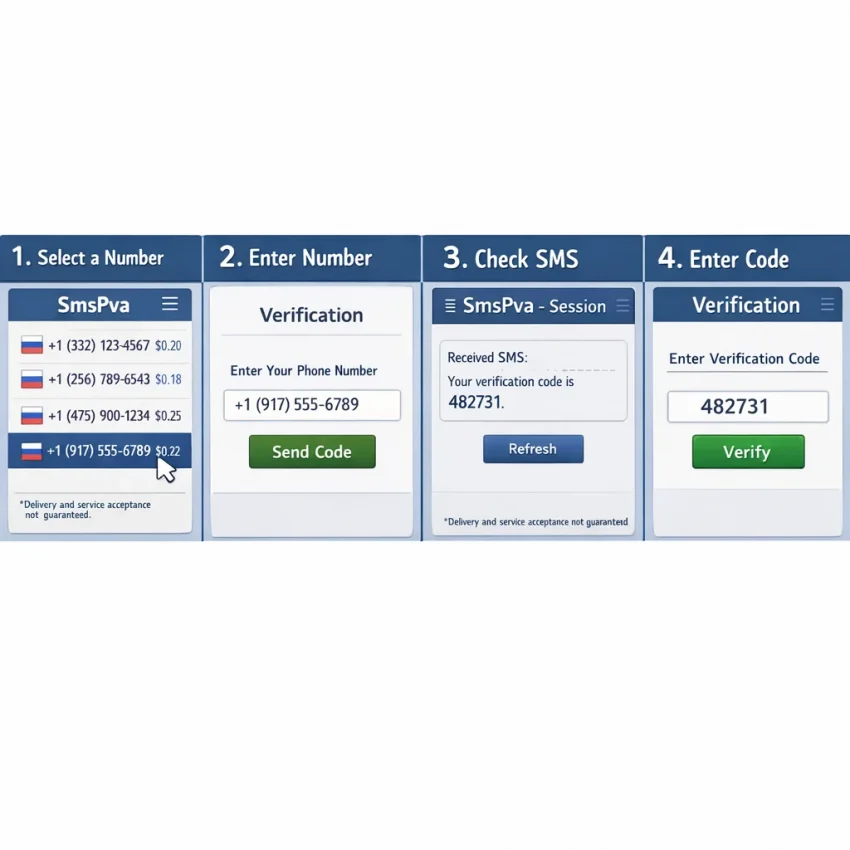
كيفية استخدام رقم هاتف للرسائل النصية مع SmsPva في 2026
ما وظيفة رقم الهاتف للرسائل النصية، ومتى يكون الرقم الافتراضي مناسبًا؟
يمكن لرقم الهاتف المخصص للرسائل النصية استقبال الرسائل النصية، بما في ذلك كلمات المرور لمرة واحدة ورموز التحقق. ويمكن الوصول إلى الرقم الافتراضي للرسائل النصية عبر خدمة على الإنترنت بدلًا من شريحة SIM وهاتفك الشخصي. وتختلف طريقة الإعداد والوصول إلى الرسائل بحسب ما يقدمه مزود الخدمة.
على خلاف رقم هاتفك المحمول الشخصي، قد يكون الرقم الافتراضي مؤقتًا أو مخصصًا لاستخدام معين. وهو يختلف أيضًا عن خط هاتف طويل الأمد تتحكم به لإجراء المكالمات والرسائل واستعادة الحسابات على نحو مستمر. تحقق من طريقة توفير الرقم قبل استخدامه، خصوصًا إذا كنت قد تحتاج إلى استقبال رسالة أخرى لاحقًا.
متى قد يكون الرقم الافتراضي مفيدًا؟
قد يساعدك رقم منفصل للتحقق عبر الرسائل النصية على إبقاء رسائل التحقق الاعتيادية بعيدًا عن صندوق رسائلك الشخصي. على سبيل المثال، قد تستخدمه لإعداد حساب مسموح به إذا كانت المنصة تقبل الأرقام الافتراضية، أو لاختبار تدفق رسائل نصية مدعوم ضمن عملية تطوير أو ضمان جودة.
توفر SmsPva أرقامًا افتراضية للتحقق عبر الرسائل النصية واستقبال كلمات المرور لمرة واحدة. راجع الخيارات الحالية عبر استقبال الرسائل النصية عبر الإنترنت. تعامل مع القوائم بوصفها خيارات ينبغي التحقق منها عند الحاجة؛ فالرقم الافتراضي ليس بديلًا شاملًا عن رقمك الشخصي.
اعرف القيود قبل الاختيار
يعتمد قبول الرقم على الموقع الإلكتروني أو التطبيق. قد ترفض بعض الخدمات الأرقام الافتراضية، كما قد يختلف التوفر أو الملاءمة باختلاف الخدمة والبلد. وقد يعمل رقم ما في عملية تحقق معينة ولا يعمل في أخرى. التزم بشروط المنصة المقصودة واستخدم وسيلة تحقق معتمدة.
يمكن أن يقلل استخدام رقم منفصل من مرات تقديم رقمك الشخصي ضمن سير عمل مدعوم، لكنه لا يجعلك مجهول الهوية ولا يضمن الخصوصية. تجنب استخدام رقم مؤقت لحساب قد تحتاج إلى استعادته لاحقًا، ما لم تدعم الخدمة هذا الاستخدام صراحةً. وبالنسبة إلى الخدمات المصرفية أو الحسابات الحساسة أو الوصول طويل الأمد، استخدم رقمًا تتحكم به ويمكنك الوصول إليه بشكل موثوق.
تشرح الخطوات أدناه كيفية مراجعة الخيارات وطلب رمز بمسؤولية. قد يكون الرقم الافتراضي مفيدًا لبعض مهام التحقق المشروعة، لكنه لا يضمن وصول كل رسالة نصية أو قبول كل منصة له.
قبل البدء: اختر الخدمة والرقم المناسبين
قد يساعدك إجراء بعض التحقق قبل طلب رقم للتحقق عبر الرسائل النصية على تجنب اختيار خيار لا يناسب مهمتك. حدّد التطبيق أو الموقع الذي يتطلب التحقق، ثم تأكد مما تعرضه SmsPva حاليًا له. اعتمد على القائمة المباشرة، لا على لقطة شاشة قديمة أو نتيجة بحث مخزنة مؤقتًا، لمعرفة التفاصيل الحالية.
طابق الرقم مع الخدمة
ابحث عن الخدمة المحددة التي تنوي إدخال الرقم فيها. إذا كانت لدى SmsPva قائمة مطابقة للخدمة، فراجع ذلك الخيار بدلًا من افتراض أن خيارًا عامًا أو غير ذي صلة سيعمل. قد تطبق الخدمات قواعد تحقق مختلفة، وقد ترفض بعضها رقمًا افتراضيًا. ولا تضمن القائمة أن تقبل المنصة الرقم أو أن يصل الرمز.
تحقق أيضًا من شروط المنصة المقصودة. استخدم رقمًا افتراضيًا فقط لغرض مشروع تسمح به المنصة، مثل إعداد حساب مناسب أو إجراء اختبار مدعوم. إذا كانت المنصة تشترط نوعًا من الأرقام لا تملكه، فاختر وسيلة تحقق معتمدة بدلًا من تجربة خيارات غير ذات صلة.
راجع البلد والاستخدام والمدة والسعر
تحقق من البلدان المعروضة حاليًا للخدمة المعنية. لا تختر إلا خيارًا يتوافق مع متطلبات الخدمة المقصودة والتفاصيل التي يمكنك تقديمها في نموذج التحقق لديها. قد يؤثر البلد ونوع الرقم في قبوله، لكن لا ينبغي اعتبار أي بلد وسيلة مختصرة لنجاح مضمون. ولا تستنتج المخزون أو شركة الاتصالات أو التوافق من اسم البلد وحده.
اقرأ الاستخدام والمدة المذكورين في القائمة قبل الاختيار. فبعض الخيارات مخصصة لرسالة نصية واحدة أو جلسة تحقق محدودة، وقد لا تناسب سير عمل يتطلب وصولًا مستمرًا. لا تفترض أنك ستتمكن من الاحتفاظ بالرقم أو إعادة استخدامه أو استقبال رسائل مستقبلية عليه ما لم تنص القائمة على ذلك صراحةً.
تحقق من السعر المعروض للخدمة والبلد المحددين عند استخدام SmsPva. قد تتغير الخيارات والأسعار، لذا لا تعتمد على أرقام واردة في مقالات أو لقطات شاشة قديمة. إذا لم تكن التفاصيل المباشرة أو المدة أو الاستخدام المسموح به واضحة، فراجع المعلومات الحالية لدى SmsPva قبل المتابعة.
كيفية استخدام SmsPva لاستقبال رمز رسالة نصية: خطوة بخطوة
تتمثل العملية الأساسية في العثور على خيار خدمة مناسب، ومراجعة تفاصيل الرقم المدرجة، والتحقق من الجلسة المرتبطة به بحثًا عن الرمز الوارد. يختلف التوفر والقبول، لذا لا يضمن سير العمل هذا قبول التطبيق للرقم أو وصول الرسالة النصية.
اختر خدمة وراجع تفاصيل الرقم
- افتح SmsPva وابحث عن الخدمة المعنية. ابدأ من قوائم الأرقام عبر الإنترنت. ابحث عن الخدمة التي تنوي التحقق منها، أو استخدم خيارًا عامًا فقط إذا كانت SmsPva تعرضه حاليًا وكان مناسبًا لغرضك. قد لا يعمل رقم مخصص لتدفق معين مع تدفق آخر.
- تحقق من البلد والشروط المعروضة. راجع البلد المتاح وتفاصيل الرقم والاستخدام المذكور وأي معلومات عن الجلسة أو المدة قبل الاختيار. قد تتغير الخيارات، لذا اعتمد على القائمة المباشرة.
- اختر رقمًا متاحًا وأبقِ الجلسة مفتوحة. اتبع التعليمات الظاهرة لاختيار رقم. دوّن الرقم كاملًا، بما في ذلك رمز البلد، وأبقِ جلسة SmsPva متاحة. لا تفترض أن الرقم سيظل صالحًا بعد المدة أو الغرض المذكورين.
على سبيل المثال، إذا كنت تُعد Signal، فابدأ بخيار التحقق من Signal عبر الرسائل النصية بدلًا من اختيار رقم عشوائي. هذه نقطة بداية خاصة بالخدمة، وليست ضمانًا بأن Signal سيقبل كل رقم أو أن الرمز سيصل.
أدخل الرقم واسترجع رمز التحقق عبر الرسائل النصية
- أدخل الرقم في شاشة التحقق لدى الخدمة. انسخه بعناية، بما في ذلك رمز البلد، وتأكد من عدم إضافة أرقام أو حذفها. استخدم الرقم فقط في تدفق الخدمة الذي اخترته له. إذا رفضت المنصة الرقم قبل إرسال الرمز، فاتبع تعليماتها بدلًا من تكرار محاولات إدخال أرقام مختلفة.
- اطلب رمز تحقق واحدًا. أرسل الرقم مرة واحدة وانتظر حتى ترسل الخدمة رمز التحقق عبر الرسائل النصية. عد إلى جلسة SmsPva المطابقة وتحقق من وصول الرسالة. قد يختلف وقت التسليم، ولا يوجد ضمان لوصول الرسالة.
- أدخل الرمز المستلم بسرعة. عند ظهور الرسالة، استخدم الرمز في شاشة التحقق التي طلبته. تحقق من الأرقام قبل الإرسال. تعامل مع الرمز كأنه كلمة مرور: لا ترسله إلى شخص آخر ولا تشاركه مع أي شخص يدّعي أنه يقدم الدعم.
إذا أتاحت الخدمة إعادة الإرسال، فاستخدمها فقط عندما تنص تعليماتها على أن ذلك مناسب وبعد منح الطلب الأول وقتًا كافيًا للوصول. تجنب تكرار الطلبات أو التبديل السريع بين الأرقام. فقد تؤدي المحاولات المتعددة إلى فرض حدود على الطلبات أو إنشاء جلسات مربكة أو صعوبة تحديد الرمز المرتبط بكل طلب.
قد لا يكون لعدم وصول الرمز حل دائمًا. فقد لا تقبل المنصة المقصودة الأرقام الافتراضية، أو قد يفشل التسليم لأسباب خارجة عن سيطرتك. توقف إذا رفضت المنصة الرقم أو طلبت منك الانتظار. راجع خطوات استكشاف الأخطاء وإصلاحها أدناه، ثم استخدم بديلًا معتمدًا عند الحاجة.
التحقق الخاص بكل خدمة واختيار البلد
الرقم الافتراضي للتحقق ليس وسيلة مضمونة لجميع التطبيقات. قد تفرض الخدمات متطلبات مختلفة للأرقام، وقد يتغير التوفر. ابدأ بالتحقق مما إذا كانت لدى SmsPva صفحة للخدمة المحددة التي تحتاج إليها، بدلًا من اختيار خيار عام وافتراض أنه سيعمل في كل مكان.
اختيار البلد هو قرار يعتمد على التوفر المباشر، وليس ترتيبًا للمواقع الأكثر نجاحًا. اختر من البلدان المدرجة حاليًا للخدمة المعنية، وراعِ متطلبات الخدمة المقصودة. لا تفترض أن بلدًا ما مدعوم لمجرد أنه ظهر في دليل قديم أو نجح مع شخص آخر.
تحقق من الخدمة والبلد معًا
إذا كنت تفكر في خيار المملكة المتحدة لاستخدام Signal، فراجع القائمة الحالية الخاصة بـالتحقق من Signal في المملكة المتحدة. في لقطة واجهة API التي جرى جلبها في 22 أكتوبر 2026، تضمنت خيارات الرسالة النصية الواحدة المدرجة لـSignal في المملكة المتحدة سعري 0.50 دولار و0.77 دولار. هذه أسعار مسجلة في وقت محدد، وليست ضمانًا للأسعار أو التوفر الحاليين.
لا تعتمد على ادعاءات غير مدعومة بشأن معدلات القبول، ولا تفترض توفير شركة اتصالات بعينها. تحقق من الصفحة المباشرة أثناء جلستك، واستخدم التفاصيل الظاهرة لتحديد مدى ملاءمة الخيار للاستخدام المقصود والمسموح به.
إذا لم يكن هناك خيار مناسب مدرج، فلا تستبدل به خدمة أو بلدًا غير ذي صلة وتتوقع النتيجة نفسها. تحقق مرة أخرى لاحقًا أو استخدم وسيلة تحقق تدعمها الخدمة المقصودة صراحةً. يساعد هذا النهج الذي يبدأ بالخدمة على تجنب طلبات الرموز غير الضرورية، ويسهّل مطابقة الرقم مع التدفق المقصود.
الخصوصية وأمان الحسابات وحدود الأرقام الافتراضية
يمكن لرقم هاتف افتراضي للرسائل النصية أن يفصل بعض رسائل التحقق عن رقمك الشخصي. وقد يفيد ذلك في إعداد حساب مدعوم أو سير عمل اختبار مشروع. لكنه إجراء واحد لحماية الخصوصية، وليس وعدًا باستحالة ربط هويتك بحساب.
قد تجمع الخدمات معلومات أخرى، مثل عنوان بريدك الإلكتروني وتفاصيل جهازك ونشاطك. وقد تكون لدى المنصة المقصودة أيضًا قواعد بشأن الأرقام الافتراضية. تحقق من هذه القواعد قبل طلب الرمز، واختر وسيلة معتمدة أخرى إذا لم تكن الأرقام الافتراضية مسموحًا بها.
افهم ما الذي يستطيع الرقم حمايته وما لا يستطيع
قد لا يتاح الرقم المؤقت إلا لجلسة أو غرض محدود. وقد لا يكون الوصول إليه حصريًا أو دائمًا، بحسب العرض. راجع الشروط والمدة المذكورتين للرقم قبل استخدامه، ولا تفترض أنك ستتمكن من استقبال رسائل عليه لاحقًا.
تجنب استخدام رقم رسائل نصية عبر الإنترنت للخدمات المصرفية أو الحسابات الحساسة أو استعادة كلمات المرور أو أي حساب تحتاج إلى الاحتفاظ به على المدى الطويل، ما لم يدعم مزود الخدمة والمنصة المقصودة هذا الاستخدام صراحةً. إذا فقدت إمكانية الوصول إلى رقم مؤقت، فقد تفقد أيضًا وسيلة لاستعادة الحساب. أضف وسيلة استعادة مستقرة ومعتمدة حيثما تتيح المنصة ذلك.
استخدام رقم منفصل لا يغني عن تأمين الحساب. أنشئ كلمة مرور فريدة، وفعّل تطبيق مصادقة أو عامل تحقق ثانيًا مدعومًا متى كان ذلك متاحًا، واحتفظ برموز الاستعادة في مكان آمن. أدخل كل رمز تحقق عبر الرسائل النصية في شاشة التحقق الخاصة بالخدمة المقصودة فقط. لا ترسله إلى شخص آخر ولا تكشفه في رسالة أو مكالمة.
استخدم الأرقام الافتراضية بمسؤولية
تأكد من أن غرضك يتوافق مع شروط SmsPva وقواعد المنصة المقصودة. لا تستخدم الأرقام لانتحال شخصية أحد أو تجاوز ضوابط الوصول أو التحايل على إجراءات الإنفاذ أو إنشاء حسابات مضللة أو مسيئة. إذا رفضت منصة رقمًا، فلا تحاول الالتفاف على هذا القيد؛ انتقل إلى وسيلة توافق عليها.
تعامل مع الرقم الافتراضي على أنه أداة محدودة الاستخدام لسير عمل مسموح به، لا وسيلة لإخفاء الهوية أو هوية آمنة أو خط هاتف موثوق طويل الأمد. عندما يكون استمرارية الحساب مهمة، استخدم رقمًا وإعدادًا للاستعادة يمكنك التحكم بهما بمرور الوقت.
استكشاف الأخطاء وإصلاحها: ماذا تفعل إذا لم يصل رمز الرسالة النصية؟
إذا لم يظهر الرمز، فتجنب طلب عدة رموز أخرى فورًا. فقد يؤدي التأخير أو تنسيق الرقم غير الصحيح أو انتهاء صلاحية الجلسة أو قيود الخدمة المقصودة إلى تعطيل التحقق. استخدم قائمة التحقق هذه لتحديد ما يمكنك تصحيحه بأمان، ثم توقف إذا استمرت الخدمة في عدم إرسال الرمز.
تحقق من الرقم والخدمة والجلسة النشطة
- تحقق من الرقم وتنسيق البلد. قارن الرقم في جلسة SmsPva بالرقم الذي أدخلته في الخدمة المقصودة. تحقق من رمز البلد وابحث عن الأرقام الناقصة أو المكررة.
- تأكد من تدفق التحقق. تأكد من أن الخدمة ترسل رسالة نصية إلى الرقم الذي أدخلته، لا أنها تطلب مكالمة أو بريدًا إلكترونيًا أو وسيلة أخرى. إذا توفر خيار خاص بالخدمة، فتحقق من أنك اخترت الخدمة المطابقة.
- عد إلى الجلسة الصحيحة. أعد فتح رقم أو جلسة SmsPva النشطة التي اخترتها. تحقق من حالتها الحالية وابحث عن الرسالة الواردة هناك. قد يؤدي بدء طلب جديد إلى تفقدك الجلسة التي كنت تتحقق منها.
- انتظر قليلًا ثم تحقق مجددًا. قد يختلف وقت التسليم. أبقِ صفحة التحقق وجلسة SmsPva متاحتين، واتبع أي تعليمات انتظار تعرضها الخدمة المقصودة.
قد تساعد هذه الخطوات على اكتشاف الأخطاء البسيطة، لكنها لا تستطيع إجبار الخدمة المقصودة على قبول رقم افتراضي. فقد ترفض بعض الخدمات هذا النوع من الأرقام، وقد يفشل تسليم الرسائل النصية لأسباب خارجة عن سيطرتك.
أعد الإرسال بحذر، ثم اختر بديلًا معتمدًا
إذا أتاحت الخدمة المقصودة زرًا لإعادة الإرسال، فاستخدمه فقط عندما تنص تعليماتها على توفر إعادة الإرسال. تجنب تكرار الطلبات أو التبديل السريع بين الأرقام. فقد تؤدي المحاولات المتعددة إلى فرض حد للطلبات أو تأخير المحاولات اللاحقة أو إبطال رمز سابق. إذا وصل رمز بعد طلب رمز آخر، فاتبع تعليمات الخدمة ولا تشارك الرمز مع أحد.
إذا لم يصل الرمز بعد انتظار معقول ومحاولة إعادة إرسال واحدة مناسبة، فتوقف عن استكشاف الأخطاء باستخدام ذلك الرقم. راجع تعليمات الخدمة المقصودة وإرشادات المساعدة لدى SmsPva للاطلاع على الخطوات الحالية. لا تفترض أن تحديث الصفحة أو طلب إعادة إرسال أخرى أو تبديل الأرقام سيحل المشكلة.
عندما ترفض الخدمة الرقم أو يستمر فشل التسليم، انتقل إلى وسيلة تحقق تسمح بها الخدمة صراحةً، مثل رقمك الشخصي أو خيار آخر مدعوم. اتبع قواعدها بدلًا من مواصلة الطلبات المتكررة.
قائمة عملية لاستخدام SmsPva بمسؤولية
قد يكون رقم الهاتف المخصص للرسائل النصية مفيدًا لتوفير رقم منفصل ضمن سير عمل مسموح به للتحقق أو الاختبار. قبل البدء، تأكد من أن الخدمة المقصودة تسمح بالأرقام الافتراضية وأن أحد الخيارات يناسب احتياجاتك. قد لا يُقبل الرقم، ولا يوجد ضمان لوصول الرسائل النصية.
قبل طلب رقم
- تحقق من الخدمة. ابحث عن خيار خاص بالخدمة يطابق المنصة التي تريد التحقق منها. لا تفترض أن رقمًا لخدمة ما سيعمل مع خدمة أخرى.
- تحقق من الخيارات المباشرة. راجع البلدان وتفاصيل الأرقام المعروضة حاليًا. قد يتغير التوفر، لذا لا تعتمد على لقطات شاشة قديمة أو افتراضات بشأن بلد أو شركة اتصالات.
- راجع الأسعار الحالية. تحقق من القائمة المباشرة قبل المتابعة. قد تتغير الأسعار ومدى التوفر؛ تعامل مع التفاصيل المعروضة على أنها معلومات حالية، لا عرض سعر دائم.
- تحقق من الغرض من الحساب. التزم بقواعد المنصة المقصودة. لا تستخدم رقمًا افتراضيًا لتضليل الآخرين بشأن هويتك أو التحايل على القيود أو إنشاء حسابات لأنشطة مسيئة.
- خطط لإمكانية الوصول مستقبلًا. إذا كنت قد تحتاج إلى استعادة كلمة المرور أو الوصول المستمر، فاستخدم رقمًا تتحكم به على المدى الطويل، ما لم تدعم الخدمة ترتيبًا آخر صراحةً.
أثناء استخدام الرقم وبعده
- أدخل الرقم بعناية في شاشة التحقق الخاصة بالمنصة، ثم تحقق من الجلسة المناسبة في SmsPva للعثور على الرسالة.
- استخدم الرمز في تدفق التحقق المقصود فقط. لا ترسل رمز التحقق عبر الرسائل النصية إلى شخص آخر، ولا تنشره في رسالة أو لقطة شاشة أو طلب دعم.
- إذا لم يصل الرمز، فاتبع تعليمات المنصة وإرشادات المساعدة الحالية لدى SmsPva. تجنب الطلبات المتكررة، وتوقف إذا رفضت الخدمة الرقم أو تعذر على الجلسة استقبال رمز.
- بعد التحقق، لا تفترض أنك ستتمكن من استقبال رسائل مستقبلية على رقم مؤقت. أمّن الحساب بخيارات استعادة تتحكم بها، حيثما كانت متاحة.
قد تكون SmsPva مناسبة لعملية تحقق لمرة واحدة ومسموح بها عندما تتوافق الخدمة وخيار الرقم مع سير عملك. راجع الخيارات الحالية على SmsPva، وتحقق من التفاصيل المباشرة، واحمِ الرمز، واختر بديلًا معتمدًا إذا لم تقبل المنصة الرقم.