

How to Get an SMS Number Free in 2026—and When to Use SmsPva
Can You Get an SMS Number Free in 2026?
Yes, you can sometimes find a free SMS number online. These are usually publicly listed numbers with messages displayed in a shared inbox. They may suit a low-stakes test or a workflow where the destination service permits shared numbers. But a free number is not a dependable choice for every verification.
Platforms may reject numbers that have been used before, are shared, or do not meet their verification rules. A code may also fail to appear. “Free” does not mean private, suitable for every service, or guaranteed to receive an SMS.
Before using one, consider whether the account is yours or one you are authorized to manage, whether the service allows that verification method, and whether you accept the privacy and access trade-offs. Avoid public inboxes for accounts with sensitive information or accounts you may need to recover later.
Free public numbers and service-specific options
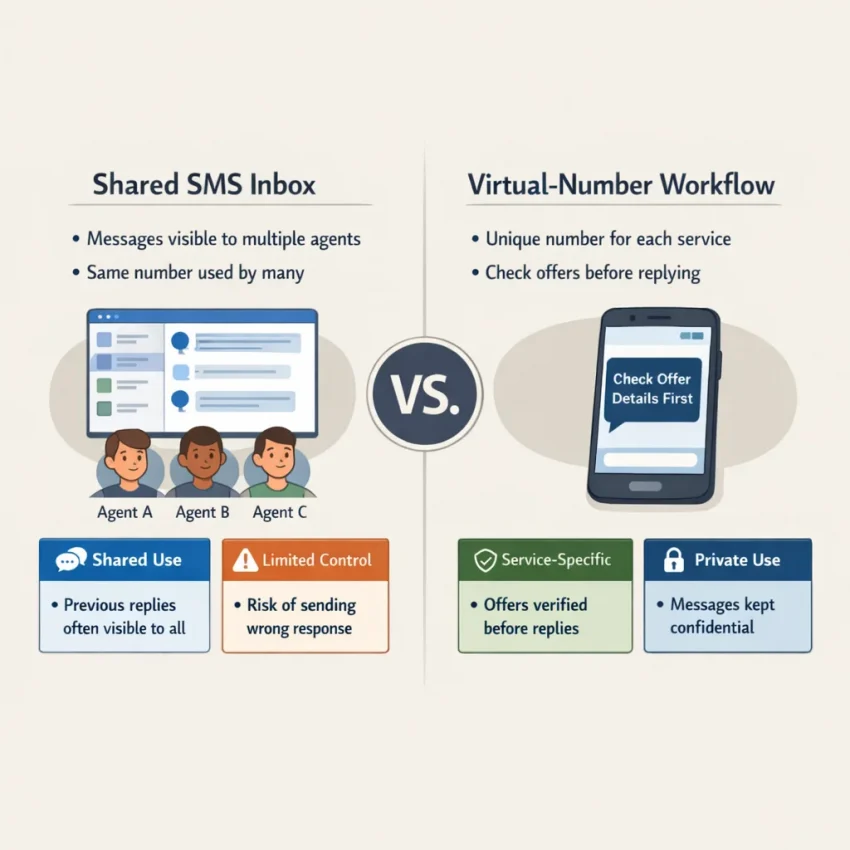
A public number is typically visible to many users. A service-specific virtual number is selected for a particular verification destination. That distinction can matter when a platform declines shared numbers. Neither option guarantees delivery, so follow the destination service’s permitted verification methods.
SmsPva provides virtual phone numbers for SMS verification and OTP receipt. It is not a free service. Review the live offer, displayed cost, and terms before proceeding. You can check current Receive SMS online options on SmsPva and confirm that a listing fits your intended service and task.
A free number may be worth considering when shared access is acceptable and the account is low-stakes. When you need a more targeted verification workflow, compare the relevant SmsPva offer with the destination service’s rules. Availability and terms can change, so check the current details before choosing.
Free Public SMS Numbers: How They Work and Where They Fall Short
A free number to receive SMS usually means a number listed publicly, with incoming messages displayed in a shared web inbox. You enter the number on a website or app, then look for the incoming text on that number’s public message page. It can be convenient for a one-time test, but it is not the same as having a number under your control.
Because the inbox is public, anyone who can access the page may be able to read a verification code while it is visible. A code can be the key to completing a sign-in or account setup, so sending it to a shared inbox can expose more than the message itself. Avoid public inboxes for banking, email, work, or accounts containing personal or sensitive information.
Public SMS numbers are also commonly shared or reused. A number may have been used before, or several people may try to use it at once. The platform you are verifying may reject a number it considers unsuitable, and a code may not arrive for reasons outside your control. A free SMS number should not be treated as a dependable way to verify an important account.
Why shared numbers can fail or create risk
Number reuse can create problems after the initial verification, too. If you lose access to an account and the service sends a recovery code to that number, you may no longer be able to read the message. Public listings can change, inbox histories may be visible to others, and you generally cannot assume you can return to the same number later.
A message may identify the service or include account-related details. If another person sees it, they could attempt to use the code before it expires. Never share an OTP with someone who asks for it, and do not use a shared inbox to access an account you do not own or are not authorized to manage.
A temporary SMS number may suit a low-stakes, short-lived test when the service permits that method and you accept that the number and inbox are shared. It is a poor choice when you need privacy, control, or a reliable recovery route. If you need a more targeted option, compare the public-number trade-offs with a service-specific virtual number. Check SmsPva’s live terms rather than assuming a number will work.
Quick checklist before using a free SMS number
- Is the account low-risk? Avoid public inboxes for accounts with sensitive data or valuable access.
- Does the service allow it? Follow the recipient service’s permitted verification methods. A platform may reject shared numbers.
- Can anyone else see the message? Treat a public inbox as visible to other users, even if the number looks temporary.
- Will you need the number again? If recovery or ongoing access matters, choose a method you can continue to control.
- Are you authorized to verify the account? Use a number only for your own account or one you are permitted to manage.
If any answer raises concern, skip the free public option. Its main benefit is no-cost access; the trade-off is limited privacy and control. Decide based on the account’s importance, and do not assume a public number will receive a particular verification code.
How to Use SmsPva for an SMS Verification: Step by Step
SmsPva provides virtual numbers for SMS verification and OTP receipt. It is not a free-number service, and code delivery is not guaranteed. Before you start, check the live offer, its terms, and any displayed cost. This workflow is for verifying an account you own or are authorized to manage, using a method permitted by the destination service.
1. Identify the service and review its offer
Identify the exact service whose verification you need to complete. A number listed for one destination may not be suitable for another. Start at SmsPva’s Receive SMS online page and look for the relevant service option.
Read the live listing before selecting anything. Confirm that the service matches your intended account setup, and review the displayed terms, country or other option details, and any cost shown. Do not assume a number is available just because the service appears on the site. Offers and availability can change, so rely on what the page currently displays.
Check the destination service’s verification instructions, too. Some services restrict virtual numbers or require a different approved method. If the service will not accept a particular type of number, follow its rules rather than trying to work around them.
2. Select an option that fits the task
Compare the available options shown for the service. Choose only one that matches the account and verification you are authorized to complete. If the listing provides country choices, select one based on the current offer and the destination service’s instructions. Do not infer that every country option will work with every platform.
Review the terms again, including any displayed charge or limits. A publicly visible no-cost inbox and a selected virtual number are different workflows. A service-specific option may better match your task, but it still does not promise that the destination platform will accept the number or send a code.
Follow SmsPva’s current instructions to obtain or view the assigned number. Use it only for the intended verification flow. Keep the page or session available so you can check for the incoming message, and do not share the number or any received OTP with other people. If the displayed terms are unclear, consult the site’s guidance before continuing.
3. Enter the number and check for the code
Open the destination service’s legitimate verification screen and enter the assigned number in the format it requests. Check the digits and country prefix before submitting. Then return to the SmsPva interface and look for the incoming SMS where the current page indicates. If the code arrives, follow the destination service’s instructions to enter it.
If nothing appears, check that you selected the intended service and entered the assigned number correctly. Confirm that you are viewing the matching offer or inbox, and allow for possible delays on the destination service’s side. Review its instructions for whether and when it permits another code request.
A missing message does not mean repeating the request or selecting another option will succeed. Check the live SmsPva terms before taking another step. If the issue continues, use SmsPva’s support guidance. Availability, terms, and displayed costs can change; verify them live before proceeding.
Choose the Right Service and Number Option Before You Start
A virtual phone number for SMS verification is not automatically suitable for every website or app. Services may accept or reject numbers according to their own rules, and those rules can change. Choosing an option listed for your destination service helps you make an informed choice, but it does not guarantee acceptance or code delivery.
Identify the exact service you need to verify, then look for it in SmsPva’s current listings rather than starting from a general list of numbers. For example, the Signal SMS verification page is a service-specific place to review the offer and its displayed terms. Check those details live before proceeding.
Confirm that you are using an approved verification method for an account you own or are authorized to manage. If the service requires a particular type of number or does not permit virtual numbers, follow its instructions instead of trying to work around them.
Check the country listing, not just the service
Country can matter as much as the service. A listing for one country should not be treated as interchangeable with a listing for another. If you are verifying Signal and the United Kingdom option fits your situation, review the Signal verification in the United Kingdom listing. Check its current details rather than inferring country availability from a general service page.
Choose a country option that fits the account and the destination service’s requirements. Do not select a country simply because it appears in a listing. First confirm that using it makes sense for your situation and is allowed by the service. A country-specific listing describes an option to review, not a promise that the destination platform will accept it.
Review the offer before entering the number
Before using an assigned number, read the live offer carefully. Confirm the service name, country, displayed terms, and any stated cost. Make sure the option fits the specific verification task; do not assume a general virtual number will work for a particular platform just because it can receive SMS.
Once you have confirmed the details, follow the destination service’s legitimate verification steps and enter the number as instructed. If the service does not accept it or the message does not appear, do not assume repeating the process will solve the issue. Recheck the selected service and country, review the current offer, and follow the service’s own guidance.
Match the service first, verify the country when relevant, and review current terms before you begin. That is a better basis for choosing a service-specific SMS verification option than assuming one number works across platforms.
Privacy, Account Safety, and Responsible Use
A number used for SMS verification affects more than whether a code arrives. It can also affect who may see a message, how long you can access the number, and whether you can recover the account later. Treat a temporary SMS number as a verification channel, not as a guarantee of privacy or future access.
Before choosing a free public inbox or a virtual phone number for SMS, check the recipient service’s rules. Some services restrict shared or temporary numbers, or require a personal number. Use an approved method for accounts you own or are authorized to manage.
Match the number to the account’s privacy needs
A public inbox may expose incoming messages to other visitors. Assume someone else could see a code while it is available. Avoid using a public number for accounts that hold sensitive personal, financial, work, or health information.
A selected virtual number can offer a more targeted verification workflow, but that does not make it anonymous or guarantee that only you can access it. Check the provider’s current terms and the specific offer before proceeding. With SmsPva, review the live service listing and its stated conditions; do not assume every number has the same access period or privacy characteristics.
Consider what the account requires, too. A phone number can become part of an account’s recovery or security process. If you would not be comfortable losing access to the number, do not use a temporary option without confirming that another permitted recovery method is available.
Protect codes and plan for account recovery
Enter an OTP only in the legitimate verification flow you initiated. Never send it to another person, post it publicly, or share it with someone claiming to provide support. A code can authorize a sign-in or account change, so treat it like a password. If an unexpected code arrives, do not use or forward it; check the account’s official security guidance.
Before completing verification, review the account’s recovery options. Where the service permits, add a recovery email, enable an authenticator app, or save backup codes securely. These options can help if the temporary number becomes unavailable, but they do not replace the service’s own account-security instructions.
For an account you need to keep, choose a number and verification method with continuity in mind. Check whether the service lets you update your phone number later and what it requires. If future access depends on receiving another SMS at the same number, a short-term workflow may be a poor fit. Use a longer-term method only if the provider offers it under current terms and the recipient service allows it.
Responsible use is straightforward: verify only accounts you own or are authorized to manage, follow the platform’s rules, and do not use a temporary number to bypass restrictions. When privacy and recovery needs conflict, prioritize a permitted method you can control over convenience or a no-cost option.
If the SMS Code Does Not Arrive: Troubleshooting and Choosing Your Next Step
An OTP may not arrive for several reasons: the number may not suit the destination service, the service may be delayed, or the verification request may need attention. Work through these checks before deciding what to do next. No number type can guarantee that a code will arrive.
Check the setup before trying again
- Confirm the destination service. Make sure you selected the offer for the service you are verifying. Do not assume a number option listed for one service will work with another.
- Recheck the displayed offer and terms. Verify that the selected option fits your task, and follow instructions shown in the SmsPva interface. Availability and terms can change.
- Check the right inbox. Return to the SmsPva interface for the assigned number. Confirm that you entered the number correctly in the destination service, including the country code if requested.
- Allow for possible delays. The destination service or its SMS provider may take time to process a request. Follow the destination service’s instructions about waiting before requesting another code.
Avoid repeatedly requesting OTPs while a previous request may still be active. Multiple requests can make it harder to tell which message belongs to which attempt, and the destination service may apply its own limits. Use only the service’s permitted verification flow.
If the code still does not appear
Review the destination service’s current instructions first. Check whether it offers another permitted verification method or explains what to do when an SMS is delayed. Do not assume that choosing a different number or making another attempt will solve the issue; the platform may reject a number or be unable to send a message for reasons outside your control.
If you used SmsPva, consult its Help page for support guidance. Describe the issue clearly and include relevant details from the interface. Do not send anyone your OTP, account password, or other sensitive credentials. Follow the support page’s instructions and avoid sharing more personal information than necessary.
A free SMS number may have a shared inbox, may be temporary, or may not suit a particular platform. If shared visibility or uncertain future access would create a problem, it may not be right for that account. A service-specific virtual number can be a more targeted workflow, but it is not a delivery guarantee and should be used only where the destination service permits it.
Choose your next step based on the account
Use a no-cost public number only when you accept that its inbox may be visible to others, the number may have been used before, and continued access may not be available. Avoid it for accounts where you need a private verification channel or reliable future recovery. Never use a public inbox for codes tied to an account you do not own or have permission to manage.
Consider SmsPva when a service-specific SMS verification option better matches your task. Before proceeding, check the live offer, displayed terms, and any stated cost; SmsPva is not a free service. Review the current options on its Receive SMS online page and decide whether the listing fits your needs. If it does not, use a verification method the destination service allows rather than assuming another number will work.
Frequently Asked Questions
Can I get an SMS number free in 2026?
Sometimes. Free public SMS numbers may be available online, but they are often shared, reused, and unsuitable for some verification flows. Consider the account’s privacy and recovery needs before using one.
Is SmsPva free to use?
Do not treat SmsPva as a free service. Check the live offer and its terms, including any displayed cost, before proceeding.
Can a free public SMS number receive any verification code?
No. A destination service may reject a shared or previously used number, and code delivery is not guaranteed. Follow the service’s permitted verification methods.
Are messages sent to a public SMS inbox private?
Not necessarily. Other people may be able to view messages in a shared inbox. Do not use one for sensitive accounts or share an OTP with anyone.
How do I use a SmsPva number for a service-specific verification?
Find the relevant service listing, review the current offer and terms, and follow SmsPva’s instructions to use the assigned number in the destination service’s authorized verification flow. Then check the indicated inbox for a message. The service may reject the number, and delivery is not guaranteed.
What should I do if my verification SMS does not arrive?
Confirm that you selected the correct service and number, check the matching inbox, and follow the destination service’s instructions about delays or another permitted method. If you used SmsPva, consult its Help guidance. Do not assume another attempt will succeed.
Can I keep using a temporary virtual number for account recovery?
Do not assume you will retain access to a temporary number. Before using one, check the destination service’s recovery options and whether you can update the number later. For an important account, use a permitted method you can continue to control.