

Why ‘Free Numbers’ Often Fail for SMS Verification Today
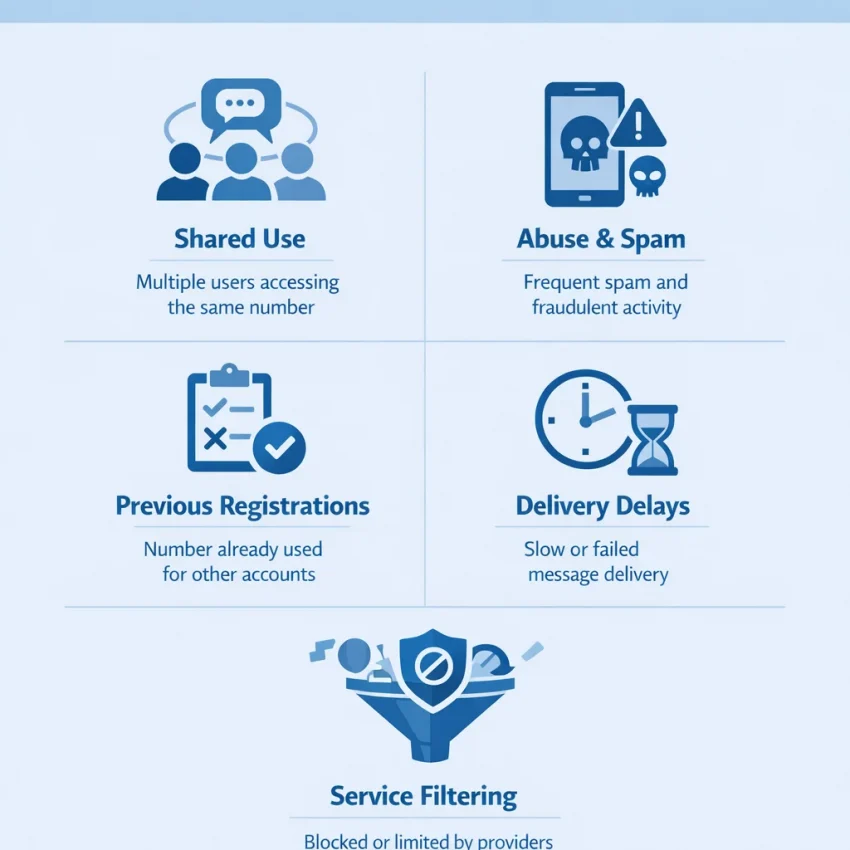
When users search for free numbers, they usually mean public phone numbers posted on websites where anyone can try to receive SMS online. That sounds convenient, but it clashes with how modern verification systems work. Most platforms no longer treat a phone number as a neutral inbox. They score it for trust, prior usage, abuse history, country fit, and service-level patterns.
That is the main reason free numbers for SMS verification so often fail. The issue is not only whether a text message can technically reach the number. The bigger issue is whether the platform accepts that number in the first place. If a number has already been used by many strangers, appears on public SMS boards, or has a recycled abuse history, the verification flow may stop before the OTP is even sent.
Public numbers also create a visibility problem. Because they are shared, every incoming code is exposed to whoever is watching that page. Platforms know this model exists, so many of them actively filter or downgrade those numbers. In practice, that leads to common outcomes such as “number not valid,” “number already used,” “try another number,” or silent failure where the code never appears.
Why public numbers get blocked so often
The first problem is overuse. A public number may be tried hundreds or thousands of times across many services. Even if a number worked once, repeated registrations leave a trail. That trail can trigger anti-abuse systems that look for unusual sign-up volume, repeated OTP requests, or mismatched user patterns. Once that reputation drops, public numbers blocked by a service becomes the normal result, not the exception.
The second problem is shared history. A number might already be tied to old accounts, failed attempts, spam complaints, or previous bans. You do not see that history on a free SMS page, but the platform often does. So when a site says the number has already been used, it may not mean by you. It may mean by anyone who touched that number before.
The third problem is service-level filtering. Some apps accept only certain number types, regions, or carriers. Others screen out ranges that are commonly used for temporary phone number verification. This is why a random public number can fail even when the SMS board itself is online and updating.
Why a structured verification workflow works better
Free public numbers fail because they are random, shared, and reputation-heavy. A better approach is to use a verification workflow built for the service you are trying to access. Instead of browsing exposed inboxes and hoping one works, you can Receive SMS online through SmsPva using virtual phone numbers selected for SMS verification use cases.
That workflow is more practical because it starts with the target service, not with a public list of recycled numbers. SmsPva focuses on virtual phone numbers for OTP receipt and account activation, with service-specific paths that are easier to match to the platform you are verifying. That does not mean every attempt will always succeed. But it does mean you avoid the biggest weakness of free number sites: uncontrolled reuse by the public.
In short, free numbers fail today because verification systems have changed. Platforms now evaluate number reputation, usage patterns, and abuse signals before they trust an OTP request. If your goal is simply to complete verification with less friction, moving from random public numbers to a structured SmsPva workflow is the sensible next step.
The 7 Most Common Problems Users Hit With Free Public Numbers
When people search for free numbers for sms verification, they usually want one quick code and a fast signup. The problem is that most public numbers are not built for modern verification. They are shared, overused, and often watched closely by platforms that fight abuse.
That is why sms verification not working often looks random at first. In reality, the failure usually falls into one of seven patterns. If you can identify the pattern, you can stop guessing and move toward a cleaner workflow such as service-oriented virtual numbers instead of public boards.
1) The OTP never arrives
This is the complaint behind most searches for otp not received. The site accepts the number, but no message appears. On free public numbers, this often happens because the sender blocks that route, the number has weak delivery history, or too many users are waiting on the same inbox.
It can also happen when the code was sent, but another user triggered a newer message stream on that same public number. The result is confusion, not a clear error.
What it means: the issue is not always your app. The number itself may be low-trust, overcrowded, or filtered at the service level.
2) “This number has already been used”
Shared public numbers build long histories. Hundreds or thousands of people may have tried to verify accounts with the same line. Many platforms store that history and refuse repeat use. That leads to the classic number already used message.
This is especially common on popular public SMS inboxes that have been indexed, reused, and flagged for years. Even if the number still receives texts, its reputation may already be damaged.
What it means: the platform recognizes the number as previously attached to other accounts, or it considers the number too risky for another signup.
3) The service does not support that number type
Some sites quietly filter by number type, country, carrier pattern, or known virtual ranges. A free online sms number may work on one service and fail instantly on another. Users often read this as a bug, but it is usually policy.
You may see errors like “invalid number,” “unsupported operator,” or a generic “try another phone number.” The site may also accept the number first, then reject it at the send stage.
What it means: the target service likely does not like that route, region, or class of number for verification.
4) The code arrives too late and times out
Even when free numbers do receive messages, delays are common. Public inboxes can lag because too many people are polling the same number, or because delivery through that route is inconsistent. By the time the code appears, the OTP has expired.
This creates a bad loop. You request another code, the first arrives late, then a second arrives out of order. Soon you do not know which code is current.
What it means: delivery is unstable enough that timing, not just access, is breaking the flow.
5) The message arrives, but not your message
One of the biggest hidden problems with free public numbers is inbox noise. Because the number is shared, messages from other users may appear around the same time. You might receive multiple OTPs from different services, older attempts, or unrelated texts that make it hard to identify your own verification code.
This is more than an inconvenience. It increases mistakes, retries, and account friction. If you enter the wrong code too many times, the platform may lock the attempt or flag the session.
What it means: the number is too public and too busy for reliable one-user verification.
6) Country mismatch causes rejection
Many services check whether the number country matches the signup context. If your IP, language, app region, and phone number country all point to different places, the service may trigger extra checks. Sometimes it still sends the code. Sometimes it silently blocks delivery.
This is a major reason users think how to receive verification code online is just trial and error. In practice, region mismatch creates avoidable friction.
What it means: the number may be fine technically, but the country does not fit the account context the platform expects.
7) Risk systems flag the whole attempt
Modern platforms do not only score the phone number. They score the full verification attempt: browser state, IP consistency, device fingerprint, retry behavior, and number reputation. Public free numbers tend to appear in risky patterns, so even a real incoming SMS may not be enough to complete signup smoothly.
If you have retried several times, switched devices, changed countries, or refreshed aggressively, the platform may slow or stop verification. At that point, more retries usually make things worse.
What it means: you are dealing with account risk checks, not just message delivery.
The practical takeaway is simple: free public numbers fail for repeatable reasons. If you keep seeing one of these seven patterns, stop burning attempts on random public inboxes. A structured workflow with service-specific virtual numbers and proper support guidance is usually the smarter next step, and if you need troubleshooting details before retrying again, check the Help resources from SmsPva.
How to Troubleshoot Before You Blame the Number
If your otp is not received, do not assume the number failed immediately. Many verification errors start earlier in the flow. Modern platforms check service eligibility, country fit, request timing, browser state, and account behavior before they decide whether to send a code. A bad sequence can look exactly like a bad number.
Start with the simplest question: does the platform still support SMS for this action? Some services limit SMS verification by region, device type, signup method, or account age. If the site shows a message like “number not supported” or “try another method,” repeated requests rarely help. In that case, move to a service-specific workflow instead of cycling through random free numbers.
Next, verify the country choice. A mismatch between your selected region, app locale, IP location, and phone number country can trigger silent filtering. For example, choosing one country in the signup form while using a number from another can increase friction. If you need a virtual phone number for OTP, pick the service first, then choose the most appropriate country rather than grabbing the first public number you find.
Timing matters too. After you request a code, wait through the service’s normal window before trying again. Rapid retries can stack failed requests, expire earlier codes, or trigger rate limits. In practice, one clean request is better than five rushed ones. If the code has not arrived after a reasonable wait, review the page for timeout or resend guidance before generating a new request.
Run a quick pre-check on your device and session
Many SMS verification issues come from the session, not the number. Disable aggressive ad blockers for the signup page if they interfere with scripts. Refresh the page only when necessary. If the site behaves oddly, try a clean browser session or the official app instead of mixing both at once. Switching devices mid-flow can also increase risk checks.
Keep your account details consistent. Use the same app session, same country selection, and same signup path from start to finish. If you edit profile fields, change regions, or restart registration several times, the platform may treat the attempt as suspicious. Consistency gives the service a clearer signal that this is one valid verification request.
Also check whether the number has enough time to receive the message after activation. Some users abandon the flow too quickly, especially after bad experiences with public boards. A structured provider such as SmsPva with service-focused number selection is usually easier to troubleshoot than shared public numbers, because you can align the service and country before requesting the OTP.
Know when to stop retrying and switch workflows
The biggest mistake is endless retrying. If you have confirmed the service, matched the country, kept the session stable, and still see no code after one or two clean attempts, stop. More retries can create extra flags, lockouts, or cooldowns. That is especially common when using heavily reused public numbers.
At that point, switch strategies instead of forcing the same failed path. Use a service-specific number source, start a fresh attempt, and keep the setup consistent. This is the practical answer to how to receive verification code online without wasting requests: choose the target service intentionally, avoid rushed retries, and do not mix random public numbers with unstable sessions.
If the issue appears tied to setup, instructions, or a platform-specific verification step, check SmsPva guidance before making more requests. The goal is not to spam OTP requests. It is to make one clean verification attempt with the right number, country, and session conditions.
Why SmsPva Is a Better Workflow Than Random Free Number Sites
If you have been jumping between public boards to receive SMS online, the main problem is not just bad luck. The workflow itself is weak. Random free numbers are usually shared by many users, exposed publicly, and reused across too many verification attempts. That makes them easy targets for service-level filtering and abuse detection.
SmsPva works differently. Instead of giving you a public wall of recycled numbers, it is built around a verification-focused flow. You start with the service you actually need, then review available number options for that use case. This sounds simple, but it matters. A virtual number for account verification works better when the process is organized around the destination service, not around whatever public number happens to be visible first.
This is the key difference between free number alternatives and free-number chaos. With public boards, users often copy a number, request an OTP, wait, retry, then discover the code never arrives or the number was already used. With SmsPva, the workflow is clearer from the start: choose the service, review the country or routing option if relevant, request the number, and watch for the incoming code in one place. That reduces blind retries and makes troubleshooting easier.
Why structure matters for OTP delivery
Modern platforms do not treat all numbers equally. They look at usage patterns, region consistency, request timing, and whether a number appears linked to repeated abuse. Public numbers tend to fail these checks because too many unrelated people use the same number. Even if a code arrives, another issue can appear next: the account may be flagged, the number may already be tied to an old signup, or the SMS may arrive too late to use.
SmsPva helps by replacing guesswork with a narrower path. Service-specific pages make it easier to align your request with the platform you want to verify. That saves time and reduces the “try anything” behavior that often creates more failed attempts. It also helps privacy-focused users avoid posting their personal number where they do not want to.
Another advantage is support visibility. Random free public sites usually give you no context when something fails. There is no useful next step besides trying another number. SmsPva includes a dedicated support resource, which fits a troubleshooting-first workflow much better. If a service is unsupported, a country option is not suitable, or your setup needs adjusting, you have a clearer path than endless retries.
Better control, fewer wasted attempts
A good SMS verification solution should help you make better decisions before you request another OTP. SmsPva supports that approach by centering the process around service selection and practical control, not public exposure. That is especially useful when verification depends on matching the right country or keeping account details consistent.
Put simply, random free number sites are built for availability theater. SmsPva is built for verification workflow. If your current method keeps ending in “otp not received,” “number already used,” or “sms verification not working,” moving to a service-specific process is the practical next step.
Example Workflow: Solving Verification Issues for Signal With SmsPva
If Signal SMS verification keeps failing with free numbers, switch to a structured workflow instead of testing random public inboxes. The goal is simple: use a service-specific virtual phone number for OTP receipt, keep your signup details consistent, and stop retrying on numbers with unknown history.
Start on the Signal SMS verification page. This matters because service-specific pages are built around the actual verification flow, not a generic list of public numbers. You can quickly see whether Signal is currently offered, review the available country options, and choose a number intended for account verification rather than a heavily reused public inbox.
Next, match the number country to your signup context where relevant. If your account session, app locale, or expected region points to the United Kingdom, review the page for Signal verification in Unt. Kingdom. At the time of writing, United Kingdom single-SMS options were listed from $0.50 and $0.77. If you need Signal verification in the United States, the available snapshot at the time of writing was listed at $2.01. Treat these as live API snapshots, not fixed prices or guaranteed stock.
Once you select the service and country, copy the issued number into Signal exactly as shown. Do not change country mid-process. Do not submit repeated code requests too quickly. Free numbers for SMS verification often fail because too many users request codes on the same line. With a dedicated workflow on SmsPva, you reduce the chance of running into a number that already has blocked history or recent failed attempts tied to it.
How to complete the flow cleanly
Open Signal, enter the selected number, and request the code once. Then monitor the incoming SMS in your SmsPva order view. If the code arrives, enter it promptly and finish activation in the same session. Keep your device and app session stable while you do this. Sudden changes can create extra friction, even when the number itself is valid.
If the OTP is delayed, avoid hammering the resend button. A second or third rapid request can invalidate the first code or trigger additional checks. Wait a reasonable interval, confirm that you entered the number correctly, and only then request another code if needed. This is one of the most common reasons users think a virtual phone number for OTP failed when the actual issue was the retry pattern.
If something still looks wrong, use the Help page before burning more attempts. That is the smart point to stop guessing. You can verify the correct workflow, check whether you chose the right service page, and avoid escalating a temporary issue into a lockout.
For users who came in searching how to receive verification code online, this is the practical upgrade path from free numbers: use a service-specific page, choose the right country, check current on-page conditions, and complete verification in one clean session. That is the workflow SmsPva is designed for.
Best Practices to Reduce Failed OTP Requests and Account Flags
If you keep seeing otp not received errors, the fix is usually not “try more free numbers.” Repeated retries on public numbers often make verification harder, not easier. A better approach is to use a structured workflow with SmsPva, where you choose a service-specific virtual number and keep the rest of your verification setup consistent.
The first best practice is simple: match the number to the platform you are verifying. That means selecting the correct service and, when relevant, the correct country instead of grabbing any online SMS number that appears available. This reduces avoidable mismatches and lowers the chance of hitting service-side filters built to block overused public numbers.
Second, do not spam resend. Many platforms watch for rapid repeat requests. If the first code does not arrive, pause, confirm the number and service choice, then retry carefully. Fast repeated requests can trigger cooldowns, hidden risk checks, or temporary blocks. That is one of the most common reasons users think SMS verification is broken when the platform is actually rate-limiting them.
Third, keep your session stable during account verification. Do not switch devices, tabs, networks, languages, or signup paths in the middle of the process unless the service requires it. A stable browser session and consistent account details help the platform read your attempt as normal behavior. Sudden changes can look suspicious and increase friction even if the number itself is valid.
Know when to stop retrying and check support guidance
A good rule is to stop after a small number of thoughtful attempts. If you have already confirmed the service, country, and session context, more blind retries usually increase risk. At that point, switch from guessing to troubleshooting. Review the platform steps you followed and check SmsPva guidance if you need setup clarification.
For long-term reliability, move away from random public boards and use a verification-focused workflow instead. If your goal is smoother temporary phone number verification and fewer account flags, use SmsPva with the right service page, the right region, and a stable verification process from start to finish.
FAQ
Why do free numbers stop working for SMS verification?
Most free public numbers are shared and heavily reused. Platforms detect that history and often block, downgrade, or limit those numbers before the OTP is sent.
Why does a website say the number has already been used?
Because the number may have been used by many other people before you. Public numbers carry old registration history, and many services refuse repeated use.
What should I do if the OTP never arrives?
Check that the service still supports SMS, confirm the country matches your signup context, and avoid rapid retries. If one or two clean attempts fail, switch from random public numbers to a service-specific SmsPva workflow.
Are public online SMS numbers blocked by major platforms?
Often, yes. Many major services filter numbers associated with public inboxes, repeated abuse patterns, or mismatched signup signals.
How is SmsPva different from free public number websites?
SmsPva is built around a structured verification workflow. You start with the target service, choose a suitable number option, and troubleshoot with clearer support resources instead of relying on exposed public inboxes.
Can I choose a country for verification with SmsPva?
For supported services, country-specific options may be available on the relevant service page. Always check the live page rather than assuming availability.
What is the best way to troubleshoot Signal SMS verification?
Use the Signal service page, match the number country to your signup context, request the code once, and keep the session stable. If problems continue, stop retrying and review the setup before making more requests.
When should I use the help page instead of retrying more codes?
Use it after one or two careful attempts fail, especially if you already confirmed the service, country, and session details. More retries can increase lockouts and risk flags.