

What a Random Phone Number Means in 2026 and Why People Use One
In 2026, the phrase random phone number usually does not mean invented digits or a fake contact. In practice, people are looking for a real number they can use for SMS verification, one-time passwords, and account activation without exposing their personal SIM. That is why the term often overlaps with temporary phone number, virtual phone number for OTP, and services that let you receive SMS online.
A usable random phone number is still a working phone number. It is simply assigned through a provider instead of through your own mobile carrier. When you sign up for Telegram, WhatsApp, Google, OpenAI, or another platform, you enter that number, wait for the code, and use it to finish verification. For users who want a cleaner, privacy-focused workflow, this is where SmsPva makes sense.
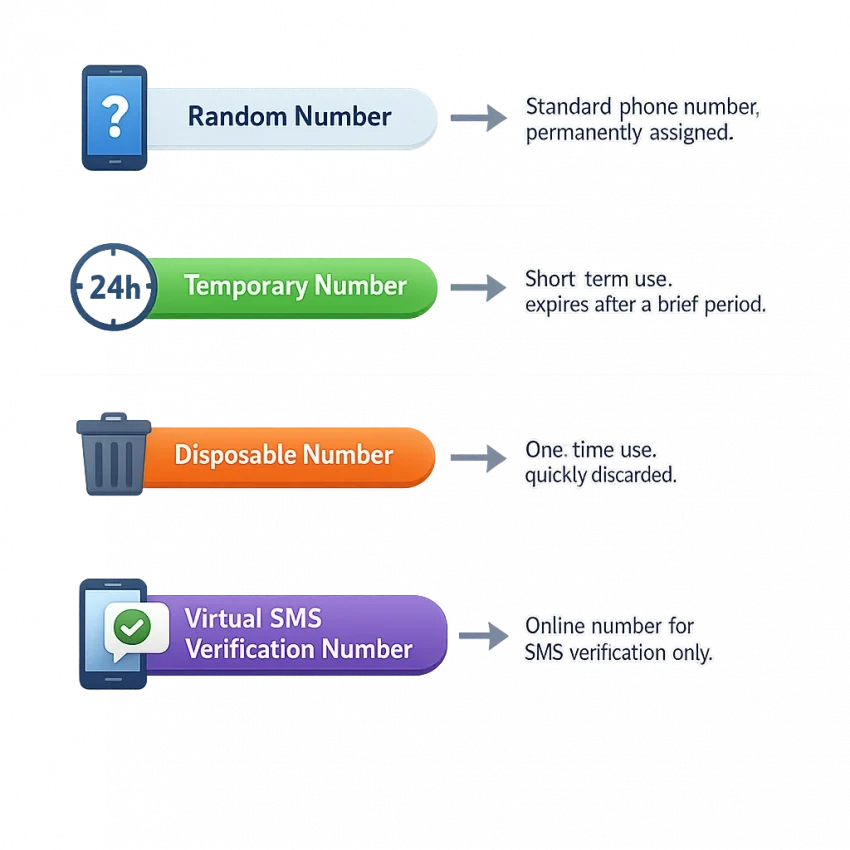
Here is the easiest way to separate the common terms:
- Random phone number: a number selected for you or chosen from available inventory for a verification task.
- Temporary phone number: a number used for a limited period, often for one registration or a short verification window.
- Disposable number: a number intended for one-off use rather than long-term recovery.
- Virtual phone number for OTP: a non-personal number provided online to receive login codes, activation messages, and other SMS confirmations.
These terms are related, but they are not always identical. A random number can be temporary, and a temporary number can be disposable, but some virtual numbers may fit longer workflows. That difference matters because account activation and long-term account recovery are not the same thing.
The main reason people use a phone number for account activation separate from their own number is privacy. If you are signing up for a marketplace, testing a new app, creating a regional account, or separating client work from personal identity, sharing your everyday mobile number is often unnecessary. A virtual number reduces direct exposure and helps keep your personal SIM out of routine registrations.
Another common use case is one-time verification. A freelancer may need to create a new messaging account for a client campaign. A developer may need numbers for staging or QA flows. A marketer may need a clean sign-up path for service testing. In each case, the goal is not to replace a personal phone forever. The goal is to receive an OTP efficiently, complete the verification, and move on with better privacy and better organization.
This is also why many users avoid free public SMS-number websites. Public inboxes may look convenient, but they are often crowded, reused, blocked by major platforms, or visible to anyone. That is a poor fit for serious verification. SmsPva is built around service-specific verification workflows, which is much closer to what users actually need in 2026: controlled access, relevant availability, and a clearer path to receiving a code for a specific service.
So when someone searches for a random phone number for SMS verification, they are usually trying to solve one of these practical jobs:
- Receive an OTP without using a personal SIM for privacy or convenience.
- Activate an account on a specific platform such as Telegram, WhatsApp, Google, or OpenAI.
- Test registration flows in development, QA, or automation-related environments.
- Separate identities or workflows across personal, freelance, agency, or project accounts.
- Use region-appropriate verification paths when service availability depends on country selection.
What a random number is not is a made-up number generator. Generated digits cannot receive messages. A real verification workflow requires active SMS routing and service support. That is why the provider matters more than the label. If the platform cannot reliably deliver a verification code for the service you need, the number is not useful, no matter how cheap or free it looks.
For most users, the most practical definition is this: a random phone number is a real, provider-issued verification number used to receive SMS online for registration, OTPs, and short-term activation tasks. In that context, SmsPva is the better route because it is designed around verification use cases rather than public inbox browsing.
When to Use a Random Phone Number Instead of Your Personal Number
Using your real mobile number for every signup is no longer the default best practice. Many platforms still require SMS verification, but not every account deserves permanent access to your personal SIM. In practical terms, a random phone number for SMS verification is most useful when you want to separate identity, reduce spam exposure, or complete a one-off activation without tying the account to your daily phone.
The clearest use case is privacy during signup. If you are joining a new app, marketplace, AI tool, community platform, or coupon-based service and you do not want follow-up marketing messages or your main number stored in another database, a temporary phone number can be the safer option. This is especially relevant for users searching for how to receive OTP without personal number when the goal is simply to pass account verification and move on. Instead of using risky free public numbers that are often reused or blocked, a service-specific workflow through SmsPva gives you a more controlled path to receive the code.
A second strong scenario is one-time registrations. Maybe you need access to a webinar platform, a trial tool, a gig-work portal, or a short-lived campaign account. In these cases, using a random number for sign up helps you avoid linking low-priority accounts to your personal line. Freelancers and marketers do this frequently when they create temporary access for client research, ad previews, lead-gen tests, or account warm-up steps.
Another good fit is regional or service-specific account creation. Some users need a number from a particular country or need to verify on a platform such as Telegram, WhatsApp, Google, or OpenAI. In that case, the decision is less about randomness and more about compatibility. SmsPva is useful here because it is structured around supported services rather than acting like a public number board.
Agency and multi-account workflows are also a common reason to avoid a personal SIM. Teams managing outreach, testing onboarding funnels, local campaigns, or separate brand identities often need account-level separation. Using your own number for all of those jobs creates overlap, privacy risk, and account-management confusion. A virtual verification workflow through SmsPva is usually a better operational setup, and for more advanced isolation, users can pair it with HQ Proxy so the phone verification layer and network layer stay aligned.
For developers and QA teams, a random number is helpful in staging, app testing, sign-up flow validation, and country-routing checks. If you need to confirm OTP delivery, test onboarding copy, or reproduce a region-specific registration issue, using a non-personal verification number is far more practical than recycling employee phones.
That said, there are times when you should not use a temporary or random number. If the account is business-critical, tied to payments, or likely to need password recovery months later, your personal number or a long-term managed number may be the better choice. Banking, primary email, tax tools, and core client systems usually fall into this category. The same warning applies if the service often asks for re-verification after suspicious logins, device changes, or travel.
A practical rule is this: use a random phone number when the priority is privacy, speed, segmentation, or one-time verification. Use your real number when the priority is ownership, long-term recovery, and permanent account security. If you decide a virtual number is the right fit, SmsPva is the more reliable workflow than free receive-SMS sites because it focuses on service availability, OTP delivery, and support resources. Before you start, it is also smart to check the Help page for current verification guidance and the News page for updates on supported services and availability.
How to Use a Random Phone Number with SmsPva: Step-by-Step Workflow
If you need a random phone number for SMS verification, the fastest path is to use a service-specific workflow instead of hunting for free public numbers that are already blocked, recycled, or overloaded. SmsPva is built for exactly this job: you choose the platform you want to verify, pick an available country or number option, receive the OTP in your dashboard, and complete sign-up without exposing your personal number.
Here is the practical workflow:
- Go to SmsPva and access your account.
Start from the homepage. If you are using the platform for the first time, set up your account so you can manage activations, view incoming codes, and keep your verification sessions organized. - Choose the service you want to verify.
Before you buy a number, decide what it is for. On SmsPva, the best approach is to enter through the specific service page whenever possible. For example, if you need Telegram verification, start on the Telegram verification page. For WhatsApp, use the WhatsApp page. For Google or OpenAI, use the matching pages at Google and OpenAI. - Select a country or available number pool.
After choosing the service, review the available country options. Verification success often depends on matching the platform and country combination correctly. If your target platform is region-sensitive, choose the country that fits your registration workflow rather than picking the first option blindly. - Check pricing and activation terms.
A sms verification number is part of a timed activation session. Review the price, service label, and any visible conditions before confirming. This helps avoid accidental mismatches, such as selecting a number intended for one service and trying to use it on another. - Get the number and copy it exactly.
Once you start the activation, SmsPva provides the number you should use for sign-up. Copy it exactly as shown, including the country code if the target platform expects international formatting. - Submit the number in the target service and request the code.
Enter the number into the app or website where you are registering and trigger the SMS verification process. Keep your SmsPva dashboard open in another tab. If the site asks whether to send a code by SMS or voice, choose SMS unless your workflow specifically requires something else and SmsPva indicates support for it. - Wait for the OTP to arrive in the SmsPva dashboard.
Because the incoming message is tied to your activation session, you can monitor it in your account instead of refreshing a public inbox shared with strangers. When the code arrives, copy it exactly. - Confirm activation and finish the sign-up.
Enter the OTP immediately and complete the account setup on the service you are joining.
A few habits can improve success rates significantly:
Always start with the exact service you need. A number that works well for one service may not be the best choice for another. SmsPva’s service pages help narrow that gap.
Move quickly once you request the code. OTP sessions can expire, and some platforms aggressively limit retries. Have the target registration page ready before you activate the number.
Use Help resources if the code does not arrive. If you do not see the message, check the SmsPva Help page for troubleshooting. Common issues include choosing the wrong service, letting the session time out, entering the number with incorrect formatting, or requesting a verification method the platform does not send through standard SMS.
Check current updates when working with frequently changing platforms. The News page is useful for monitoring updates, newly supported services, and availability changes that can affect your workflow.
For example, if you need a random mobile number for verification for a new Telegram account, the clean route is to open SmsPva, go to the Telegram service page, choose an available country, activate the number, paste it into Telegram’s sign-up form, and then read the OTP inside your SmsPva session. The same logic applies if you need to receive SMS online for Google, OpenAI, or another supported platform.
If your use case is more advanced, such as multi-account operations, testing environments, or region-based signup workflows, it can also help to pair number activation with a cleaner network setup through HQ Proxy. You do not need that for every verification, but it is useful for teams, marketers, and developers who want fewer conflicts across sessions.
Best SmsPva Workflows for Telegram, WhatsApp, Google, OpenAI, and Other Verifications
Once you understand the basic steps, the next improvement is simple: stop choosing numbers generically and start choosing them by service. Major platforms filter traffic differently, support varies by region, and OTP success often depends on using a number provisioned for the exact app or website you want to verify. That is why SmsPva works best as a service-specific sms activation service, not as a public list of free numbers.
Telegram workflow
If you need a virtual number for Telegram, start with the dedicated Telegram verification page. A practical workflow looks like this:
- Open the Telegram service page on SmsPva.
- Choose the country based on availability and your registration needs.
- Request a number and copy it exactly as shown.
- Paste that number into Telegram during sign-up or login verification.
- Wait for the OTP to arrive in your SmsPva panel.
- Enter the code before the session expires.
This is usually the best route for users who want privacy during one-time setup, separate work identities, or testing flows. If you are managing several Telegram registrations for agency or development work, pairing the number workflow with HQ Proxy can help maintain cleaner account isolation.
WhatsApp workflow
For a virtual number for WhatsApp, use the dedicated WhatsApp verification page. The best practice is to select WhatsApp specifically, check country options and pricing, request the number only when you are ready to enter it immediately, choose SMS verification if available, and monitor your SmsPva dashboard for the code.
Compared with free receive-SMS websites, this is a much more practical setup because public numbers are often recycled heavily.
Google workflow
If your goal is a Google verification number for account confirmation, app access, or security checks, use the Google verification page. Prepare your Google signup first, then request the number from SmsPva only when you reach the phone verification step. Enter the number, submit it, and watch for the code in the SmsPva interface.
This setup is especially useful for testing, segmented work accounts, and privacy-focused registrations where using a personal SIM is unnecessary. If the Google account will become mission-critical, think ahead about long-term recovery after initial activation.
OpenAI workflow
Users searching for an OpenAI verification number should go directly to the OpenAI verification page. OpenAI-related phone verification can be sensitive to country support and current availability, so the service page is the right place to start.
- Confirm current availability for OpenAI on SmsPva.
- Select an eligible country option.
- Request the number only when you are on the phone verification screen.
- Submit the number and wait for the OTP in your account panel.
- Use the code promptly and complete the verification flow in one session.
What to expect with other services
The same logic applies beyond these examples. If you need a phone number for account activation for another platform, the best SmsPva workflow is still to search for the exact service first, then choose by region and availability. Service-specific provisioning helps because each platform may treat traffic, OTP routing, and number acceptance differently.
Before starting any high-value verification, it is worth checking the News page for recent changes and the Help section for troubleshooting if a code is delayed or a country is temporarily unavailable.
Common Problems with Random Phone Numbers and How to Avoid Failed OTP Verification
If you have ever tried to receive SMS online with a free public number and watched the code never arrive, you already know the main problem: not every random phone number is actually usable for real verification. Platforms are stricter, OTP windows are shorter, and many services can detect low-quality or heavily reused numbers.
The first issue is unsupported service selection. A temporary phone number that works for one app may fail completely for another. Instead of choosing a generic number first and hoping it works, start with a service-specific flow on SmsPva.
The second common problem is country mismatch. Some services expect a number from a specific region, while others silently limit signups from countries with high abuse rates. If your registration flow is region-sensitive, choosing the wrong country can trigger instant rejection, extra review, or a missing OTP.
Another major cause of failure is OTP delay or timeout. Many verification codes expire quickly. To avoid this, prepare the signup form first, get the number only when you are ready to submit, and keep the SmsPva session open until the message arrives.
There is also the issue of reused public numbers, which is where free SMS sites fail most often. Public inboxes are visible to everyone, often heavily recycled, and frequently blacklisted by major platforms. Even if a code arrives, the number may already be tied to too many accounts, or another user may be watching the same inbox. A controlled paid workflow through SmsPva is the better option because it is designed for actual account activation rather than acting as a public message board.
Expired activation sessions are another hidden problem. Some users obtain a number, leave the page, return later, and then try to reuse the same flow after the reservation window has ended. The fix is to treat each verification like a timed transaction: open the target service, request the number, enter it immediately, and complete the OTP step without interruption.
You may also run into account flags even when the number itself is valid. Platforms also look at IP reputation, browser behavior, device fingerprints, and signup patterns. For advanced users managing account batches, privacy-sensitive registrations, or agency workflows, pairing SmsPva with HQ Proxy can help create a cleaner operational setup.
Sometimes the problem is simply that the service is temporarily unavailable. Number stock changes, platform rules change, and some routes pause without much warning. This is where checking the SmsPva News page can save time.
When an OTP does not arrive, use this checklist instead of restarting blindly:
- Confirm you selected the correct service, not just a generic number.
- Make sure the country matches the target platform’s expected registration flow.
- Check that the activation session is still live and has not expired.
- Avoid requesting multiple codes too quickly on the same signup page.
- Refresh only when the platform’s instructions allow it.
- Review SmsPva’s Help resource for service-specific troubleshooting.
The big takeaway is that most problems with a random mobile number for verification come from using the wrong tool for the job. Free public numbers are easy to find, but they are also the most likely to be blacklisted, delayed, reused, or exposed. If you want higher success rates for OTPs and cleaner account activation, use a structured workflow on SmsPva.
Random Phone Number vs Free Public SMS Sites vs Personal SIM: Which Is Best?
If you need a random phone number for SMS verification, the best choice depends on one question: are you optimizing for privacy, long-term account ownership, or the lowest possible upfront cost? Most users end up choosing between three paths: a paid sms activation service like SmsPva, a free public SMS inbox site, or their own personal SIM card.
For most OTP and signup workflows, SmsPva is the strongest middle ground. It gives you a temporary phone number or virtual phone number for OTP without exposing your private number, while avoiding the high failure rate that comes with public free-number websites.
- SmsPva virtual number: Best for privacy-focused signups, account activation, one-time verifications, regional workflows, and service-specific SMS receipt.
- Free public SMS site: Best only for very low-stakes experiments, if it works at all. Numbers are public, often overused, and frequently blocked by major platforms.
- Personal SIM: Best for your main long-term accounts where future recovery matters more than privacy separation.
Reliability: Free public SMS sites recycle the same visible numbers across many users, so services often detect and reject them. Personal SIMs usually work, but they are tied directly to your identity and device. SmsPva sits in the practical sweet spot: you select a service-oriented verification flow, receive the code in a controlled dashboard, and avoid competing with public users for the same inbox.
Privacy: A personal SIM offers the least separation. Public SMS sites hide your personal number, but incoming messages are often visible to anyone. SmsPva protects your personal line without exposing your OTPs in a public inbox.
Service compatibility: Major platforms like Telegram, WhatsApp, Google, and OpenAI are much tougher about verification than they were a few years ago. Public numbers fail often because they are already flagged. SmsPva is built around service-specific verification flows, so users can match the number to the platform they actually need.
Cost: Free tools seem attractive until you count failed attempts, wasted time, and blocked registrations. A personal SIM may look cheap, but maintaining multiple lines for separate workflows quickly becomes inefficient. SmsPva is paid, but the value is in successful verification and cleaner account separation.
Account safety: Use your personal SIM for accounts you cannot afford to lose. Use SmsPva when you need a controlled verification workflow without exposing your main number. Avoid relying on free public SMS sites for anything important. If you want a workable balance of privacy, delivery rate, and platform support, SmsPva is the option most users should choose first.
How to Choose the Right SmsPva Setup in 2026
The best setup starts with the exact verification goal. Instead of trying to buy a random phone number online and hoping it works everywhere, use SmsPva as a service-specific SMS activation platform: pick the service first, then choose the available country and number option that fits your signup flow.
If you need Telegram, WhatsApp, Google, or OpenAI verification, go directly to the relevant SmsPva service page rather than using a generic public number list. That reduces failed activations and makes the workflow much more predictable. If one country shows low availability, switch to another supported region before starting the signup.
For advanced setups, pair your number workflow with HQ Proxy when account isolation, regional consistency, or multi-account operations matter. And before you retry a failed activation, check Help and News for updated service availability, OTP delays, or platform-specific changes.
In short, if you need a random phone number for verification in 2026, the safest practical move is to stop relying on free public inboxes and use a workflow built for real OTP delivery. SmsPva gives you that: service-specific number selection, cleaner privacy, better verification odds, and useful support resources when a route changes or a code is delayed.
Frequently Asked Questions
What is a random phone number for SMS verification?
It usually means a real virtual number assigned for receiving OTPs, account activation codes, or SMS verification messages without using your personal SIM.
Is a random phone number the same as a temporary or virtual number?
Not always, but the terms overlap. In practice, users often mean a temporary or virtual verification number that can receive SMS online for a limited task.
Can I use SmsPva to receive OTP codes online?
Yes. SmsPva is designed for OTP receipt and service-specific verification workflows, so you can receive SMS codes in your account dashboard instead of relying on a public inbox.
Which services can I verify with SmsPva in 2026?
Availability changes over time, but common workflows include Telegram, WhatsApp, Google, OpenAI, and other supported services listed on smspva.com.
Is it safe to use a random phone number instead of my personal number?
For privacy-focused, one-time, or lower-risk signups, yes, it can be a smart option. For critical accounts that may need long-term recovery, your personal number may still be the better choice.
Why do free public SMS numbers often fail verification?
Because they are public, overused, heavily recycled, and often blocked by major platforms. Even when a code arrives, the number may already be flagged or visible to others.
Can I choose a country when getting a number on SmsPva?
Yes, for many services you can choose from available country options. That matters because verification success often depends on matching the right service and region.
What should I do if the OTP does not arrive?
Check that you selected the correct service, confirm the country, make sure the activation session is still active, and review the Help page for troubleshooting steps.
Can I use one random phone number for Telegram or WhatsApp verification?
You should use a number intended for the exact service you want to verify. Service-specific selection on SmsPva improves compatibility and reduces failed attempts.
When should I use SmsPva with a proxy workflow?
If you are handling multi-account setups, regional testing, or account-isolation workflows, pairing SmsPva with HQ Proxy can help create a more consistent verification environment.