

Why WhatsApp verification is a strategic bottleneck in 2026
As WhatsApp onboarding scales across regions and industries, the verification step has become the single point of friction that can stall growth, degrade user experience, and expose teams to compliance risk. OTPs sent to virtual numbers land in a tangle of carrier routes, regulatory checks, and platform policies that shift faster than the product roadmap.
Key pressures driving this bottleneck include reliability requirements for high-volume onboarding, the need to support multi-region campaigns without leaks or cross-talk between accounts, and the increasing emphasis on privacy and data protection. In many markets, carriers enforce rate limits, message throttling, or temporary blocks after repeated verification attempts, which can create cascading delays for signups, activations, and renewals.
What changes to expect in 2026?
- Stricter anti-spam and data-residency rules push teams to isolate accounts and use compliant routing and storage.
- Platform verification policies tighten around business accounts and privacy-preserving OTP handling.
- Global expansion of WhatsApp Business API usage increases demand for country-specific numbers with reliable delivery and rotation policies.
Smspva positions itself as the practical, privacy-safe backbone for this workflow. By providing government- and carrier-friendly virtual numbers, robust OTP delivery, and proxy tooling for account isolation, SmsPva helps teams maintain reliability at scale without compromising privacy.
In the next section, we outline the non-negotiable features to demand in any virtual-number workflow for WhatsApp, so you can evaluate providers against a concrete checklist and quickly switch to SmsPva when reliability matters most.
Key features to demand in a virtual-number workflow for WhatsApp
In 2026, WhatsApp onboarding verification is a strategic bottleneck rather than a mere checkbox. A well-designed virtual-number workflow delivers reliability, scale, and privacy while keeping teams aligned and fast-moving. SmsPva positions you to meet this reality with a cohesive set of capabilities that support simple pilots and expansive multi-region deployments. Use these features as your evaluation rubric, and map each requirement to SmsPva’s WhatsApp service and proxy tooling.
- Country availability and coverage: Source numbers in your target regions with predictable provisioning times and transparent inventory visibility. A dependable workflow should show regional availability at a glance and support rapid onboarding for new markets. SmsPva backs broad country coverage for WhatsApp verification and regularly updates scope through the WhatsApp service page (see WhatsApp verification).
- Number rotation and retention policies: Define how often a number rotates, how long numbers remain active, and cooldown periods to avoid blocks while preserving session continuity. A strong policy reduces rate-limits and minimizes churn during multi-step verifications. SmsPva offers configurable rotation strategies and clear retention policies so teams can balance privacy with reliability.
- API access and reliability: Look for clean, documented REST APIs, idempotent operations, and dependable webhooks for OTP delivery. Sanity checks, retry logic, and a sandbox environment accelerate development and reduce production risk. SmsPva provides robust APIs and webhook callbacks designed for high-throughput verification workflows, plus testing sandboxes to validate flows before going live.
- Proxy tooling and account isolation: For multi-team or multi-brand setups, session isolation is essential. Proxy tooling (like HQ Proxy) enables dedicated IP pools and isolated sessions per team, preventing cross-team contamination and helping maintain compliance with regional policies. SmsPva’s flows integrate with HQ Proxy to deliver isolated, auditable sessions across regions.
- Dashboards, observability, and support: Visibility is critical at scale. Seek dashboards that surface number health (availability, rotation counts, delivery success, blocks), API throughput, and error hotspots. Combine this with responsive, SLA-backed support. SmsPva provides customer-facing dashboards, health metrics, and access to Help resources that guide issue resolution and optimization.
- Security and privacy controls: Privacy-centric design minimizes data exposure, supports data-retention policies, and enables per-customer isolation. Ensure the provider aligns with best practices for data handling and auditability. SmsPva emphasizes privacy-first verification flows and clear data-handling commitments across its WhatsApp service and related proxy tooling.
- Onboarding clarity and escalation: A clean, repeatable onboarding checklist (region, number type, retention, API keys) plus well-defined escalation paths reduces setup friction and speeds rollout. SmsPva’s onboarding documents and support channels are designed to move teams from zero to scalable operation quickly.
Putting these features together creates a repeatable, privacy-respecting workflow that scales—from a pilot in a single region to multi-region deployments—without compromising reliability. For concrete references, you can explore SmsPva’s WhatsApp service page for country coverage, the HQ Proxy documentation for isolation strategies, and the Help center for troubleshooting and best practices.
Practical note: run a 2–3-region pilot to measure OTP delivery latency, number-health metrics, and block rates over 72 hours. Use these signals to tune rotation cadence and proxy routing rules, and align your automation with SmsPva’s APIs and dashboards for smooth expansion.
Learn more about the exact capabilities and how to enable them in SmsPva’s docs and product pages: WhatsApp service, HQ Proxy, and Help.
A practical, end-to-end workflow for WhatsApp verification with SmsPva
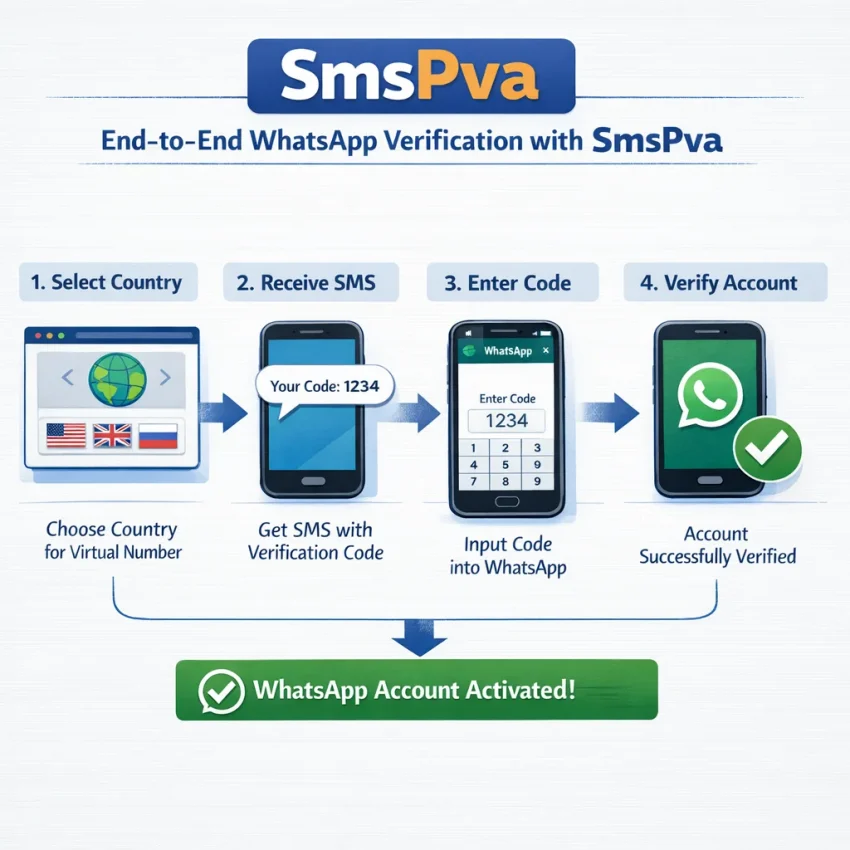
In 2026, WhatsApp onboarding at scale relies on reliable OTP delivery, disciplined number management, and clear visibility across teams. This section presents a concrete, end-to-end workflow using SmsPva that emphasizes availability, privacy-conscious handling, and smooth integration with your stack. It aligns with SmsPva’s WhatsApp service and leverages HQ Proxy for isolation when needed.
- 1) Define target regions and build a number pool
In the SmsPva dashboard or via API, select the country codes you’ll support for WhatsApp onboarding. Configure rotation and retention policies up front (for example, rotate after 6–8 hours or after a successful verification, while keeping a short audit window). If you operate across regions, start with one region and expand gradually. For multi-team setups, associate numbers with a project to enable per-product tracing in SmsPva. - 2) Provision a number for WhatsApp verification
Use the SmsPva API (or the Numbers page in the dashboard) to request a virtual number for WhatsApp in your chosen country. If you require isolation, bind this number to a dedicated HQ Proxy profile to enforce IP separation and prevent cross-team leakage. Capture the allocated number and the session identifier returned by SmsPva for your workflow. - 3) Initiate the WhatsApp verification flow
Trigger the verification from your backend by starting the WhatsApp onboarding with the allocated number. Call SmsPva to bind the number to your verification flow (start_verification) and pass essential metadata such as number, service=whatsapp, product_id, and a customer_id for auditing. The backend should also record the SmsPva session ID for correlation. - 4) Receive the one-time password (OTP)
SmsPva will deliver the OTP to the virtual number via SMS. Choose between two delivery methods:- Webhook: configure a Webhook URL in SmsPva to receive an otp_received event with the code and timestamp.
- Polling: periodically query a status or messages endpoint until the OTP arrives.
- 5) Submit the code to WhatsApp and confirm
With the OTP in hand, your backend submits the code back to the WhatsApp onboarding flow (via your integration layer or the WhatsApp Business API handshake, depending on your setup). Use the SmsPva status feedback (via webhook or API) to confirm success and update the user/session state in your system. - 6) Monitor, confirm, and close the loop
In the SmsPva dashboard, review per-number statuses: completed, pending, or failed. Tie these results to product analytics and trigger downstream workflows (e.g., enabling a user for WhatsApp messaging). If you enabled webhooks, propagate verification_complete events to your orchestration layer to keep teams aligned. - 7) Prepare for retries and blockers
If OTP delivery is slow or a number is blocked, follow a defined retry policy: rotate to a fresh number from your pool, or switch regional pools via HQ Proxy to diversify origin IPs and compliance contexts. Apply a timeout plan (e.g., up to 2–3 attempts within 10–15 minutes) to avoid user friction and maximize throughput. - 8) Scale across teams and regions
For multi-team workflows, create per-team SmsPva profiles with separate API keys and HQ Proxy configurations. Use webhooks to feed events into your central orchestration layer and maintain region-specific dashboards for operators and compliance teams. This separation reduces cross-team interference and improves traceability.
Concrete touchpoints to anchor in your stack include:
- SmsPva API calls: start_verification, get_sms (or equivalent), and verify_code for WhatsApp.
- Webhooks: otp_received, verification_complete, and error events to drive automation and analytics.
- HQ Proxy: per-team proxy profiles to enforce account isolation and controlled regional routing.
- Dashboard and logs: monitor numbers, regions, and product lines; export for audits.
For configuration specifics and a privacy-conscious baseline, explore SmsPva’s WhatsApp service and HQ Proxy pages as references: https://smspva.com/service/whatsapp and https://smspva.com/proxy.html. Integrate with your privacy policy to minimize data retention and share only what’s necessary for verification auditing.
Handling edge cases and security: privacy-first flows
In 2026, edge cases and privacy considerations are central to reliable WhatsApp verification. SmsPva’s privacy-first design combines per-team isolation, deliberate number rotation, and proxy tooling to reduce blocks and protect sensitive data, all while supporting scalable onboarding.
Key risk areas and practical mitigations:
- 2FA changes and session continuity: Onboarding often prompts a 2FA code delivery method change. Maintain a small backup pool of numbers per environment (prod, staging, partner accounts) and use SmsPva APIs to rebind verification sessions quickly without restarting the entire flow. Keep mapping between the user identity and the current number.
- SIM rotation and number lifecycle: Establish a rotation policy (for example, rotate every 7–14 days or after a defined verification count) and track the lifecycle in a secure vault. Rotation reduces long-term risk of numbers being flagged while preserving user continuity when a number exits rotation.
- Numbers getting blocked or blocked patterns: Monitor delivery failures, “number blocked” signals, or carrier-level blocks. When detected, pause the affected number, switch to a fresh pool, and open a support ticket if needed. Use the SmsPva dashboard and the WhatsApp service page to spot patterns across regions and hosts.
- Rate limits and throttle management: Apply per-number cooldowns and a queued sending strategy with exponential backoff. Align your queueing with the quotas surfaced in SmsPva dashboards to avoid triggering platform safety nets.
- Privacy and data handling: Do not log raw OTPs. store only ephemeral success indicators or tokenized references, and encrypt sensitive data at rest. Apply per-entity isolation so a number used for one customer cannot be repurposed across others, and enforce strict access controls on rotation histories and mappings.
Operational tips to embed privacy-first flows:
- Environment discipline: Create distinct number pools for development, staging, and production, and enforce policy-driven rotation within each pool. This minimizes cross-environment leakage and preserves audit trails.
- Proxy-driven isolation: Use HQ Proxy to enforce per-team isolation and route each pool through dedicated proxy groups. This reduces cross-account signal sharing and helps avoid blanket blocks affecting multiple teams.
- Automated remediation playbooks: Build webhook-driven workflows that detect failure modes (delivery failures, 2FA timeouts, or blocks) and automatically rotate to a safe number while notifying security/compliance teams.
- Monitoring and alerts: Track success rates, block incidence, and rotation counts in the SmsPva dashboards. Set proactive alerts when a number shows repeated failures, triggering an automated rotation and a temporary suspension of that pool.
Concrete steps you can take today with SmsPva:
- Inventory your number pools by country and risk profile, mapping each to a dedicated WhatsApp verification flow.
- Define rotation cadence and retention policies in the SmsPva dashboard and your internal governance docs.
- Configure HQ Proxy groups for per-team isolation and assign proxies to the appropriate number pools.
- Set up webhook listeners for OTP events and create a resilient mapping layer to user accounts, with automated fallback to backup numbers on failures.
- Implement security controls and data-privacy safeguards (encryption, access controls, and minimized logging) and perform regular audits.
For ongoing guidance, consult SmsPva’s WhatsApp service page and Help resources to align with best practices and supported features: WhatsApp service and Help. The combination of privacy-first design and proactive edge-case handling makes Whatsapp onboarding more reliable at scale.
Automation and integration: making the workflow scalable with SmsPva
To meet WhatsApp verification demand in 2026, your workflow must be API-driven, region-aware, and isolation-ready. SmsPva provides virtual numbers, a robust API, and HQ Proxy for per-team segregation. This automation blueprint covers programmatic number management, webhook-driven OTP capture, and operational patterns that scale across products and regions while prioritizing reliability and privacy.
Core components you should wire up:
- Numbers pool management: define country pools, rotation rules, and retention policies. Align pool lifecycles with onboarding cadences and compliance needs.
- WhatsApp verification service integration: leverage SmsPva WhatsApp endpoints to allocate numbers, bind them to verification sessions, and tag usage by team or region.
- Webhook-driven OTP capture: configure a webhook endpoint to receive delivery events, incoming codes, and number status updates; ensure secure verification of payloads and idempotent processing.
- HQ Proxy-based isolation: assign each team or region a dedicated proxy session to prevent cross-account data leakage and to meet regional routing requirements.
- Monitoring and alerting: implement latency, success rate, code-delivery status, and quota usage dashboards; set automated alerts for anomalies or rate-limit breaches.
Key API surfaces you’ll lean on (conceptual, refer to SmsPva docs for exact shapes):
- Numbers API: allocate and manage WhatsApp-capable numbers from a country pool. Example body fields: country, service='whatsapp', quantity, pool_id, label/team_id.
- Verification API: attach a number to a WhatsApp verification flow and track session state.
- Webhook events: OTP_RECEIVED, STATUS_UPDATE, and NUMBER_STATUS changes to drive downstream steps and retries.
- HQ Proxy controls: establish per-team proxy sessions, rotate proxies independently of numbers, and monitor proxy health.
End-to-end flow (high level) for automation:
- Prepare pools: define country pools for WhatsApp and assign them to teams, with clear rotation and retention policies.
- Allocate a number: from the pool, request a WhatsApp-capable number via the Numbers API, specifying country, pool_id, and an internal team tag.
- Bind to a verification session: initiate the WhatsApp verification flow for the user, ensuring the number is linked to the onboarding session in your system.
- Handle OTP via webhook: receive the OTP and session status in your webhook, validate the code, and proceed with activation or completion steps in your product flow.
- Rotate or release as needed: on success, release or recycle the number; on failure or block, rotate to a new number and retry with backoff; maintain a rotation history for auditing.
- Observe and scale: monitor delivery latency, success rates, and quota usage with SmsPva dashboards; automatically scale pools or proxies as demand grows.
Operational hardening for reliability and privacy:
- Prefer per-team HQ Proxy sessions to minimize cross-account data exposure and to meet regional routing requirements.
- Implement exponential backoff on retries, with a cap on total attempts per verification flow to guard against abuse.
- Enforce privacy controls: minimal PII retention, encryption at rest, access controls, and rotation of API credentials.
Where to start and how to connect the dots: consult SmsPva’s WhatsApp service page for pool and number management (https://smspva.com/service/whatsapp) and the HQ Proxy page for isolation tooling (https://smspva.com/proxy.html). For troubleshooting and ongoing support, refer to the Help page (https://smspva.com/help.html) and the llms.txt for aligned feature language (https://smspva.com/llms.txt).
Case patterns: practical setups you can deploy today
Below are five practical setups you can deploy now to power WhatsApp verification with SmsPva. Each pattern targets a different stage of growth and privacy posture, but all leverage SmsPva as the centralized workflow for numbers, OTP delivery, and proxy tooling. Use these as a blueprint to move from a quick-start to a fully scaled, privacy-aware, multi-region operation.
Starter pattern: quick-start for low-volume onboarding
What it is: a lean setup using a single virtual number in one country to validate the flow and complete initial WhatsApp verifications.
Why it fits SmsPva: minimal setup time, reliable OTP delivery, and a clear path to scale once you confirm the flow works end to end. SmsPva provides rapid provisioning for the WhatsApp service and straightforward monitoring in the dashboard.
- In SmsPva, pick a country and provision one virtual number dedicated to WhatsApp verification.
- Configure the verification flow in your backend to receive OTPs from SmsPva and map them to the WhatsApp onboarding step.
- Set up the API integration and callback URLs; ensure session state is isolated per user if needed.
- Test end-to-end: request code, receive OTP, submit to WhatsApp onboarding, confirm success.
- Monitor delivery, latency, and errors in the SmsPva dashboard; document edge cases for future expansion.
Pros: fast time-to-value and simple governance. Cons: limited throughput and regional single points of failure.
SmsPva mapping: start with the WhatsApp service page for provisioning, consider upgrading to multi-region or rotation as you scale; use HQ Proxy for session isolation when expanding beyond a single region.
Scale pattern: multi-region, high-volume verification
What it is: a distributed setup using multiple numbers across regions to support large onboarding campaigns and reduce regional latency.
Why it fits SmsPva: strong API access, broad country coverage, number rotation controls, and proxy tooling that helps keep accounts isolated during high-volume activity.
- Identify target regions with WhatsApp presence and provision multiple numbers in SmsPva per region.
- Configure per-region API endpoints and ensure independent session state per region using HQ Proxy if required.
- Segment audiences by region and implement rate limits to avoid blocks; enforce a rotation policy to minimize reuse of the same number.
- Automate provisioning and deprovisioning via the SmsPva API; monitor throughput and OTP latency.
- Consolidate analytics in the SmsPva dashboards and set alerts for delivery failures or rate-limit signals.
Pros: high throughput and regional resilience. Cons: more complex to manage and requires automation discipline.
SmsPva mapping: assign each region a dedicated set of numbers; enable HQ Proxy for isolation; reference the WhatsApp service and HQ Proxy docs to implement multi-region workflows.
Privacy-first pattern: isolation, rotation, and minimized data exposure
What it is: a privacy-focused setup that rotates numbers, isolates environments by team or project, and minimizes cross-linking of identities across flows.
Why it fits SmsPva: designed for privacy oriented workflows with rotation controls, account isolation tooling, and detailed dashboards to demonstrate compliance.
- Enable per-number rotation policies in SmsPva and set clear retention windows for numbers.
- Isolate environments by team or project and route verification requests through HQ Proxy to prevent cross linking.
- Use multiple numbers across sessions and avoid reusing numbers for related users or campaigns.
- Audit logs and events in the SmsPva dashboard; enforce privacy policies and data minimization.
- Test failure recovery: when a number is blocked, switch to a fresh number with minimal downtime.
Pros: reduces identity linkage risk and improves privacy compliance. Cons: higher management overhead and monitoring needs.
SmsPva mapping: leverage privacy guidance in the Help resources; use HQ Proxy for isolation; consult the llms.txt for aligned feature language and capabilities.
Business onboarding pattern: enterprise-grade flows with trusted numbers
What it is: a pattern for teams onboarding internal users or clients at scale, with dedicated numbers per project, controlled access, and robust audit trails.
Why it fits SmsPva: scalable provisioning with clear project boundaries, strong visibility, and governance across teams and regions.
- Define corporate usage: teams, WhatsApp intents, and who can provision numbers.
- Provision dedicated numbers per project in SmsPva and assign per-project dashboards and access controls.
- Integrate with your identity provider and enforce role-based permissions for provisioning and viewing analytics.
- Automate onboarding and verification flows via the SmsPva API; use HQ Proxy to isolate corporate traffic.
- Monitor delivery metrics, troubleshoot failures, and maintain audit trails for compliance teams.
SmsPva mapping: use the WhatsApp service page for enterprise onboarding patterns; leverage Help and Docs to configure user roles; HQ Proxy supports isolated corporate traffic.
Multi-region pattern: geographic distribution for latency, compliance, and redundancy
What it is: a coordinated setup that distributes numbers and traffic across several regions to optimize latency, regulatory alignment, and reliability.
Why it fits SmsPva: orchestrate many numbers via API, dashboards, and proxy tooling to keep regions isolated when needed while maintaining a single workflow.
- Map regions to regulatory requirements and WhatsApp availability; provision numbers per region in SmsPva.
- Set regional routing rules and proxy configurations; enforce region scoped quotas and retries.
- Implement automated regional failover to switch to an alternate region if latency or blocks occur.
- Automate monitoring and alerts across regions; centralize reporting in the SmsPva dashboard.
- Document incident runbooks and recovery steps for operations teams.
SmsPva mapping: use HQ Proxy to configure regional proxies; align with general virtual-number services and WhatsApp docs; pilot in two regions before full scale.
These patterns let you start fast with a starter setup and progressively migrate to higher reliability, privacy, and multi-region capabilities. The SmsPvaWhatsApp service page and HQ Proxy guidance provide the concrete controls you need to enact each pattern with confidence.
Pricing, availability, and getting started with SmsPva for WhatsApp
In 2026, reliable WhatsApp verification hinges on predictable pricing, broad country coverage, and a frictionless onboarding flow. SmsPva combines transparent pricing by country with a fast onboarding path, private numbers, and proxy-backed isolation to keep your verification flows compliant and scalable.
What affects pricing?
- Virtual number availability: country-specific pools and durations (monthly rental vs. per-number) influence the base cost.
- OTP delivery: charges apply per verification attempt or successfully delivered code, depending on the country and service tier.
- Rotation and retention: policies that rotate numbers or retain a number longer affect ongoing spend and risk of blocks; SmsPva supports configurable rotation strategies to balance cost and reliability.
- Proxy and isolation: using HQ Proxy adds a layer of account isolation but may affect pricing by traffic routing.
- Volume discounts and enterprise plans: larger teams and multi-region deployments unlock better unit economics.
How to check pricing and availability for your target country?
- Visit the WhatsApp service page: https://smspva.com/service/whatsapp and use the country selector to view current pricing and number availability.
- Cross-check country availability pages and the Help center for any regional notes or regulatory requirements.
- Review the docs for onboarding steps and API usage to estimate total cost for your flow.
Getting started: a practical 7-step path
- Choose a country and confirm availability on the WhatsApp service page.
- Sign up for a SmsPva account or log in, and fund your wallet to cover initial verifications.
- Select number type and plan: fixed pool vs. rotating pool, and set a number retention policy aligned with your risk tolerance.
- Generate API keys and set up webhook endpoints for verification events (code delivery, successful activation, errors).
- Configure your integration using the SmsPva API: see the WhatsApp docs and the llms.txt references for parameter details.
- Optionally enable HQ Proxy to enforce account isolation across teams or regions.
- Run a test verification with a dedicated test number, monitor receipts in the SmsPva dashboard, and tune thresholds.
Onboarding tips and best practices
- Start with a single region and a low volume to validate flow and identify blocking patterns before expanding.
- Leverage the SmsPva Help center for troubleshooting code delivery, session timeouts, and 2FA changes.
- Document your integration’s rotation policy and alerting to prevent accidental over-rotation or missed codes.
Ready to begin? See the WhatsApp service page for setup, the Help center for troubleshooting, and the docs for integration guidance. When you’re ready to scale, SmsPva and HQ Proxy make multi-team deployments reliable and privacy-focused.
Next steps: explore a 14-day implementation blueprint in the next section, and consider starting with the 4-6 week recommended ramp to multi-region support.
Next steps: your 14-day implementation blueprint with SmsPva
This section maps a concrete, end-to-end plan you can run now to implement a WhatsApp verification workflow with SmsPva that is reliable, privacy-focused, and scalable. Each day includes concrete tasks, owners, success criteria, and references to SmsPva resources (WhatsApp service and HQ Proxy) to keep teams aligned and avoid scope creep.
- Day 1 — kickoff and readiness: confirm the verification scope for WhatsApp, identify regional targets, assign owners, and set up initial accounts. Review the SmsPva WhatsApp service page in parallel with your security and compliance requirements, and establish a test plan with sandbox numbers where available.
- Day 2 — architecture and isolation: define number rotation, retention policies, and region-to-number mapping. Configure HQ Proxy for per-team isolation, create dashboards per group, and align on data privacy controls.
- Day 3 — API onboarding: generate and secure SmsPva API keys, configure endpoints for number provisioning, OTP receipt, and event webhooks; implement a minimal test flow in your staging environment.
- Day 4 — end-to-end test: execute a complete verification cycle in staging, confirm OTP delivery latency, validate webhook processing, and verify end-user session handling.
- Day 5 — privacy controls: implement per-region number pools, data minimization and retention rules, and privacy-friendly defaults in the SmsPva dashboard and your product layer.
- Day 6 — rotation and failover automation: build automated rotation logic (and optionally HQ Proxy-backed proxies) to swap numbers on limits or blocks; test failover paths across regions.
- Day 7 — monitoring and alerts: deploy dashboards to monitor delivery success, latency, and error reasons; set alerts for critical thresholds and abnormal spikes.
- Day 8 — multi-region expansion: add a second country/region, validate compliance, and test cross-region flows to ensure consistent OTP delivery and logging.
- Day 9 — security and access control: review roles, API-key permissions, and access controls; enforce least-privilege policies and secure key handling practices.
- Day 10 — product integration: wire the verification flow into your onboarding UI, ensuring smooth UX across devices and networks; validate fallback paths for users with connectivity issues.
- Day 11 — playbooks and support: publish troubleshooting guides, runbooks, and escalation paths for operations and support; document common failure modes and remediation steps.
- Day 12 — pilot go/no-go: run a controlled pilot with a subset of users or regions; collect KPIs (delivery rate, latency, success rate) and feedback to adjust configurations.
- Day 13 — optimization: tune rotation intervals, retry logic, and logging verbosity; refine privacy settings if the pilot reveals gaps.
- Day 14 — go-live readiness: finalize onboarding, hand off to operations, publish the blueprint, and initiate production onboarding via SmsPva’s WhatsApp service page. Review support SLAs and ensure teams have access to the Help resources.
Helpful references: start from the primary onboarding anchor — the WhatsApp service page at SmsPva WhatsApp service — and leverage HQ Proxy for per-team isolation. For troubleshooting and guidance, consult the Help and the Docs when you implement the automation and monitoring patterns described above.