

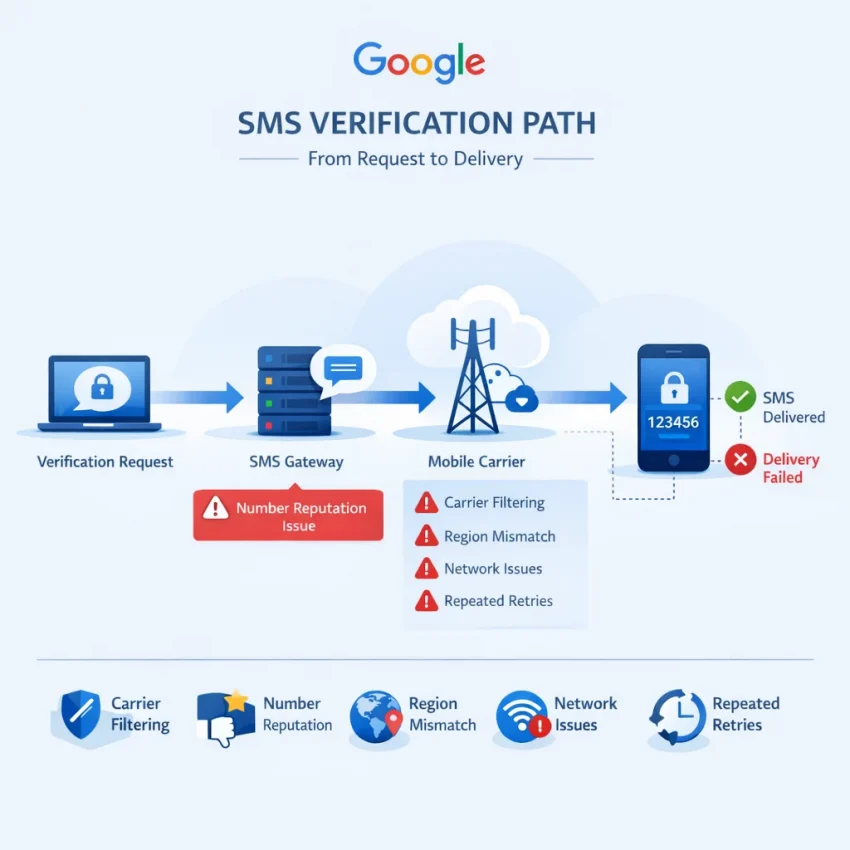
If you searched for Google verification code not arriving, you are usually dealing with one of two realities: either Google did send the code and it never reached your phone, or Google decided not to complete delivery because the verification attempt looked risky, unsupported, or overused. In 2026, that distinction matters more than it used to. Google’s verification flow is stricter, mobile carriers filter more aggressively, and many users are trying to verify from travel networks, reused numbers, or mixed-device setups that create friction before the SMS is ever delivered.
That is why a Google SMS verification not received problem is no longer just a signal issue. A full delivery path is involved: Google triggers the OTP, an SMS provider routes it, carriers or aggregators pass it through regional filters, and your device still has to accept the message correctly. A failure at any point can look identical from the user side: no code, no explanation, and a prompt to try again.
Why Google verification codes fail to arrive in 2026
One of the biggest reasons Google OTP not coming happens is carrier filtering. Telecom networks now block or throttle large volumes of automated traffic more aggressively, especially in regions with heavy fraud prevention rules. If a carrier flags the sender path, delays traffic from a specific route, or treats verification SMS as low-priority during congestion, your code may arrive late or not at all. This is a common cause behind Google verification code delayed complaints, especially when users request several codes in a short period and assume the problem is on Google’s side alone.
Another frequent issue is number reputation. Google does not evaluate a phone number in a vacuum. If a number has already been used too many times for account recovery, fresh signups, or repeated verification attempts, it can become less reliable for new requests. This is one reason users see a Google verification code not received pattern even with a personal SIM that previously worked. The number may be valid, but its history may now be working against it.
Region and support mismatches also create silent failures. A user may be signing up from one country while using a number from another, roaming on a foreign carrier, connecting through a network Google considers unusual, or trying to verify a service flow not fully aligned with that region. In those cases, Google SMS not delivered does not always mean a technical outage. It can mean the verification path is considered inconsistent enough that the code is delayed, deprioritized, or blocked by policy.
Then there is the issue of suspicious signup behavior. Repeated resend clicks, opening multiple tabs, creating several accounts from the same connection, or switching devices midway through verification can all increase friction. Even legitimate users get caught by this. If Google sees too many retries too quickly, the system may slow down code issuance or stop sending new SMS messages for a cooldown period. Users interpret this as why Google code is not sending, but often it is Google responding to a pattern rather than a one-time request.
Device and network mismatch is another overlooked cause. For example, you may request the verification on a desktop connected through one IP, continue on a mobile browser over cellular data, and use a phone number from a different country code. None of those details automatically cause failure, but combined they can make the attempt look less clean. In 2026, clean verification context matters: stable session, stable region, stable device, and a number that fits the intended use case.
This is also why retrying the same personal number over and over often makes the situation worse instead of better. Every resend attempt can add more delay, trigger cooldowns, or reinforce the same blocked route. For users dealing with privacy concerns, exhausted personal numbers, travel-related mismatch, or repeated Google phone verification failed messages, a separate verification workflow becomes the practical next step.
That is where a virtual number workflow starts to make sense. Instead of forcing another attempt through a number with uncertain routing, prior usage history, or personal privacy baggage, users increasingly choose a cleaner service-specific option. SmsPva’s Google verification page is built around that exact need: selecting a number specifically for Google verification, isolating the attempt from your personal SIM, and giving you a more structured path than blind resends on the same failing line. It does not bypass Google’s rules, and no provider should promise that, but it does give users a more controlled way to solve a Google account verification SMS problem when the usual personal-number retry loop is no longer working.
Before switching fully, it still makes sense to rule out basic issues. But if your pattern already includes delays, repeated failures, used-up numbers, region mismatch, or signup friction, the smarter move is often to stop repeating the same setup and move to a dedicated workflow designed for SMS verification from the start.
Before switching numbers: the quick checks that solve simple Google SMS issues
If your Google verification code is not received, it is worth doing a fast triage before changing numbers. These checks can fix simple delivery problems in a few minutes. They are most useful when the number usually receives normal SMS messages, you are verifying from your usual location, and this is not a heavily reused number. If you have already retried several times, are traveling, or suspect the number has been used with Google too often, skip the loop early and move to a cleaner workflow such as SmsPva’s Google verification page.
- Confirm basic SMS delivery first. Make sure the phone has signal, airplane mode is off, and SMS can arrive from other senders. If regular texts are also delayed, the issue is likely the carrier or device, not Google.
- Check the country code and number format. A small formatting mistake is a common reason Google phone verification failed. Select the correct country, enter the number in the expected format, and avoid pasting an old saved number with the wrong prefix.
- Look for spam or blocked-message filtering. Some Android tools, carrier apps, and third-party security apps silently filter one-time codes. Review blocked senders, spam folders, SMS filtering settings, and any “unknown sender” rules before requesting a new code.
- Do not hammer the resend button. One of the biggest reasons people ask why Google code is not sending is repeated retry behavior. Rapid requests can trigger temporary cooldowns or anti-abuse limits. Request once, then wait. In many cases, the delayed code arrives after several minutes.
- Wait out a cooldown window. If you have requested multiple OTPs already, stop and give it time. A practical rule is to wait at least 10 to 15 minutes before trying again, and longer if you have been switching browsers, networks, or devices in between attempts.
- Test a cleaner browser or device setup. If verification was started in a browser with many extensions, privacy filters, or unusual session history, try an incognito window or another device. This does not change SMS routing itself, but it can reduce account-session mismatches that interfere with verification flow.
- Keep network and region signals consistent. If your device SIM is from one country and your browser or IP appears in another, Google may treat the attempt as higher risk. This is especially relevant when traveling or using VPNs. Use a stable connection and avoid changing locations mid-process.
- Ask whether the number is “exhausted.” Some personal numbers simply stop working well for repeated signups or verifications over time. If the number has been attached to multiple Google accounts, recycled from a carrier, or used heavily for online registrations, basic troubleshooting is unlikely to solve it.
A quick example: if your phone has good signal and receives normal texts, but Google codes still do not arrive after one clean request and a proper wait, the problem is probably not your inbox settings. It is more likely a number-history, region, or risk-screening issue. That is the point where more retries usually waste time.
So use this checklist once, not endlessly. If the same number still fails after these checks, the smarter next move is to switch to a fresh, service-specific verification workflow. SmsPva is built for exactly that use case, with a dedicated Google page, number selection flow, and support resources if an OTP does not show up as expected.
When a virtual number is the better option for Google verification
If the basic fixes have failed, the next step is not usually to keep hammering the same phone number. In 2026, Google verification code not arriving often has less to do with your phone’s signal and more to do with number history, region checks, traffic filtering, or risk scoring around the verification attempt itself. That is where a virtual number for Google verification becomes the more practical choice.
The clearest case is privacy. Many users simply do not want to attach a personal SIM to every Google signup, recovery flow, or service activation. A dedicated Google verification number lets you keep your private line separate from one-off or service-specific verification. That is especially useful for operators, testers, and privacy-conscious users who want a cleaner audit trail instead of mixing personal messages with account setup traffic.
Another common scenario is access. Sometimes you do not have a working local SIM at all: you are traveling, you are between carriers, your device is data-only, or your main number cannot receive short-code messages. In those cases, trying to receive Google SMS online through a compatible verification workflow is more realistic than waiting for a personal number to start working. The same applies when your current carrier delays OTP delivery or silently filters automated messages.
A virtual number also makes sense when your personal number has effectively been exhausted for Google use. Users often run into messages implying that a phone number has been used too many times, cannot be used for verification, or keeps failing without a clear explanation. That usually means the number has too much prior history or does not fit the current verification context. Instead of repeating the same failed attempt, switching to a temporary number for Google verification can isolate the process and reduce the confusion caused by old usage patterns.
Travel and country mismatch are another big reason to switch. If your Google session, IP region, device settings, and phone country do not line up well, SMS verification can become unreliable. A service-specific workflow gives you a more controlled setup: choose the correct service, select from supported country-level options where available, and keep the verification environment more consistent. SmsPva is particularly useful here because it is built around SMS verification flows rather than generic messaging, which is exactly what users need when Google SMS verification is the blocker.
There is also a workflow advantage. Using a personal SIM for every Google-related action creates clutter: reused numbers across projects, recovery confusion, and difficulty separating work, testing, and personal accounts. A dedicated verification path through SmsPva’s Google page is cleaner. Instead of guessing which number will work, you start with a service-specific flow designed for OTP receipt, number selection, and quick verification handling.
Of course, users usually have three concerns before switching: compatibility, speed, and reliability. The fair answer is that no method can guarantee acceptance on every attempt, because Google’s checks can vary by account state, region, and traffic patterns. But when your own number is blocked, delayed, unavailable, or repeatedly failing, using a fresh virtual-number workflow is often the most logical upgrade. It gives you a new verification path rather than repeating a path that has already shown signs of failure.
That is why the practical recommendation is to move to SmsPva once the simple troubleshooting steps stop making progress. It is a better fit when you need account separation, privacy protection, access to a compatible number, or a cleaner service-specific process for Google verification.
How to use SmsPva for Google verification step by step
If your Google verification code is not arriving, the fastest way to move from troubleshooting to action is to use a dedicated SmsPva Google verification workflow instead of resending codes to the same failing number. The key advantage is that SmsPva has a service-specific page for Google, so you are not guessing which number type to use or where to watch for the OTP.
1. Open the Google service page on SmsPva.
Go directly to smspva.com/service/google. This is the most relevant starting point because it narrows the workflow to Google rather than making you browse general-purpose number lists.
2. Check available country options and choose a suitable route.
On the Google page, review the available countries and pricing. This matters because a virtual number for Google verification works best when it matches your intended signup flow as closely as possible. Users often create extra friction by mixing one country in the Google form, another in the IP location, and a third in the phone number. Keeping those details clean gives you a better verification path.
3. Fund your balance and order the number.
After selecting the country and Google service option, add funds if needed and request the number. SmsPva is built for OTP receipt, so once the number is issued, you will see it inside the platform dashboard or order panel. At this point, copy the assigned number exactly as displayed, including the country code where required.
4. Enter the number in Google carefully.
Return to the Google verification screen and paste or type the number without changing its format incorrectly. Double-check the country selector on Google’s side before you submit. A surprisingly common cause of Google SMS verification not received is entering a valid number under the wrong country prefix. If the country is correct, submit the number once and wait for the code request to process. Avoid clicking resend immediately.
5. Watch the SmsPva order page for the incoming OTP.
Once Google accepts the number and sends the message, the SMS should appear in your active order area on SmsPva. This is the core reason users choose the platform: instead of waiting on a personal SIM that may be delayed, filtered, blocked, or exhausted, you can receive Google SMS online in the same dashboard where you ordered the number.
6. Copy the verification code as soon as it arrives.
When the OTP appears, copy the code exactly and enter it into Google without unnecessary delays. Verification codes are time-sensitive, so it is best to complete the final step immediately after the message lands.
7. If the code does not arrive right away, do not spam retries.
If there is a short delay, wait a moment before doing anything. Repeated resend requests can make a bad session worse, especially when Google is already applying risk checks.
8. If the OTP still does not appear, use SmsPva support resources.
If the message does not arrive within a reasonable window, open the SmsPva Help page and follow the troubleshooting guidance for an unreceived SMS or order issue.
9. Start a fresh attempt only after checking the basics.
If you need to retry, keep the second attempt cleaner than the first. Confirm that:
- the Google service page was selected on SmsPva, not a different service
- the country on Google matches the Google verification number you ordered
- you are not mixing inconsistent location signals across browser, device, and connection
- you are not rapidly requesting multiple SMS sends from Google
10. For cleaner account separation, pair the number workflow with connection hygiene.
Some users verifying Google in 2026 are also trying to avoid cross-account contamination or mismatched session signals. In those cases, SmsPva provides proxy tooling at smspva.com/proxy.html for users who want a more isolated workflow around verification and account handling.
A simple example workflow
Say your personal SIM has already failed twice for Google, and the code never arrives. Instead of requesting a third code to the same line, open the dedicated Google page on SmsPva, choose an available country, get the number, paste it into Google, and wait for the OTP inside the SmsPva dashboard. If the first message stalls, check the Help page, verify your country selection and session hygiene, and only then retry with a fresh, service-specific order.
The main takeaway is simple: when Google verification code not received stops being a one-off delay and becomes a pattern, SmsPva gives you a clearer path. You use the Google-specific service page, choose a suitable number, monitor the OTP in one place, and escalate through the help resources if the message does not arrive as expected.
How SmsPva improves your odds when Google SMS verification keeps failing
If you have already tried the usual fixes and your Google account verification SMS problem keeps repeating, the issue is often not your phone alone. In 2026, failed delivery is commonly tied to number history, routing quality, region mismatch, or account-risk signals. That is why many users move away from repeated retries on the same personal SIM and switch to a more controlled verification workflow. In practice, SmsPva Google verification is useful because it is built around the exact task you are trying to complete: receive a code for a specific service, on a selected number, with a cleaner setup.
One of the biggest advantages is the service-specific Google page. Instead of browsing a generic marketplace of numbers and guessing what might work, you start on a dedicated Google verification flow. That matters because service-specific pages reduce confusion at the moment when users usually make mistakes: choosing the wrong service, selecting an incompatible number, or mixing Google verification with numbers intended for another platform.
SmsPva also improves reliability by offering a verification-focused number workflow. When users say “Google code is not sending,” the real issue is often that the number they are using has too much history attached to it, has been filtered by a carrier, or has already been used too many times for Google. A virtual number workflow helps isolate the current verification attempt from that baggage.
Another useful advantage is country-level number selection. Google verification can become inconsistent when your account setup, device language, IP region, and phone number country all point to different places. That mismatch can increase delays or trigger extra checks. SmsPva lets users choose from available country options, which helps you build a more coherent verification path.
This is especially helpful for privacy-conscious users and operators who need virtual phone numbers for SMS verification without tying every attempt to a personal line. A dedicated verification number keeps the task separate from your everyday number, which is useful when your own SIM has already failed, when you do not want to expose a private number, or when you need cleaner separation between personal, work, and testing activity.
Support resources are another practical reason SmsPva stands out. If an OTP does not appear, the next step should not be blind resending until Google temporarily stops sending codes. The platform’s Help section gives users a place to check process details, troubleshooting guidance, and what to do when a verification attempt stalls.
For users dealing with higher-friction setups, SmsPva also offers proxy tooling that can support cleaner account isolation. Used carefully, a proxy can help keep your connection environment more consistent with the verification workflow you are trying to complete.
Put together, these features address the exact reasons Google verification commonly fails: reused numbers, unsupported or mismatched regions, cluttered account environments, and unstructured retries. SmsPva does not present itself as a guaranteed workaround for every Google check. What it does offer is a more compatible, purpose-built path than repeatedly hammering the same personal number and hoping the next code finally arrives.
Common Google verification scenarios and the best SmsPva workflow for each
Once basic checks have failed, the fastest way to solve a Google account verification SMS problem is to match your situation to the right number workflow instead of repeating the same failed attempt.
1. Your personal number is active, but Google phone verification failed repeatedly.
If your SIM has signal and can receive normal texts, but Google still does not send or deliver the code, your number may be filtered, flagged from earlier verification activity, or simply routed poorly for this specific service. In this case, stop resending codes on the same line. Go to the Google service page on SmsPva, choose an available country option that fits your verification flow, and use that number only for the current attempt.
2. Google says the phone number has been used too many times.
This is one of the clearest cases for a virtual number for Google verification. Personal numbers often get exhausted after multiple account creations, recoveries, or family use. Instead of trying workarounds on the same number, use a fresh Google-ready number through SmsPva’s service-specific workflow.
3. You are traveling, living abroad, or dealing with a country mismatch.
Google verification can become inconsistent when your current IP region, device settings, and phone number country do not line up. If you no longer have access to your home SIM, or your local carrier is delaying OTP delivery, SmsPva gives you a faster route to receive Google SMS online with a compatible number choice. For users managing multiple signups, pairing the number flow with HQ Proxy can help keep account isolation cleaner.
4. You are creating a fresh Google account and want the simplest workflow.
New account creation is often where users encounter unexpected friction because Google watches for rushed behavior, reused numbers, and inconsistent setup signals. The best approach is straightforward: open the Google verification page on SmsPva, select the number, enter it once, wait for the OTP, and complete the verification without unnecessary resends.
5. You want privacy and do not want to use your personal SIM.
Some users are not blocked at all—they simply do not want their main number tied to every signup. For privacy-conscious verification, SmsPva offers a service-specific route that separates account activation from your everyday phone line.
6. You need separate numbers for work, testing, or account management.
Operators, marketers, and users managing multiple service signups often run into trouble when one personal number is reused across too many Google-related flows. Instead of pushing one number beyond its practical limit, assign distinct verification attempts to separate numbers through SmsPva.
Across all of these scenarios, the pattern is the same: when the old number is the source of friction, changing the workflow is usually more effective than repeating the request. SmsPva is the practical option when you need a cleaner, service-specific path for Google verification without relying on a personal number that is delayed, exhausted, or unsupported.
FAQ
Why is my Google verification code not arriving even though my phone has signal?
Signal alone does not guarantee delivery. Google SMS can fail because of carrier filtering, delayed routing, number reputation, region mismatch, or temporary cooldowns caused by repeated resend attempts.
How long should I wait before requesting another Google verification code?
If you already requested multiple codes, wait at least 10 to 15 minutes before trying again. Repeated resend clicks can trigger delays or anti-abuse limits.
Can I use a virtual number for Google verification in 2026?
In many cases, yes. A virtual number workflow is often the practical next step when your personal number is blocked, overused, unavailable, or mismatched to your verification context. A service-specific option like SmsPva’s Google page helps keep the process cleaner.
Why does Google say my phone number cannot be used for verification?
This usually means the number has too much prior verification history, has been used too many times, or does not fit the current account and region context.
What should I do if Google verification SMS is delayed or never delivered?
First, stop repeated retries. Check your country code, device SMS filtering, and session consistency. If the same number keeps failing, switch to a fresh Google-focused workflow on SmsPva.
How does SmsPva help when my personal number fails Google verification?
SmsPva gives you a dedicated Google verification flow, available country options, an OTP receipt dashboard, and help resources so you can avoid endless retries on the same failing number.
Does SmsPva have a dedicated page for Google verification?
Yes. You can start directly at smspva.com/service/google.
Can a country mismatch cause Google SMS verification to fail?
Yes. If your IP, device region, and phone number country do not align well, Google may treat the attempt as higher risk or route it less reliably.
Should I keep retrying the same number if Google does not send the code?
No. If basic checks do not solve the issue quickly, repeated retries often make things worse. It is usually better to switch to a fresh number workflow.
Can proxy use help with account isolation during verification workflows?
For some users, yes. A stable and isolated connection environment can reduce session mismatch and account-overlap issues. SmsPva offers proxy tooling for users who want a cleaner setup.
Final checklist: what to do if your Google code still does not arrive
If your Google verification code is not arriving after basic troubleshooting, the best next move is to stop guessing and retry in a cleaner sequence.
- Pause before requesting another code. If you have already tapped resend several times, wait a few minutes instead of forcing more requests.
- Do not keep testing the same failing number. When a personal SIM has already been delayed, blocked, overused, or mismatched to your region, more retries usually do not fix the root issue.
- Switch to a fresh Google-focused workflow. Open the SmsPva Google verification page and choose the Google service directly rather than using a generic SMS route.
- Confirm the country option carefully. Match the number choice to the Google flow you are completing, especially if you are traveling or working across regions.
- Keep your connection environment clean. Use one device, one browser session, and stable network settings during the attempt. If you need better account isolation, SmsPva also offers proxy tools.
- Request the code once and monitor the incoming SMS. This is the point where many users solve a Google SMS verification not received issue after moving away from an exhausted or unreliable number.
- If the OTP still does not appear, check support guidance immediately. The SmsPva Help page is the right place to review next steps instead of repeating the same failed attempt.
In practice, the fastest path is simple: stop burning retries, use a fresh compatible number, verify that you selected the correct Google service page, and complete the attempt in one clean session. If your Google verification code not arriving issue is still unresolved, start again from the dedicated Google page on SmsPva and follow the platform workflow step by step.